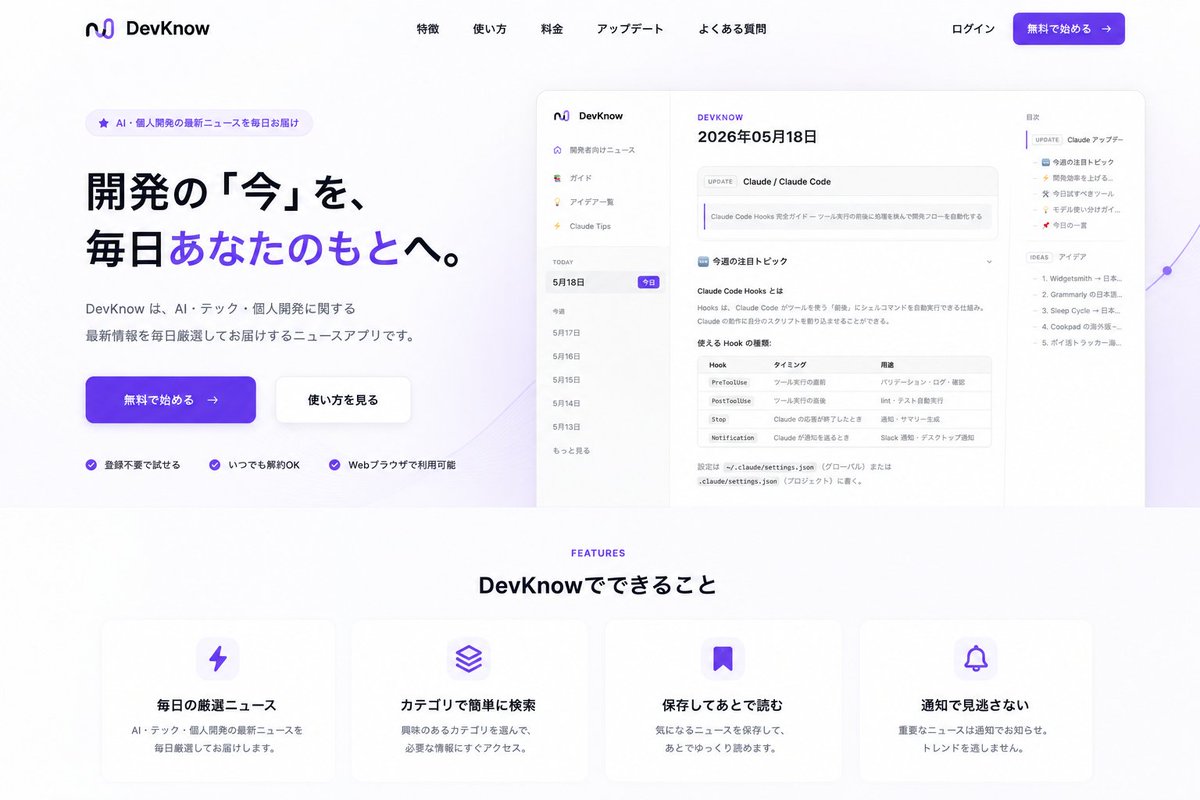
DevKnow SaaS Landing Page
Generates a polished Japanese SaaS landing page from an existing app screenshot, with hero CTA, product mockup, navigation, and feature cards.
This is a gpt-image-2 prompt case for Graphic & Poster. Use the copy-ready prompt below to generate similar visuals, and review YouMind OpenLab awesome-gpt-image-2 attribution plus commercial-use rights before reuse.
Prompt
Copy-ready prompt
Using REFERENCE_0 as a screenshot of the product UI, we transformed it into a beautiful Japanese SaaS landing page for use in [the following context].{argument name="product name" default="DevKnow"} Maintain the recognizability of the app screenshots by placing them on the right side of the home screen in a browser/model preview box with large rounded corners, appropriately reducing their size, and adding soft shadows and subtle purple abstract lines/gradient decorations in the background. Layout: Create a clean desktop landing page with a white background and purple brand color scheme. Add a top navigation bar, placing the existing logo/name on the left, five menu links centered in the middle: "Special Features," "Usage," "Reimbursement," "App Date," and "Questions," and placing "Login" and a purple CTA button "Start Free →" on the right. Home Screen Area: Add a small rounded badge on the left with the text "Delivering the latest AI/personal development news daily." Add a prominent Japanese title:{argument name="hero headline" default="Bringing the latest developments to you every day."} , and highlights the phrase "あなたのもとへ" in purple. Add auxiliary text below:{argument name="hero description" default="DevKnow is a news app that delivers a curated selection of the latest information on AI, tech, and personal development every day."} Add two home screen buttons: a purple main button “Start Free →” and a white secondary button “See How to Use”. Below the buttons, add three trust points with small purple checkmark icons: “Start Without Login”, “Can Be Released Even Now”, and “Can Be Used Through Web Browser”. Function Area: At the bottom of the home screen, add a centered purple “FEATURES” label and the title “DevKnow でできること”. Create 4 rounded feature cards with soft shadows and purple icons, arranged in a row: 1) Lightning icon, title "Everyday's 厳选ニュース", description "AI・テック・Personal Kailu's latest ニュースを掎日厳选してお session けします."; 2) Stacked layer icon, title "カテゴリで简単に検SO", description "Xingwei のあるカテゴリを选んで, necessary information にすぐアクセス."; 3) Bookmark icon, title "Saved してあとで読む", description "気になるニュースを saved して, あとでゆっくり読めます."; 4) Bell icon, title "Notification of escape", description "Important notice of escape. Notice of escape." Styling constraints: Make it look like a modern, launch-ready landing page rather than a raw app screenshot. Use wide margins, rounded corners, subtle drop shadows, purple gradient buttons, clear Japanese typography, and remove all clutter outside of your landing page design. Keep the reference app's UI content visible, but use it as a supplementary part of the landing page design.Prompt variables
Editable argument placeholders found in the prompt, with their default values.
Variable
product name
Default
DevKnow
Variable
hero headline
Default
Bringing the latest developments to you every day.
Variable
hero description
Default
DevKnow is a news app that delivers a curated selection of the latest information on AI, tech, and personal development every day.
Reuse and source notes
Use this prompt safely after previewing the case.
- 1.Copy the prompt or open it directly in Dovoo with the generation button.
- 2.Adjust variables, aspect ratio, and reference images for your own use case.
- 3.Before publishing or paid usage, verify source rights, attribution requirements, and brand or likeness risks.
Can I use this prompt commercially?
Commercial-use status is unknown. Review the original source, license, brand constraints, and legal requirements before paid usage.
Where does this case come from?
This case is imported from YouMind OpenLab awesome-gpt-image-2; keep attribution visible and check the source URL before reuse.