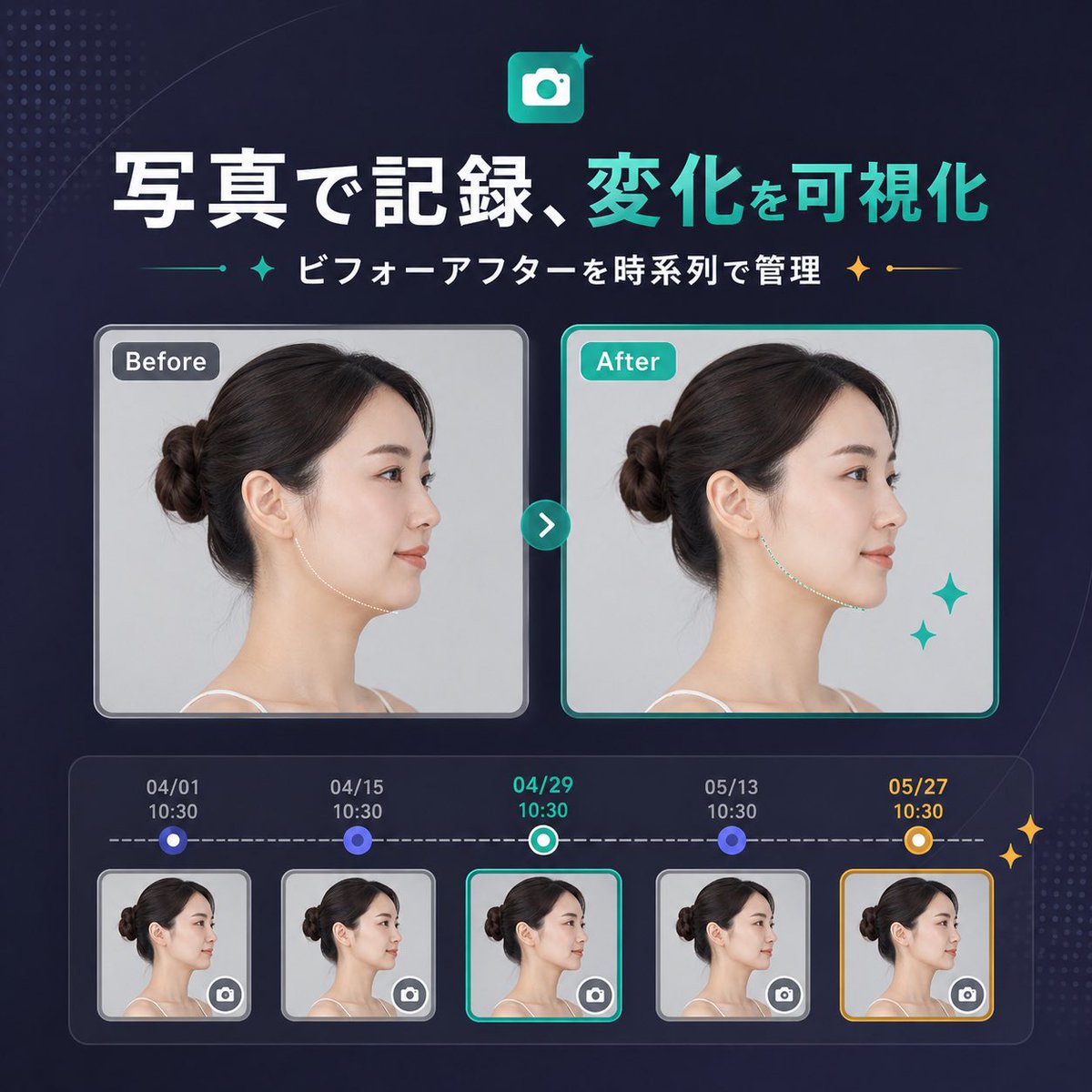
Japanese SaaS Before-After Banner
A polished square SaaS marketing banner in Japanese showing a before-and-after photo comparison with a five-step timeline, suitable for product update announcements or landing pages.
This is a gpt-image-2 prompt case for Graphic & Poster. Use the copy-ready prompt below to generate similar visuals, and review YouMind OpenLab awesome-gpt-image-2 attribution plus commercial-use rights before reuse.
This prompt is designed for multiple reference images. We will open Dovoo with the prompt and the available preview image; add the remaining references in Dovoo before generating.

Prompt
Copy-ready prompt
{
  "type": "SaaS Feature Update Banner Info",
  "style": "The design features a clean and modern Japanese tech marketing style, a sophisticated UI, a deep navy blue gradient background, subtle dotted halftone textures in the upper left and lower right corners, soft curved accents, and striking neon cyan highlights, resulting in a refined and high-quality product launch visual effect.",
  "canvas": {
    "aspect_ratio": "1:1"
  },
  "headline": {
    "icon": "The app icon is a rounded square with a white camera symbol, a cyan gradient background, and small glitter decorations.",
    "title": "{argument name=\"headline text\" default=\"Photographs record and visualize changes\"}",
    "subtitle": "{argument name=\"subtitle text\" default=\"Comparison of management before and after by timeline\"}",
    "language": "Chinese",
    "title_style": "Large, bold sans-serif font; the first phrase is white, and the second phrase is bright cyan.",
    "subtitle_style": "Medium-sized bold white sans-serif font, with cyan and gold glitter separators on both sides."
  },
  "layout": {
    "sections": [
      {
        "title": "Comparison Cards",
        "position": "center",
        "count": 2,
        "labels": [
          "Before",
          "after"
        ]
      },
      {
        "title": "Timeline entries",
        "position": "bottom",
        "count": 5,
        "labels": [
          "04/01 10:30",
          "04/15 10:30",
          "04/29 10:30",
          "05/13 10:30",
          "05/27 10:30"
        ]
      }
    ],
    "centerpiece": "The side-by-side before-and-after portrait cards are connected by a circular cyan arrow button.",
    "bottom_panel": "The rounded rectangle timeline module contains five thumbnails with dates, connected by a dashed horizontal progress bar."
  },
  "comparison": {
    "subject": "The same adult woman, profile view from the left, with dark brown hair tied in a neat low bun, fair skin, wearing a spaghetti strap top, studio lighting, and a light gray background.",
    "privacy": "The facial areas in the large card and all five thumbnails are covered with vertical rectangular blur blocks.",
    "before_card": {
      "label": "Before",
      "frame": "Rounded rectangle with light gray border and soft shadow",
      "image": "Neutral clinical style portrait"
    },
    "after_card": {
      "label": "after",
      "frame": "Rounded rectangle with a light cyan border and soft shadow",
      "image": "Similar portraits, with subtle improvements to the jawline/neck contour, suggesting visible changes.",
      "decorations": "Then there are two cyan flashing stars in the bottom right corner of the card."
    },
    "connector": "The small, round, cyan button in the center of the card has a white right-pointing arrow."
  },
  "timeline": {
    "panel_style": "Dark, semi-transparent, rounded container with an internal glow effect.",
    "line": "White horizontal dashed line",
    "entries": [
      {
        "date": "04/01",
        "time": "10:30",
        "state": "Small blue circular node above the thumbnail",
        "thumbnail": "A thumbnail of a woman's profile, with a blurred area and a miniature camera icon button in the lower right corner.",
        "frame": "Light gray rounded corner border"
      },
      {
        "date": "04/15",
        "time": "10:30",
        "state": "Small blue circular node above the thumbnail",
        "thumbnail": "A thumbnail of a woman's profile, with a blurred area and a miniature camera icon button in the lower right corner.",
        "frame": "Light gray rounded corner border"
      },
      {
        "date": "04/29",
        "time": "10:30",
        "state": "Currently selected, with a bluish-white ring node.",
        "thumbnail": "A thumbnail of a woman's profile, with a blurred area and a miniature camera icon button in the lower right corner.",
        "frame": "Bright cyan rounded corner border"
      },
      {
        "date": "05/13",
        "time": "10:30",
        "state": "Small blue circular node above the thumbnail",
        "thumbnail": "A thumbnail of a woman's profile, with a blurred area and a miniature camera icon button in the lower right corner.",
        "frame": "Light gray rounded corner border"
      },
      {
        "date": "05/27",
        "time": "10:30",
        "state": "Highlighted milestone with gold and white ring nodes",
        "thumbnail": "A thumbnail of a woman's profile, with a blurred area and a miniature camera icon button in the lower right corner.",
        "frame": "Gold rounded corner border"
      }
    ],
    "extra_decorations": "There are two small golden flashing stars on the far right edge of the timeline panel."
  },
  "color_palette": {
    "background": "Deep navy blue to indigo gradient",
    "primary": "bright cyan",
    "secondary": "White",
    "accent": "gold",
    "support": "Soft gray and blue-purple"
  },
  "rendering": "The clean vector graphics combined with UI design, embedded with realistic portrait photography, balanced spacing, and centered composition deliver the quality of a startup landing page banner."
}
Prompt variables
Editable argument placeholders found in the prompt, with their default values.
Reuse and source notes
Use this prompt safely after previewing the case.
- 1.Copy the prompt or open it directly in Dovoo with the generation button.
- 2.Adjust variables, aspect ratio, and reference images for your own use case.
- 3.Before publishing or paid usage, verify source rights, attribution requirements, and brand or likeness risks.
Can I use this prompt commercially?
Commercial-use status is unknown. Review the original source, license, brand constraints, and legal requirements before paid usage.
Where does this case come from?
This case is imported from YouMind OpenLab awesome-gpt-image-2; keep attribution visible and check the source URL before reuse.