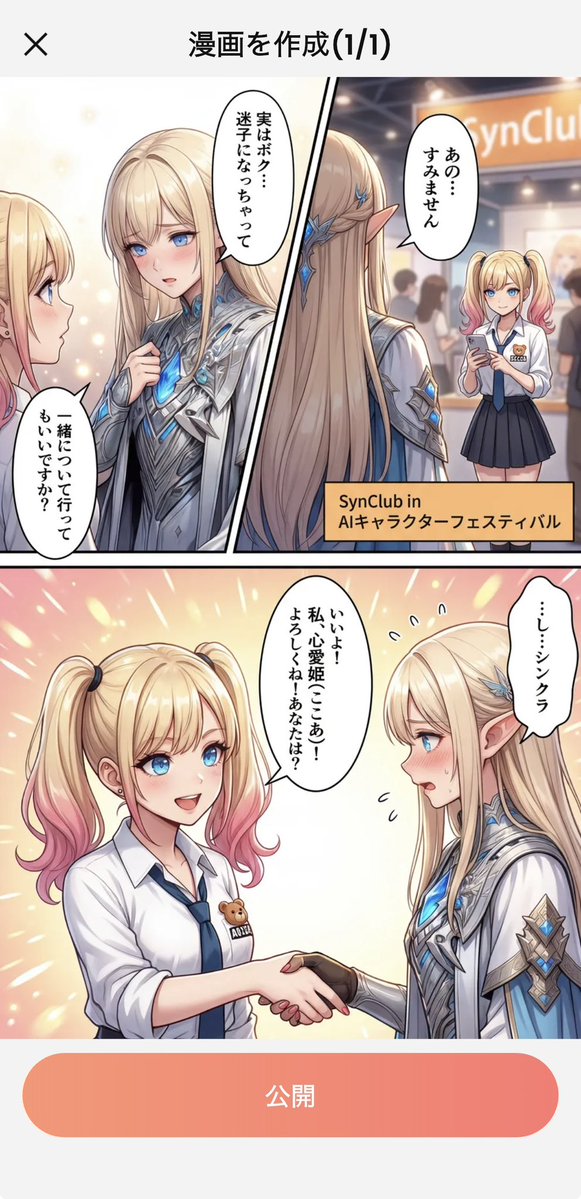
Japanese Manga Creation App Screenshot
Generates a vertical mobile UI screenshot featuring a completed Japanese anime manga page with festival panels, speech bubbles, and a publish button.
This is a gpt-image-2 prompt case for 平面海报. Use the copy-ready prompt below to generate similar visuals, and review YouMind OpenLab awesome-gpt-image-2 attribution plus commercial-use rights before reuse.
Prompt
Copy-ready prompt
Objective: Create a vertical smartphone app screenshot showcasing a preview of a manga creation completed within a Japanese-style UI. The content is an anime-style manga page about a blonde female student encountering an elegant, elfin-like character at an AI character festival. Canvas: An elongated smartphone screenshot, approximately 9:16 aspect ratio, with a white app background. At the top is a simple app title bar: a black "×" close icon on the left and a bold black Japanese title "漫画を作成(1/1)" in the center. At the bottom is a large, rounded coral pink to pink gradient button with the white text "公开" (Publish). Main Manga Layout: The manga page occupies most of the screen space between the title bar and the publish button. Uses clean black manga panel borders. There are three visible manga areas: 1) A narrow cropped area in the upper left corner showing the female student and a speech bubble; 2) The top area, diagonally divided into a close-up of the elfin character and a festival booth scene; 3) A large panel at the bottom showing a handshake scene. Characters: Includes two main characters who appear repeatedly in different panels. Character A is a cute blonde girl with twin ponytails and pink highlights, blue eyes, wearing a white short-sleeved shirt, navy blue tie, and dark pleated skirt. A small teddy bear badge is pinned to her shirt. Character B is a tall, beautiful, elfin-like fantasy character with extremely long blonde hair, pointed ears, blue crystal hair accessories, fair skin, and wearing gorgeous silver-white futuristic armor with glowing blue gems and cloak details. Close-up characters' faces are covered with flat beige rectangular obfuscation blocks for anonymization. Top area of the comic: On the right, Character A is shown standing in a convention or festival hall holding a smartphone. Behind her is a blurred, warm-toned booth sign that reads "SynClub," with blurred crowds in the background. An orange rectangular description box is added to the bottom right corner of this top area, reading "SynClub in\nAIキャラクターフェスティバル." The top area, on the left/center, features a dramatically diagonally divided composition showcasing Character B's front and back, complete with luminous blue fantasy details. The bottom of the comic shows Characters A and B facing each other, shaking hands warmly. Character A appears excited and friendly; Character B looks somewhat shy or nervous. The background is bright, soft light, flashes, and celebratory beams. Text content: Use 5 speech bubbles with Japanese text: 1) Cropping bubble on the left: "一丝について行ってもいいですか?" 2) Vertical bubble near character B in the top area: "実はボク...MIZIになっちゃって" 3) The bubble in the upper right of Character A: "あの...すみません" 4) The bubble in the middle of the bottom of Character A: "いいよ! privy, beloved 姫ここあ! よろしくね! あなたは?" 5) Character B The bubble on the lower right: "...し...シンクラ". Visual Style: Refined modern Japanese anime and webcomic style, clean lines, glossy lighting, soft gradients, warm convention lighting, bright fantasy blue accents, highly detailed costumes, vivid comic-style speech bubbles, and a realistic smartphone screenshot feel. Constraints: Keep UI text and buttons clearly legible. Use 5 speech bubbles, 2 main character designs, and 3 comic-style areas for description. Do not add extra panels, extra main characters, watermarks, or English translations within images. Customizable App Title:{argument name="app title" default="Creating a manga (1/1)"} Customizable booth name:{argument name="booth name" default="SynClub"} Customizable activity description:{argument name="event caption" default="SynClub in AIキャラクターフェスティバル"} Customizable publish button text:{argument name="publish button text" default="public"} Customizable sprite name row:{argument name="elf name line" default="…し…シンクラ"} .Prompt variables
Editable argument placeholders found in the prompt, with their default values.
More cases in this category
Prioritized by category, input mode compatibility, quality, and lower risk.






Reuse and source notes
Use this prompt safely after previewing the case.
- 1.Copy the prompt or open it directly in Dovoo with the generation button.
- 2.Adjust variables, aspect ratio, and reference images for your own use case.
- 3.Before publishing or paid usage, verify source rights, attribution requirements, and brand or likeness risks.
Can I use this prompt commercially?
Commercial-use status is unknown. Review the original source, license, brand constraints, and legal requirements before paid usage.
Where does this case come from?
This case is imported from YouMind OpenLab awesome-gpt-image-2; keep attribution visible and check the source URL before reuse.