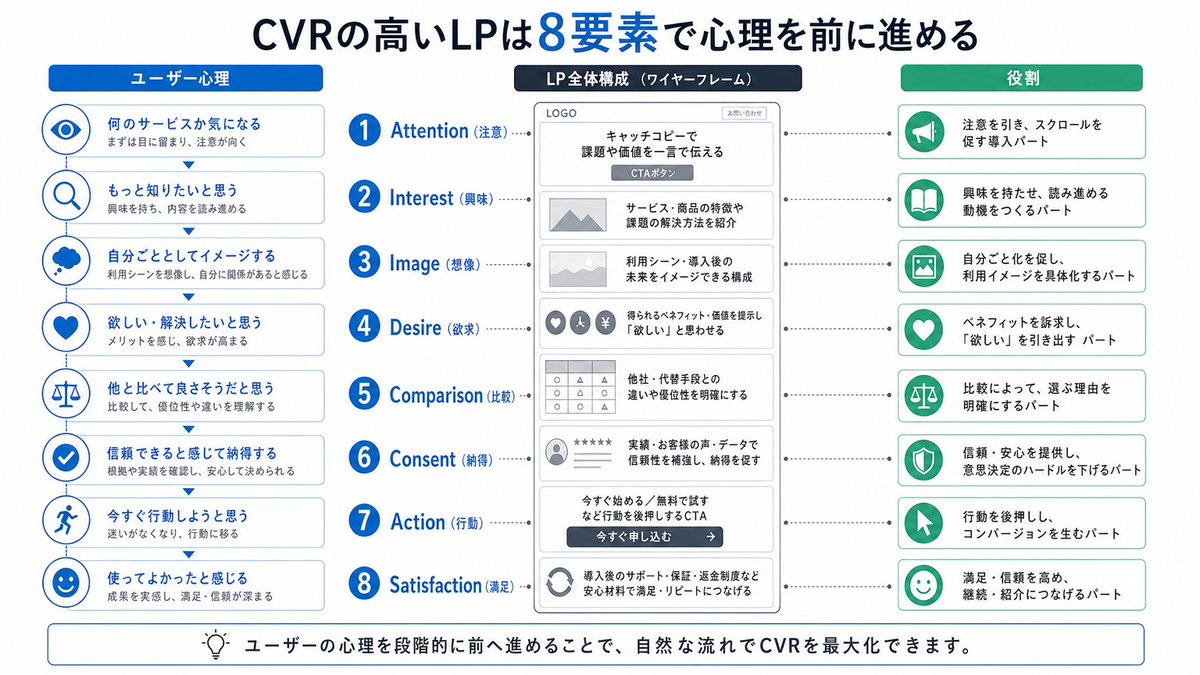
Japanese LP Psychology 8-Step Infographic
A clean Japanese educational infographic showing an 8-step landing page structure aligned with user psychology, suitable for marketing manuals, slide decks, and LP conversion training.
This is a gpt-image-2 prompt case for Graphic & Poster. Use the copy-ready prompt below to generate similar visuals, and review YouMind OpenLab awesome-gpt-image-2 attribution plus commercial-use rights before reuse.
Prompt
Copy-ready prompt
{
  "type": "Japanese Marketing Infographic",
  "topic": "High-conversion landing page structure based on user psychology",
  "style": {
    "look": "Simple and flat business infographics",
    "palette": {
      "primary": "blue",
      "secondary": "green",
      "neutral": "White and light gray",
      "accent": "The title is navy blue, with a highlighted blue number."
    },
    "background": "pure white",
    "lines": "Thin gray connecting lines and border",
    "icons": "Simple blue and green circular line icons",
    "aspect_ratio": "16:9 Landscape"
  },
  "headline": {
    "text": "High CVR LP{argument name=\"number of elements\" default=\"8\"} Several factors drive user psychology",
    "position": "Centered at the top",
    "emphasis": "The numbers are large and bright blue."
  },
  "layout": {
    "columns": 3,
    "sections": [
      {
        "title": "User Psychology",
        "position": "Left sidebar",
        "count": 8,
        "items": [
          {
            "index": 1,
            "icon": "eye",
            "label": "Curious what kind of service?",
            "subtext": "First, attract attention and draw eye."
          },
          {
            "index": 2,
            "icon": "magnifying glass",
            "label": "Want to know more",
            "subtext": "Become interested and continue reading."
          },
          {
            "index": 3,
            "icon": "thought cloud",
            "label": "Create a sense of immersion",
            "subtext": "Imagine the usage scenarios and feel that they are relevant to you."
          },
          {
            "index": 4,
            "icon": "heart",
            "label": "Want to solve/want to solve the problem",
            "subtext": "Feeling the benefits, desires increase."
          },
          {
            "index": 5,
            "icon": "balance scale",
            "label": "I think it's better than others.",
            "subtext": "By comparison, we can understand the advantages and differences."
          },
          {
            "index": 6,
            "icon": "check mark badge",
            "label": "Feeling credible and agreeing",
            "subtext": "Confirm the basis and actual results, and make a decision with confidence."
          },
          {
            "index": 7,
            "icon": "running person",
            "label": "Want to take immediate action",
            "subtext": "Eliminate hesitation and take action."
          },
          {
            "index": 8,
            "icon": "smiling face",
            "label": "I had a good user experience.",
            "subtext": "They truly felt the results, and their satisfaction and trust deepened."
          }
        ]
      },
      {
        "title": "LP Overall Structure (Wireframe)",
        "position": "Middle column",
        "count": 8,
        "items": [
          {
            "index": 1,
            "label": "Attention",
            "wireframe": "The top logo and main visual area include the title and CTA button.",
            "text": "Use headlines to pinpoint pain points or value."
          },
          {
            "index": 2,
            "label": "Interest",
            "wireframe": "Image placeholders and text blocks",
            "text": "Introduce the features of the service/product and the methods for solving problems."
          },
          {
            "index": 3,
            "label": "Image (Imagination)",
            "wireframe": "Wide-format image placeholder",
            "text": "Build a structure that envisions use cases and its future after implementation."
          },
          {
            "index": 4,
            "label": "Desire",
            "wireframe": "Three small circular icons and text",
            "text": "Showcase the available benefits/value to stimulate the desire for something."
          },
          {
            "index": 5,
            "label": "Comparison",
            "wireframe": "Comparison Table Grid",
            "text": "Clearly define the differences and advantages compared to competing products or alternatives."
          },
          {
            "index": 6,
            "label": "Consent",
            "wireframe": "Star rating, profile picture, review line",
            "text": "Enhance credibility and foster recognition through achievements, customer testimonials, and data."
          },
          {
            "index": 7,
            "label": "Action",
            "wireframe": "Large CTA area with dark buttons",
            "text": "Drive action through CTAs such as \"Start Now\" or \"Free Trial\"."
          },
          {
            "index": 8,
            "label": "Satisfaction",
            "wireframe": "Circular arrows support both icons and text.",
            "text": "By introducing reassuring support, guarantees, and refund policies, we aim to increase customer satisfaction and repeat purchases."
          }
        ],
        "extra_labels": [
          "LOGO",
          "CTA button",
          "Apply Now"
        ]
      },
      {
        "title": "Role",
        "position": "Right sidebar",
        "count": 8,
        "items": [
          {
            "index": 1,
            "icon": "megaphone",
            "text": "Attract attention and guide scrolling in the intro section"
          },
          {
            "index": 2,
            "icon": "open book",
            "text": "The part that sparks interest and creates motivation to continue reading"
          },
          {
            "index": 3,
            "icon": "picture frame",
            "text": "To foster a sense of immersion, concrete use of imagery."
          },
          {
            "index": 4,
            "icon": "heart",
            "text": "Appealing to interests, drawing out the psychological aspect of \"wanting\"."
          },
          {
            "index": 5,
            "icon": "balance scale",
            "text": "By comparing, the reasons for making a choice are clarified."
          },
          {
            "index": 6,
            "icon": "shield",
            "text": "Providing trust and peace of mind, lowering the decision-making threshold"
          },
          {
            "index": 7,
            "icon": "cursor arrow",
            "text": "Driving action, the part that produces transformation"
          },
          {
            "index": 8,
            "icon": "smile face",
            "text": "Enhancing satisfaction and trust, connecting continued use with recommendations."
          }
        ]
      }
    ],
    "connectors": "Dashed horizontal guide lines connect the 8 central stages to their corresponding items in the left and right columns; small downward arrows connect the stacked cards in the left column."
  },
  "footer": {
    "style": "Rounded rectangular annotation bar with light background and thin blue border",
    "icon": "light bulb",
    "text": "By engaging users' psychology in stages, CVR can be maximized in a natural way."
  },
  "composition": "A symmetrical educational slides design suitable for landing page optimization manuals, featuring a top heading, three equally spaced vertical columns below, and eight aligned horizontal rows across the page.",
  "quality": "Clear vector text, presentation-level clarity, high-quality corporate training materials."
}
Prompt variables
Editable argument placeholders found in the prompt, with their default values.
Reuse and source notes
Use this prompt safely after previewing the case.
- 1.Copy the prompt or open it directly in Dovoo with the generation button.
- 2.Adjust variables, aspect ratio, and reference images for your own use case.
- 3.Before publishing or paid usage, verify source rights, attribution requirements, and brand or likeness risks.
Can I use this prompt commercially?
Commercial-use status is unknown. Review the original source, license, brand constraints, and legal requirements before paid usage.
Where does this case come from?
This case is imported from YouMind OpenLab awesome-gpt-image-2; keep attribution visible and check the source URL before reuse.