Japanese LP Conversion Infographic Grid
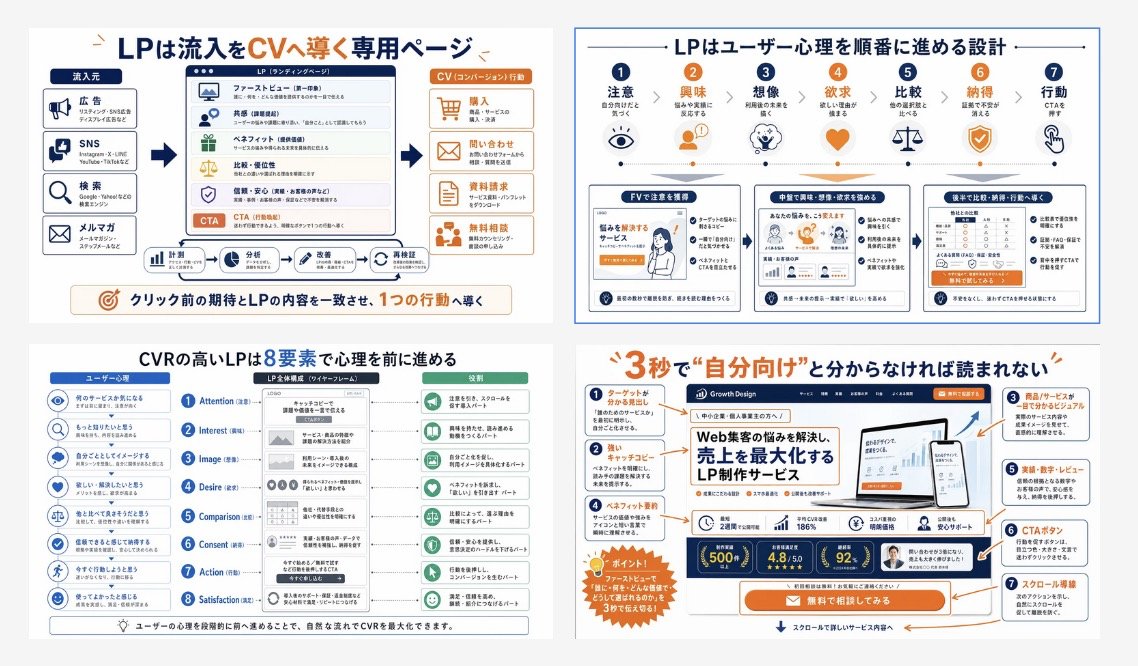
A four-panel Japanese educational infographic that explains landing page structure, user psychology, and conversion design for training materials or marketing presentations.
This is a gpt-image-2 prompt case for Graphic & Poster. Use the copy-ready prompt below to generate similar visuals, and review YouMind OpenLab awesome-gpt-image-2 attribution plus commercial-use rights before reuse.
Prompt
Copy-ready prompt
{
  "type": "Japanese landing page educational infographic collage",
  "style": "Concise corporate training slides, featuring a flat vector infographic mixed with UI model thumbnails, a white background, navy blue and orange accent colors, thin gray dividing lines, rounded corners, clear icons, and presentation-quality visuals.",
  "language": "Japanese",
  "canvas": {
    "aspect_ratio": "16:9",
    "background": "Light gray margins, containing four white infographic panels arranged in a 2x2 grid."
  },
  "layout": {
    "grid": {
      "rows": 2,
      "columns": 2,
      "count": 4
    },
    "sections": [
      {
        "title": "LP is a dedicated page for directing traffic to be converted into CV.",
        "position": "top-left",
        "count": 4,
        "labels": [
          "Traffic sources",
          "LP (Landing Page)",
          "CV (Conversion) Action",
          "Align pre-click expectations with LP content to guide a single action."
        ]
      },
      {
        "title": "LP is a design that guides the user's psychology in a sequential manner.",
        "position": "top-right",
        "count": 7,
        "labels": [
          "Notice",
          "interest",
          "Imagine",
          "desire",
          "Compare",
          "Agree",
          "action"
        ]
      },
      {
        "title": "High CVR LPs drive psychological processes through 8 elements",
        "position": "bottom-left",
        "count": 8,
        "labels": [
          "Attention",
          "Interest",
          "Image (Imagination)",
          "Desire",
          "Comparison",
          "Consent",
          "Action",
          "Satisfaction"
        ]
      },
      {
        "title": "If it doesn't seem \"related to me\" within 3 seconds, it won't be read.",
        "position": "bottom-right",
        "count": 7,
        "labels": [
          "Headlines that clearly target the audience",
          "Advertising copy",
          "Product/service visuals that are easy to understand at a glance",
          "Benefits and Achievements",
          "Performance, figures, evaluation",
          "CTA button",
          "Scroll guide line"
        ]
      }
    ]
  },
  "panel_details": {
    "top_left": {
      "diagram_type": "Analysis of the conversion funnel",
      "source_count": 4,
      "sources": [
        "advertise",
        "SNS",
        "search",
        "Email Subscription"
      ],
      "lp_module_count": 6,
      "lp_modules": [
        "First screen",
        "resonance",
        "Profit point",
        "Comparison/Advantages",
        "Trust/Peace of Mind",
        "CTA"
      ],
      "conversion_count": 4,
      "conversions": [
        "Buy",
        "consult",
        "Information Request",
        "Free consultation"
      ],
      "footer_flow_count": 5,
      "footer_flows": [
        "monitor",
        "analyze",
        "Improvement Plan",
        "Implementation Request",
        "Re-verification"
      ]
    },
    "top_right": {
      "diagram_type": "User mental processes with icons and three LP thumbnail samples",
      "step_count": 7,
      "steps": [
        {
          "label": "Notice",
          "icon": "eye"
        },
        {
          "label": "interest",
          "icon": "person"
        },
        {
          "label": "Imagine",
          "icon": "head with spark"
        },
        {
          "label": "desire",
          "icon": "heart"
        },
        {
          "label": "Compare",
          "icon": "scales"
        },
        {
          "label": "Agree",
          "icon": "shield check"
        },
        {
          "label": "action",
          "icon": "hand clicking"
        }
      ],
      "sample_card_count": 3,
      "sample_cards": [
        "Get attention on the first screen",
        "The middle section deepens interest, imagination, and desire.",
        "The latter part guides the discussion to comparison, identification, and action."
      ]
    },
    "bottom_left": {
      "diagram_type": "8-Step CVR Framework",
      "left_column_count": 8,
      "left_column": "User psychological cue with blue circular icon",
      "center_column_count": 8,
      "center_column": "LP structural blocks aligned with each stage in a smartphone wireframe diagram",
      "right_column_count": 8,
      "right_column": "Results of green actions or reading status at each stage",
      "header_labels_count": 3,
      "header_labels": [
        "User Psychology",
        "LP Overall Structure (Wireframe)",
        "Role"
      ]
    },
    "bottom_right": {
      "diagram_type": "Annotated LP First Screen Evaluation",
      "headline": "{argument name=\"headline text\" default=\"If it doesn't seem "related to me" within 3 seconds, it won't be read.\"}",
      "annotation_count": 7,
      "annotations": [
        "Headlines that clearly target the audience",
        "Advertising copy",
        "Product/service visuals that are easy to understand at a glance",
        "Benefits and Achievements",
        "Performance, figures, evaluation",
        "CTA button",
        "Scroll guide line"
      ],
      "mockup_brand": "{argument name=\"brand name\" default=\"Growth Design\"}",
      "mockup_headline": "{argument name=\"mockup headline\" default=\"LP creation services that solve the challenges of attracting customers through the web and maximize sales.\"}",
      "device_count": 2,
      "devices": [
        "Desktop monitor",
        "smartphones"
      ],
      "metric_badge_count": 3,
      "metric_badges": [
        "500+",
        "4.8/5.0",
        "92%"
      ],
      "cta_text": "{argument name=\"CTA text\" default=\"Free consultation\"}"
    }
  },
  "visual_notes": {
    "icon_style": "Simple lines and flat icons in navy blue, orange, and soft green.",
    "typography": "Bold Japanese sans-serif headings, smaller, easy-to-read body text, keywords and numbers highlighted in orange.",
    "composition": "The educational posters are compact and well-organized, with each panel individually framed and spaced evenly.",
    "quality": "Clear, high-resolution slides, suitable for social media posts or training manual covers.",
    "avoid": "Photorealistic style, messy hand-drawn feel, dark background, 3D rendering"
  }
}
Prompt variables
Editable argument placeholders found in the prompt, with their default values.
Reuse and source notes
Use this prompt safely after previewing the case.
- 1.Copy the prompt or open it directly in Dovoo with the generation button.
- 2.Adjust variables, aspect ratio, and reference images for your own use case.
- 3.Before publishing or paid usage, verify source rights, attribution requirements, and brand or likeness risks.
Can I use this prompt commercially?
Commercial-use status is unknown. Review the original source, license, brand constraints, and legal requirements before paid usage.
Where does this case come from?
This case is imported from YouMind OpenLab awesome-gpt-image-2; keep attribution visible and check the source URL before reuse.