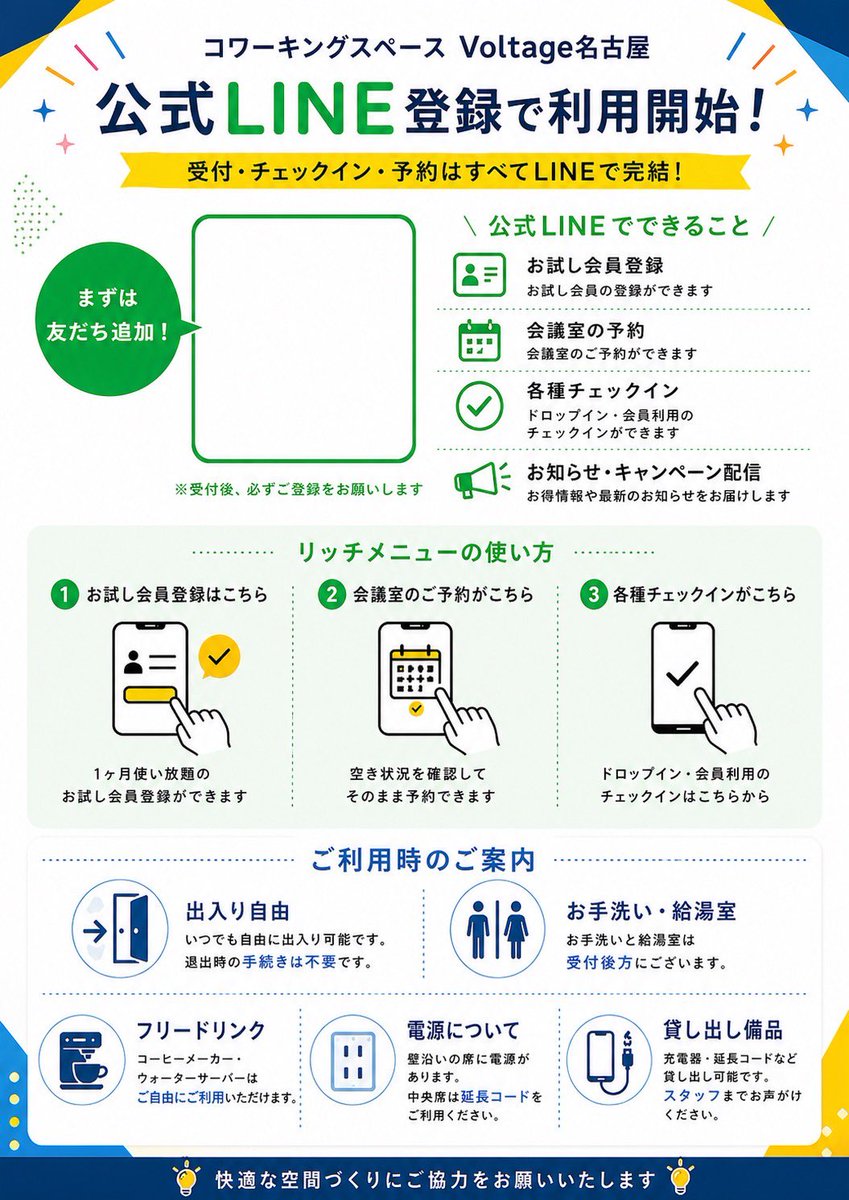
Japanese LINE Registration Poster
A clean Japanese promotional poster for a coworking space explaining LINE-based registration, reservations, check-in, and facility guidance, ideal for store signage or reception-area print materials.
This is a gpt-image-2 prompt case for 平面海报. Use the copy-ready prompt below to generate similar visuals, and review YouMind OpenLab awesome-gpt-image-2 attribution plus commercial-use rights before reuse.
Prompt
Copy-ready prompt
{
  "type": "Japanese promotional posters and flyers",
  "purpose": "LINE Registration Guide for Shared Workspaces",
  "style": "A clean, flat corporate design, modern Japanese advertising typography, vector icons, a white background accented with striking blue and green, highly readable, and suitable for print.",
  "brand": {
    "name": "Voltage Nagoya",
    "category": "Shared office space",
    "header": "Shared office space{argument name=\"venue name\" default=\"Voltage Nagoya\"}"
  },
  "layout": {
    "orientation": "Vertical",
    "sections": [
      {
        "title": "Register for the official LINE account to start using it!",
        "position": "Top title",
        "count": 2,
        "labels": [
          "Register for the official LINE account to start using it!",
          "Reception, check-in, and appointments are all completed via LINE!"
        ]
      },
      {
        "title": "Main Registration Area",
        "position": "Upper Mid-to-Upper",
        "count": 3,
        "labels": [
          "First, add them as friends!",
          "QR code placeholder",
          "※Please be sure to complete the registration after being received."
        ]
      },
      {
        "title": "Official LINE features",
        "position": "upper right",
        "count": 4,
        "labels": [
          "Trial Member Registration",
          "Meeting room reservation",
          "Various check-in",
          "Notifications and Event Push Notifications"
        ]
      },
      {
        "title": "How to use rich media menus",
        "position": "Central",
        "count": 3,
        "labels": [
          "1. Click here to register for a trial membership.",
          "2. Click here to book a meeting room.",
          "3. Click here to check in for various purposes."
        ]
      },
      {
        "title": "User Guide",
        "position": "Mid-lower part",
        "count": 5,
        "labels": [
          "Free entry and exit",
          "restrooms and tea rooms",
          "Free drinks",
          "Power Supply Instructions",
          "Borrowing equipment"
        ]
      },
      {
        "title": "Footer information",
        "position": "bottom",
        "count": 1,
        "labels": [
          "Please help us create a comfortable space."
        ]
      }
    ]
  },
  "content_blocks": {
    "line_features": [
      {
        "icon": "Green outline ID card profile icon",
        "heading": "Trial Member Registration",
        "text": "Trial membership registration is available."
      },
      {
        "icon": "Green outline calendar icon",
        "heading": "Meeting room reservation",
        "text": "Meeting room reservations are available."
      },
      {
        "icon": "Green outline checkmark icon",
        "heading": "Various check-in",
        "text": "Check-in can be used temporarily or by members."
      },
      {
        "icon": "A megaphone icon with a green outline",
        "heading": "Notifications and Event Push Notifications",
        "text": "We will send you promotional information and the latest notifications."
      }
    ],
    "rich_menu_steps": [
      {
        "step": 1,
        "heading": "Click here to register for a trial membership.",
        "visual": "A smartphone screen displays a profile form, with a yellow button, a tap button, and yellow LINE-style checkboxes.",
        "text": "You can register for a trial membership with unlimited uses for one month."
      },
      {
        "step": 2,
        "heading": "Click here to book a meeting room.",
        "visual": "A smartphone screen with a calendar; tap the date with your finger.",
        "text": "You can make an appointment directly after confirming availability."
      },
      {
        "step": 3,
        "heading": "Click here to check in for various purposes.",
        "visual": "A smartphone screen with a large checkmark, tap with your finger.",
        "text": "This is for temporary or member-only check-in."
      }
    ],
    "facility_info": [
      {
        "heading": "Free entry and exit",
        "icon": "Door icon with arrow",
        "text": "You can come and go freely at any time. No procedures are required when leaving."
      },
      {
        "heading": "restrooms and tea rooms",
        "icon": "Symbols for men's and women's restrooms",
        "text": "The restrooms and tea room are located behind the reception area."
      },
      {
        "heading": "Free drinks",
        "icon": "Coffee machine cup",
        "text": "Coffee machines and water dispensers are available for free use."
      },
      {
        "heading": "Power Supply Instructions",
        "icon": "power outlet",
        "text": "The seats against the wall are equipped with power outlets. Please use an extension cord for the middle seats."
      },
      {
        "heading": "Borrowing equipment",
        "icon": "Charging cable or power bank device",
        "text": "Chargers, extension cords, etc., can be borrowed. Please consult staff."
      }
    ]
  },
  "visual_details": {
    "top_decorations": "There are a few colorful confetti and glitter decorations in the top corner.",
    "frame": "The poster has subtle geometric blue and yellow corner shapes along its edges.",
    "main_colors": [
      "Dark blue",
      "Bright LINE green",
      "yellow",
      "White",
      "Light gray"
    ],
    "typography": "The Japanese sans-serif titles are in bold, with a prominent green emphasis on the LINE profile, smaller black descriptive text, and green and blue chapter titles.",
    "icons": "Simple outline vector icons with consistent line thickness",
    "qr_area": "Large blank rounded rectangle placeholder with green border, used for{argument name=\"QR code area\" default=\"Official LINE QR code\"}",
    "speech_circle": "The solid green circle on the left has the white text \"Add friends first!\" inside."
  },
  "customizable_fields": {
    "headline": "{argument name=\"main headline\" default=\"Register for the official LINE account to start using it!\"}",
    "subheadline": "{argument name=\"subheadline text\" default=\"Reception, check-in, and appointments are all completed via LINE!\"}",
    "brand_green": "{argument name=\"accent green\" default=\"LINE Green\"}",
    "footer_note": "{argument name=\"footer message\" default=\"Please help us create a comfortable space.\"}"
  }
}
Prompt variables
Editable argument placeholders found in the prompt, with their default values.
More cases in this category
Prioritized by category, input mode compatibility, quality, and lower risk.






Reuse and source notes
Use this prompt safely after previewing the case.
- 1.Copy the prompt or open it directly in Dovoo with the generation button.
- 2.Adjust variables, aspect ratio, and reference images for your own use case.
- 3.Before publishing or paid usage, verify source rights, attribution requirements, and brand or likeness risks.
Can I use this prompt commercially?
Commercial-use status is unknown. Review the original source, license, brand constraints, and legal requirements before paid usage.
Where does this case come from?
This case is imported from YouMind OpenLab awesome-gpt-image-2; keep attribution visible and check the source URL before reuse.