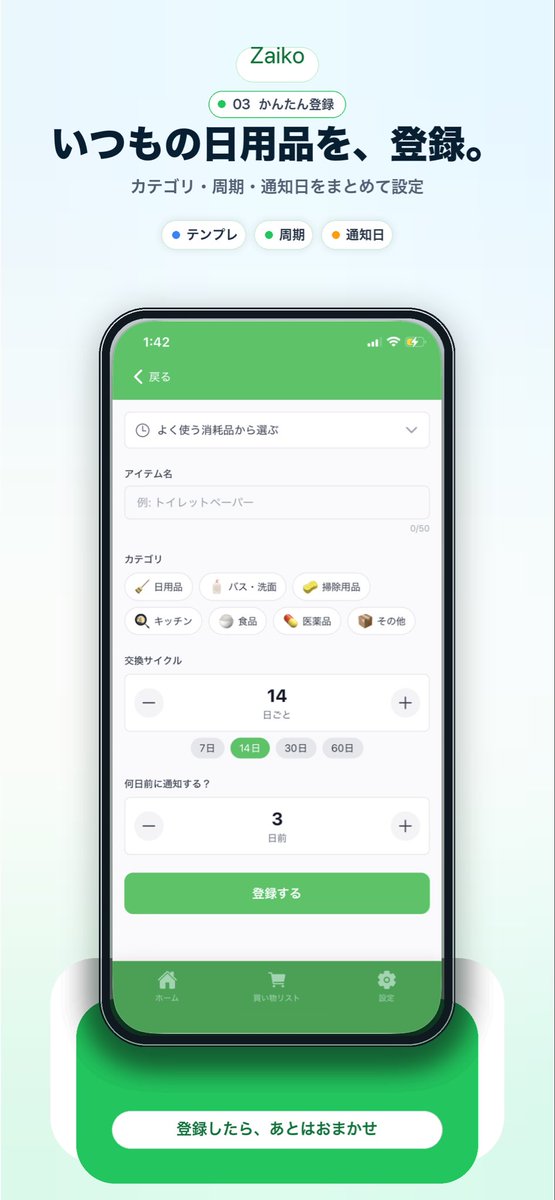
Japanese Inventory App Promo Mockup
Generates a polished vertical marketing visual for a Japanese household inventory app with a centered smartphone UI, headline copy, and a strong bottom call-to-action.
This is a gpt-image-2 prompt case for 平面海报. Use the copy-ready prompt below to generate similar visuals, and review YouMind OpenLab awesome-gpt-image-2 attribution plus commercial-use rights before reuse.
Prompt
Copy-ready prompt
{
  "type": "Mobile App promotional screenshots and posters",
  "app": {
    "name": "{argument name=\"app name\" default=\"Zaiko\"}",
    "platform": "iPhone-style inventory and daily necessities management app",
    "theme": {
      "primary": "Fresh green",
      "background": "Very light mint gray gradient",
      "accent": "Soft white",
      "text": "Deep Navy Blue"
    }
  },
  "layout": {
    "orientation": "vertical",
    "composition": "A single, centered smartphone demo unit, with marketing copy above and a CTA card below.",
    "sections": [
      {
        "title": "Brand header",
        "position": "Centered at the top",
        "count": 2,
        "labels": [
          "Zaiko",
          "03 Easy Registration"
        ]
      },
      {
        "title": "Main title copy",
        "position": "Centered at the top",
        "count": 2,
        "labels": [
          "Register daily necessities.",
          "One-click setting of category, cycle and reminder date"
        ]
      },
      {
        "title": "Functional tags",
        "position": "Below the main title",
        "count": 3,
        "labels": [
          "template",
          "cycle",
          "Reminder Date"
        ]
      },
      {
        "title": "App Interface Forms",
        "position": "Center of mobile phone screen",
        "count": 10,
        "labels": [
          "return",
          "Choose from commonly used consumables",
          "Item Name",
          "Classification",
          "Replacement cycle",
          "How many days in advance should I be notified?",
          "register",
          "front page",
          "Shopping list",
          "set up"
        ]
      },
      {
        "title": "Category Tags",
        "position": "Center of the phone screen",
        "count": 7,
        "labels": [
          "daily necessities",
          "Bathroom",
          "Cleaning products",
          "kitchen",
          "food",
          "pharmaceuticals",
          "other"
        ]
      },
      {
        "title": "Periodic options",
        "position": "lower middle of the phone screen",
        "count": 4,
        "labels": [
          "7 days",
          "14 days",
          "30 days",
          "60 days"
        ]
      },
      {
        "title": "Bottom slogan",
        "position": "Centered at the bottom",
        "count": 1,
        "labels": [
          "After registration, leave everything to the App."
        ]
      }
    ]
  },
  "visuals": {
    "style": "A clean and modern landing page style for a Japanese startup, featuring beautiful UI mockups, soft shadows, rounded corner cards, a minimalist interface, and App Store marketing aesthetics.",
    "background": "Light mint green vertical canvas with a faint halo behind the equipment.",
    "top_badge": "Small, rounded white capsule with green outline and green text.",
    "phone": {
      "color": "Black border",
      "angle": "Frontal view",
      "size": "Centered Large Size",
      "screen": {
        "header": "Green App Navigation Bar",
        "status_time": "1:42",
        "form_fields": [
          "dropdown selector",
          "A text input box with placeholders, for example: toilet paper.",
          "Category tag grid",
          "The replacement cycle stepper is displayed as 14.",
          "The reminder days stepper is displayed as 3.",
          "Green submit button"
        ],
        "selected_states": [
          "The 14-day period is highlighted in green.",
          "Green home button",
          "Green bottom label bar"
        ]
      },
      "shadow": "Soft diffused shadows below the phone"
    },
    "bottom_card": {
      "shape": "Large rounded green rectangle behind the white capsule button",
      "text": "{argument name=\"cta text\" default=\"After registration, leave everything to the App.\"}",
      "effect": "Soft halo and layered rounded white side panels"
    }
  },
  "text_customization": {
    "headline": "{argument name=\"headline text\" default=\"Register daily necessities.\"}",
    "subheadline": "{argument name=\"subheadline text\" default=\"One-click setting of category, cycle and reminder date\"}"
  },
  "color_customization": {
    "primary": "{argument name=\"primary color\" default=\"Fresh green\"}"
  }
}
Prompt variables
Editable argument placeholders found in the prompt, with their default values.
More cases in this category
Prioritized by category, input mode compatibility, quality, and lower risk.






Reuse and source notes
Use this prompt safely after previewing the case.
- 1.Copy the prompt or open it directly in Dovoo with the generation button.
- 2.Adjust variables, aspect ratio, and reference images for your own use case.
- 3.Before publishing or paid usage, verify source rights, attribution requirements, and brand or likeness risks.
Can I use this prompt commercially?
Commercial-use status is unknown. Review the original source, license, brand constraints, and legal requirements before paid usage.
Where does this case come from?
This case is imported from YouMind OpenLab awesome-gpt-image-2; keep attribution visible and check the source URL before reuse.