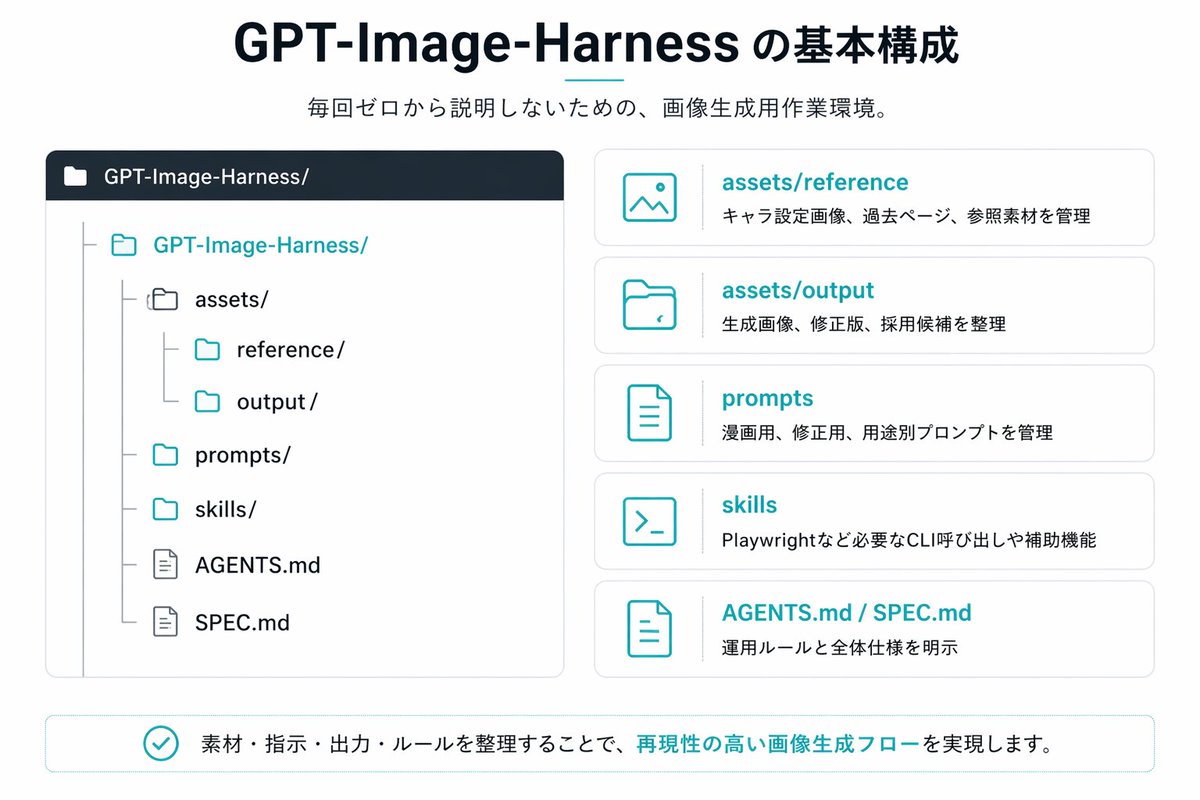
Japanese GPT-Image-Harness Infographic
A clean Japanese presentation-style infographic showing a repository structure and five explanatory cards, ideal for documenting an AI image generation workflow or project folder system.
This is a gpt-image-2 prompt case for 平面海报. Use the copy-ready prompt below to generate similar visuals, and review YouMind OpenLab awesome-gpt-image-2 attribution plus commercial-use rights before reuse.
Prompt
Copy-ready prompt
{
  "type": "Japanese Infographic Slides",
  "style": "Simple, flat vector graphics, minimalist corporate design, white background with dark navy blue and cyan accents, elegant light gray borders, clear typography, and balanced spacing.",
  "canvas": {
    "aspect_ratio": "16:9"
  },
  "title_block": {
    "headline": "{argument name=\"headline text\" default=\"Basic Components of GPT-Image-Harness\"}",
    "subheadline": "{argument name=\"subheadline text\" default=\"No need to start from scratch every time; a working environment specifically designed for image generation.\"}",
    "headline_alignment": "center top",
    "headline_style": "bold sans-serif, very large, dark navy",
    "accent": "short horizontal teal line under headline"
  },
  "layout": {
    "sections": [
      {
        "title": "repository tree",
        "position": "left large panel",
        "count": 1,
        "panel_style": "rounded rectangle with light gray outline and dark navy header bar",
        "header_label": "GPT-Image-Harness/",
        "content": {
          "type": "folder tree",
          "root": "GPT-Image-Harness/",
          "items_count": 8,
          "items": [
            "assets/",
            "reference/",
            "output/",
            "prompts/",
            "skills/",
            "AGENTS.md",
            "SPEC.md"
          ],
          "hierarchy": "The assets directory contains references and outputs; the root directory also contains prompts, skills, AGENTS.md, and SPEC.md.",
          "icon_style": "outline folder and document icons, teal for active folders, gray for nested guides"
        }
      },
      {
        "title": "feature cards",
        "position": "right stacked column",
        "count": 5,
        "panel_style": "five separate rounded white cards with light gray outline, evenly spaced vertically",
        "labels": [
          "assets/reference",
          "assets/output",
          "prompts",
          "skills",
          "AGENTS.md / SPEC.md"
        ],
        "descriptions": [
          "Manage character concept art, past pages, and reference materials.",
          "Organize the generated images, revisions, and candidate works",
          "Management prompts for comics, revised editions, and other purposes.",
          "Playwright and other necessary CLI calls and accessibility functions",
          "Clearly define operating rules and overall standards"
        ],
        "icons": [
          "image icon",
          "folder icon",
          "document icon",
          "terminal icon",
          "document icon"
        ],
        "title_color": "teal",
        "body_color": "dark gray"
      },
      {
        "title": "bottom message",
        "position": "bottom full width banner",
        "count": 1,
        "panel_style": "rounded rectangle with light teal outline",
        "content": {
          "icon": "teal circled checkmark",
          "text": "{argument name=\"footer message\" default=\"By organizing materials, instructions, output content, and rules, a highly reproducible image generation workflow is achieved.\"}",
          "emphasis": "The image generation workflow with high phrase reproducibility is highlighted in cyan."
        }
      }
    ],
    "composition": "title and subtitle centered at top, large repository diagram on left, five explanatory cards on right, summary banner across bottom"
  },
  "text_language": "Japanese",
  "visual_details": {
    "left_panel_header_gradient": "dark navy to slightly lighter navy",
    "folder_tree_line_color": "light gray",
    "teal_hex_approx": "#22B8C7",
    "navy_hex_approx": "#0F2236",
    "background": "very light gray-white"
  }
}
Prompt variables
Editable argument placeholders found in the prompt, with their default values.
More cases in this category
Prioritized by category, input mode compatibility, quality, and lower risk.






Reuse and source notes
Use this prompt safely after previewing the case.
- 1.Copy the prompt or open it directly in Dovoo with the generation button.
- 2.Adjust variables, aspect ratio, and reference images for your own use case.
- 3.Before publishing or paid usage, verify source rights, attribution requirements, and brand or likeness risks.
Can I use this prompt commercially?
Commercial-use status is unknown. Review the original source, license, brand constraints, and legal requirements before paid usage.
Where does this case come from?
This case is imported from YouMind OpenLab awesome-gpt-image-2; keep attribution visible and check the source URL before reuse.