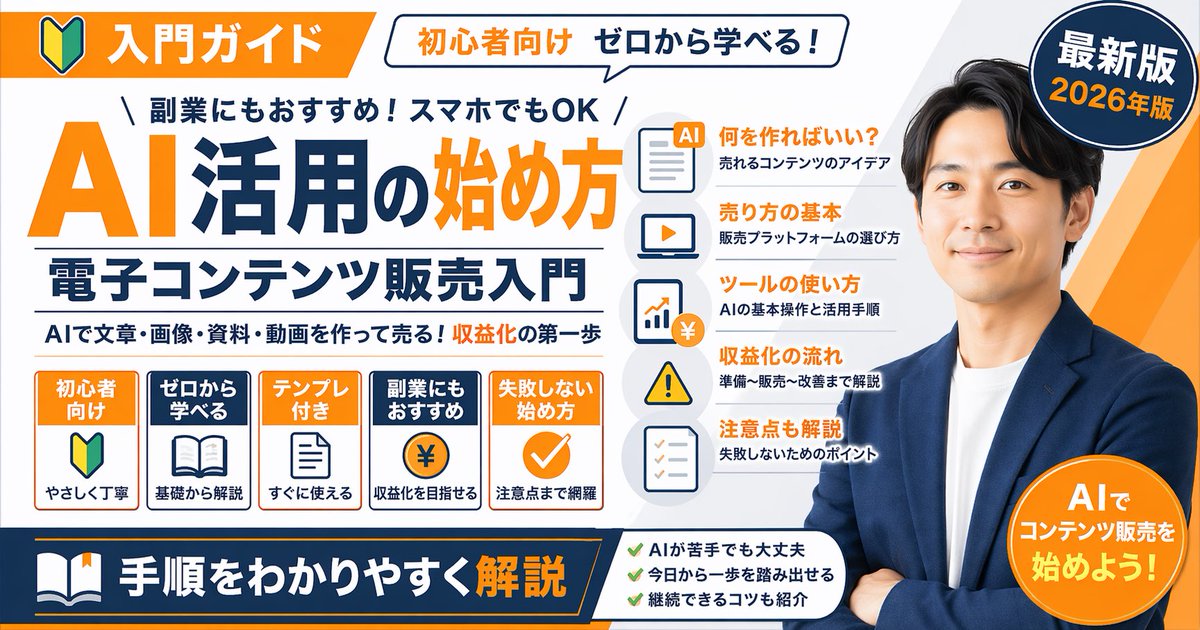
Japanese Educational Promo Banner
Generates a highly detailed, text-heavy promotional banner or YouTube thumbnail featuring a spokesperson, main titles, and multiple feature lists.
This is a gpt-image-2 prompt case for 平面海报. Use the copy-ready prompt below to generate similar visuals, and review YouMind OpenLab awesome-gpt-image-2 attribution plus commercial-use rights before reuse.
Prompt
Copy-ready prompt
{
  "type": "Promotional banner infographic",
  "style": "Simple, professional, flat design, corporate and educational graphics, white background with orange and dark blue accents.",
  "subject": "{argument name=\"spokesperson\" default=\"A smiling Asian man wearing a blue suit jacket and a white T-shirt, arms crossed.\"}",
  "layout": {
    "top_section": {
      "left_badge": "An orange banner with a \"Getting Started\" icon and the text \"Getting Started Guide\"",
      "speech_bubble": "A white bubble with the text \"For beginners, learn from scratch!\"",
      "right_badge": "With the text \"Latest Version\" and \"{argument name=\"year edition\" default=\"2026 Edition\"} The dark blue circle"
    },
    "main_title_section": {
      "top_small_text": "Recommended as a side hustle! Works perfectly on a mobile phone.",
      "large_title": "{argument name=\"main title\" default=\"Introduction to AI Applications\"}",
      "subtitle": "{argument name=\"subtitle\" default=\"Getting Started with Digital Content Sales\"}",
      "bottom_small_text": "Use AI to create and sell articles, images, materials, and videos! Take your first step towards profitability."
    },
    "middle_sections": [
      {
        "position": "middle-left",
        "type": "Function box",
        "count": 5,
        "items": [
          "Orange box: \"For beginners,\" with an introductory icon, \"simple and easy to understand.\"",
          "Blue box: \"Learn from Scratch,\" open book icon, \"Basic Explanation\"",
          "Orange box: \"Templates included,\" document icon, \"Ready to use immediately.\"",
          "Blue box: \"Recommended as a side hustle,\" with a coin icon marked \"¥,\" indicating \"Profitable.\"",
          "Orange box: \"A foolproof way to get started,\" checkmark icon, \"Includes important considerations.\""
        ]
      },
      {
        "position": "middle-center",
        "type": "List items with icons",
        "count": 5,
        "items": [
          "Document icon: \"What should we create?\" / \"Bestselling content ideas\"",
          "Laptop icon: \"Sales Basics\" / \"How to Choose a Sales Platform\"",
          "Chart icons: \"Tool Usage Instructions\" / \"AI Basic Operation and Application Steps\"",
          "Warning icon: \"Profitability Process\" / \"Explanation from Preparation to Sales to Optimization\"",
          "Checklist icons: \"Important Notes\" / \"Key Points to Avoid Failure\""
        ]
      }
    ],
    "bottom_section": {
      "left_banner": "Featuring a book icon and the text \"{argument name=\"bottom banner text\" default=\"Easy-to-understand step-by-step explanation\"} Dark blue banner",
      "center_checklist": {
        "count": 3,
        "items": [
          "It's okay if you're not good at AI.",
          "Take the first step today!",
          "Introducing tips for staying consistent"
        ]
      },
      "right_badge": "Orange circle with the text \"Start selling content with AI!\""
    }
  }
}
Prompt variables
Editable argument placeholders found in the prompt, with their default values.
More cases in this category
Prioritized by category, input mode compatibility, quality, and lower risk.






Reuse and source notes
Use this prompt safely after previewing the case.
- 1.Copy the prompt or open it directly in Dovoo with the generation button.
- 2.Adjust variables, aspect ratio, and reference images for your own use case.
- 3.Before publishing or paid usage, verify source rights, attribution requirements, and brand or likeness risks.
Can I use this prompt commercially?
Commercial-use status is unknown. Review the original source, license, brand constraints, and legal requirements before paid usage.
Where does this case come from?
This case is imported from YouMind OpenLab awesome-gpt-image-2; keep attribution visible and check the source URL before reuse.