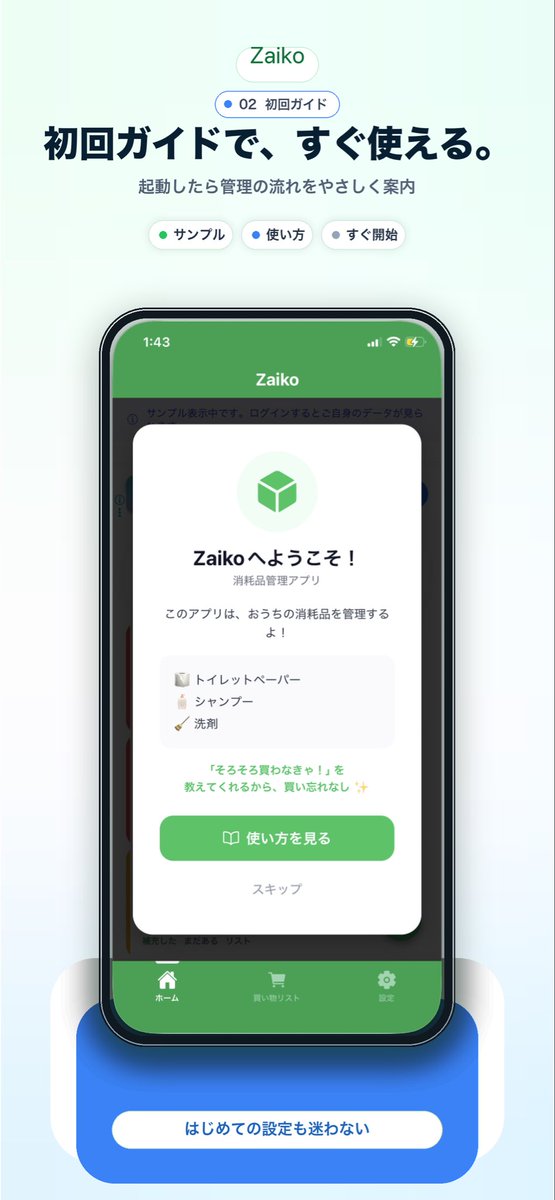
Japanese app onboarding promo mockup
This generates a polished Japanese mobile app marketing visual featuring a smartphone mockup and onboarding screen, ideal for landing pages, app store assets, or social media promotion.
This is a gpt-image-2 prompt case for 产品商业. Use the copy-ready prompt below to generate similar visuals, and review YouMind OpenLab awesome-gpt-image-2 attribution plus commercial-use rights before reuse.
Prompt
Copy-ready prompt
A clean and modern app promotional poster with a very light mint blue background, featuring a centered vertical composition similar to a landing page screenshot of a Japanese inventory management app. At the top is a small, rounded white capsule-shaped logo with a soft shadow, containing green text.{argument name="app name" default="Zaiko"} Below, add a smaller, rounded-out badge with a blue dot and the text "02 First Edition". Further down, add a large, bold, dark navy blue Japanese title:{argument name="headline text" default="The initial guide makes it ready to use right away."} This is followed by a smaller gray subtitle: “Let’s learn about management flow from the start.” Below the subtitle, three small, rounded white category labels with soft shadows are evenly arranged: “Summarize” with a green dot, “Usage” with a blue dot, and “Start” with a dark dot. A realistic front view of a modern smartphone mockup is displayed in the center, with a black border, rounded corners, subtle reflections, and a dramatic soft blue glow at the bottom. The phone screen displays the app UI, with a green status bar at the top, a white “Zaiko” title, iPhone-style status icons at the top, a darkened app interface background, and a centered new user guide mod card overlaid on top. The white mod card has rounded corners and soft shadows, with a light green circular icon area at the top containing a green cube symbol. This is followed by the bold Japanese welcome title "Zaiko へようこそ!", the smaller subtitle "Consumables Management アプリ", and the main text "このアプリは, おうちのConsumables をManagement するよ!". Adds a light gray rounded corner list box containing 3 sample inventory items displayed in rows, complete with miniature icons: "Tower", "Tower", and "Waste". Add a sentence with green highlighting below: "『そろそろBUYわなきゃ!』を教えてくれるから、BUYいforgetれなし✨". At the bottom of the modal card is a large, rounded green main button labeled "..."{argument name="button text" default="See how to use it"} It features a small book icon and a soft text link below it that reads "Skipp." Behind the modal card, the app UI is subtly visible: a green header, a side category bar, and a bottom tab bar containing three labels: "Home," "Buying Things List," and "Settings," each with a simple white icon. Below the phone, a large, rounded blue label card with a soft shadow and a centered white capsule-shaped label with the text "..."{argument name="footer text" default="Even first-time setup is easy."} It adopts a sophisticated Apple-style SaaS marketing aesthetic, combining soft gradients, subtle shadows, rounded UI elements, and clear typography to create a friendly and trustworthy atmosphere.Prompt variables
Editable argument placeholders found in the prompt, with their default values.
More cases in this category
Prioritized by category, input mode compatibility, quality, and lower risk.






Reuse and source notes
Use this prompt safely after previewing the case.
- 1.Copy the prompt or open it directly in Dovoo with the generation button.
- 2.Adjust variables, aspect ratio, and reference images for your own use case.
- 3.Before publishing or paid usage, verify source rights, attribution requirements, and brand or likeness risks.
Can I use this prompt commercially?
Commercial-use status is unknown. Review the original source, license, brand constraints, and legal requirements before paid usage.
Where does this case come from?
This case is imported from YouMind OpenLab awesome-gpt-image-2; keep attribution visible and check the source URL before reuse.