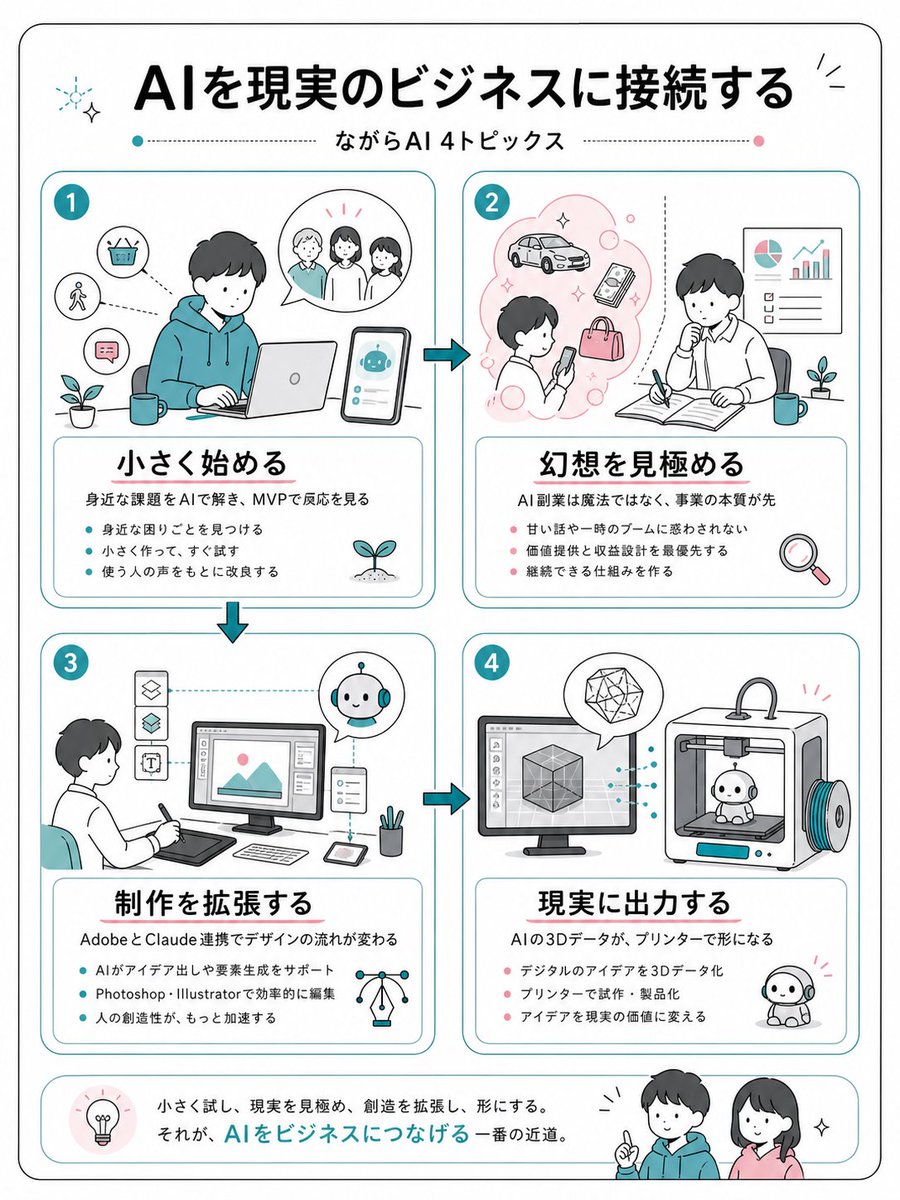
Japanese AI Business Infographic
Generates a clean four-step Japanese infographic explaining how to connect AI ideas to practical business workflows.
This is a gpt-image-2 prompt case for 平面海报. Use the copy-ready prompt below to generate similar visuals, and review YouMind OpenLab awesome-gpt-image-2 attribution plus commercial-use rights before reuse.

Prompt
Copy-ready prompt
{
  "type": "Simple Japanese business infographic poster",
  "format": "Vertical A4 page, white background, black rounded corner border",
  "style": "Friendly, flat-style line art, accented with cyan and coral, featuring softly rounded rectangles, a hand-drawn commercial sketch style, a black Japanese Gothic title, thin cyan dividing lines, and small glitter and plant icons.",
  "language": "Japanese",
  "headline": "{argument name=\"headline text\" default=\"Connecting AI to real-world business\"}",
  "subtitle": "{argument name=\"subtitle text\" default=\"Four topics related to AI applications\"}",
  "layout": {
    "top": "A large, centered headline with decorative glitter, and a subheading positioned between a dashed horizontal line, adorned with cyan and pink dots.",
    "main_grid": "Four equally sized rounded-corner cards are arranged in a 2x2 grid and connected by cyan arrow icons, showing the process from 1 to 2, then to 3, and finally to 4.",
    "bottom_banner": "The summary bar has rounded corners, a lightbulb icon on the left, a Japanese concluding remark in the middle, and two friendly figures on the right."
  },
  "sections": [
    {
      "number": "1",
      "position": "Top left",
      "title": "{argument name=\"section 1 title\" default=\"Start from small\"}",
      "main_illustration": "A young man wearing a light blue hoodie sat at a table using a laptop. Next to him, a phone displayed a cute AI chatbot interface with three chat bubbles and small icons for a shopping basket, pedestrians, chat messages, plants, and mugs.",
      "description": "Use AI to solve everyday problems and observe feedback through MVP.",
      "bullet_count": 3,
      "bullets": [
        "Discover the troubles around you",
        "Make it on a small scale and try it immediately.",
        "Improvements based on user feedback"
      ]
    },
    {
      "number": "2",
      "position": "Top right",
      "title": "{argument name=\"section 2 title\" default=\"See through illusions\"}",
      "main_illustration": "A person is looking at their phone in a pink, creative cloud containing cars, phones, bags, and bubbles; a second person is thinking and taking notes in an open notebook, while pie charts and rising bar charts hang on the wall, accompanied by icons of plants, mugs, and magnifying glasses.",
      "description": "AI side hustles aren't magic; prioritize the core business.",
      "bullet_count": 3,
      "bullets": [
        "Don't be fooled by sweet talk or short-term trends.",
        "Prioritize value delivery and revenue design",
        "Establish sustainable mechanisms"
      ]
    },
    {
      "number": "3",
      "position": "Bottom left",
      "title": "{argument name=\"section 3 title\" default=\"Extended Creation\"}",
      "main_illustration": "The designer sits in front of a graphics tablet, facing a desktop monitor displaying the image editing interface. To the left are vertical tool icons, and within circular speech bubbles are small AI robot assistants, accompanied by icons for a tablet, stylus, pen holder, and network light bulb.",
      "description": "The collaboration between Adobe and Claude has changed the design process.",
      "bullet_count": 3,
      "bullets": [
        "AI-assisted creative brainstorming and element generation",
        "Efficient editing with Photoshop and Illustrator",
        "Further accelerate human creativity"
      ]
    },
    {
      "number": "4",
      "position": "Bottom right",
      "title": "{argument name=\"section 4 title\" default=\"Output to reality\"}",
      "main_illustration": "The desktop monitor displays 3D cube modeling software, connected by dashed cyan lines to a 3D printer printing a small, cute robot model. Geometric crystals are present in speech bubbles, and a completed robot mascot sits on the ground.",
      "description": "AI's 3D data is transformed into physical objects through a printer.",
      "bullet_count": 3,
      "bullets": [
        "Transforming digital ideas into 3D data",
        "Prototyping and productization using printers",
        "Transforming creativity into real value"
      ]
    }
  ],
  "bottom_summary": {
    "icon": "The light bulb in the pale pink circle",
    "text": "Start small, see reality clearly, expand your creativity, and shape it. This is the fastest way to connect AI to business.",
    "characters": "Two smiling young people, one wearing a light blue hoodie pointing forward, and the other a woman wearing a pink top with small glittery markings."
  },
  "visual_requirements": "Use 4 numbered theme cards, each containing 3 key points. The Japanese text must be clear and easy to read. Maintain ample margins, rounded corners, and cyan card borders. Use coral dots for sections 2 and 4, and cyan dots for sections 1 and 3. Avoid a realistic style."
}
Prompt variables
Editable argument placeholders found in the prompt, with their default values.
More cases in this category
Prioritized by category, input mode compatibility, quality, and lower risk.






Reuse and source notes
Use this prompt safely after previewing the case.
- 1.Copy the prompt or open it directly in Dovoo with the generation button.
- 2.Adjust variables, aspect ratio, and reference images for your own use case.
- 3.Before publishing or paid usage, verify source rights, attribution requirements, and brand or likeness risks.
Can I use this prompt commercially?
Commercial-use status is unknown. Review the original source, license, brand constraints, and legal requirements before paid usage.
Where does this case come from?
This case is imported from YouMind OpenLab awesome-gpt-image-2; keep attribution visible and check the source URL before reuse.