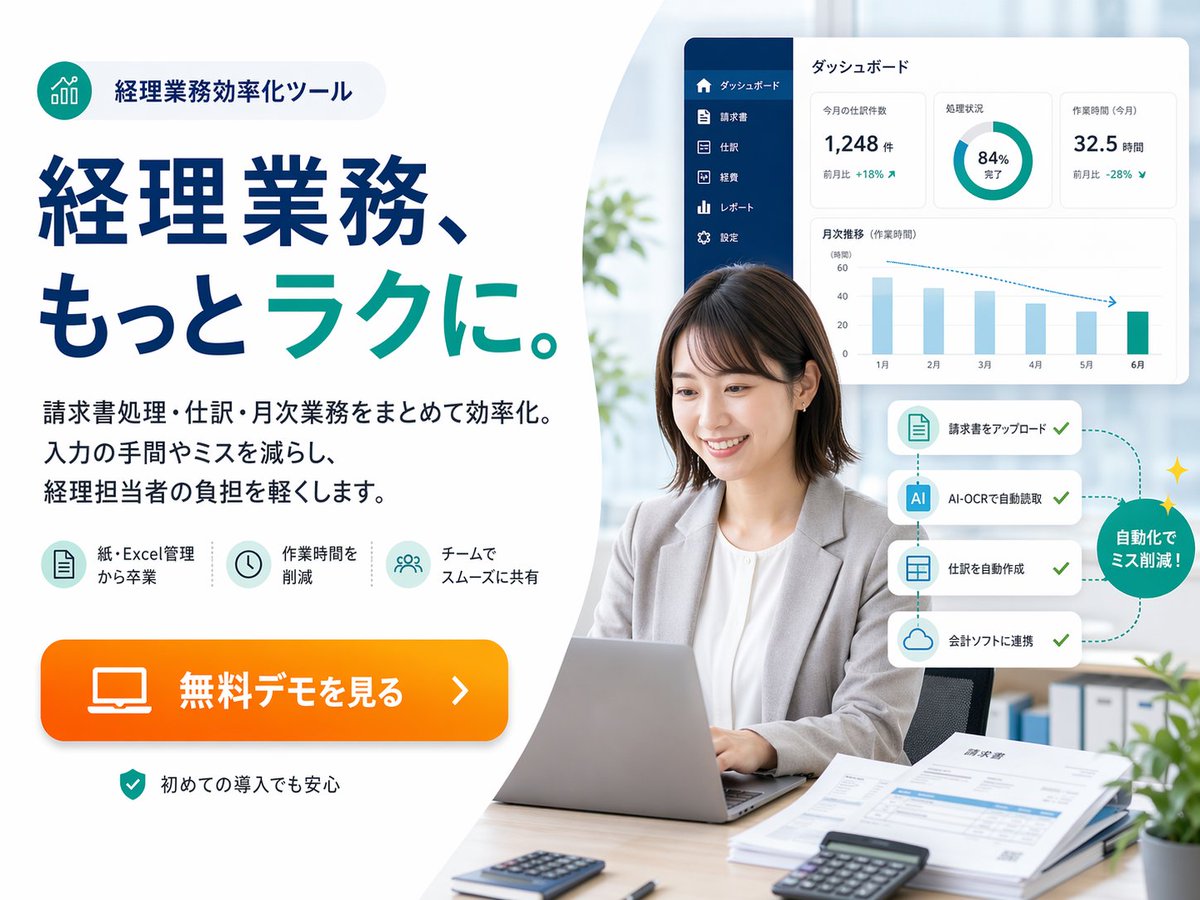
Japanese Accounting SaaS Hero Banner
A polished Japanese fintech-style promotional banner for an accounting automation tool, suitable for landing pages, web ads, and SaaS marketing visuals.
This is a gpt-image-2 prompt case for 产品商业. Use the copy-ready prompt below to generate similar visuals, and review YouMind OpenLab awesome-gpt-image-2 attribution plus commercial-use rights before reuse.
Prompt
Copy-ready prompt
{
  "type": "Japanese SaaS promotional landing page hero banner",
  "style": "The corporate website ads are concise, exude a modern fintech brand feel, and blend bright office photography with vector UI overlays, conveying high trustworthiness and demonstrating sophistication while prioritizing conversion.",
  "canvas": {
    "aspect_ratio": "4:3",
    "background": "A soft, light gray to white color scheme, featuring large, curved white shapes, is used to separate the text area on the left and the image area on the right."
  },
  "branding": {
    "badge": {
      "position": "top-left",
      "icon": "A cyan circular icon containing rising bar chart lines.",
      "text": "Managerial Business Efficiency Tools",
      "shape": "Rounded capsule shape with light gray filling"
    },
    "palette": {
      "primary": "Deep Navy Blue",
      "secondary": "Blue-green",
      "accent": "Bright orange",
      "background": "White and very light gray"
    }
  },
  "layout": {
    "sections": [
      {
        "title": "Marketing copywriting area on the left",
        "position": "left half",
        "count": 5,
        "labels": [
          "Top Badge",
          "Main Title",
          "3 lines of text",
          "3 function icons",
          "Orange CTA button"
        ]
      },
      {
        "title": "Right side office photo area",
        "position": "right half",
        "count": 6,
        "labels": [
          "Working women using laptops",
          "Dashboard panel",
          "4-Step Automated Card",
          "Green circle marker",
          "Files and calculator on the desk",
          "Blurred office background"
        ]
      }
    ],
    "composition": "The left side features heavy text ads, while the right side displays realistic portraits of professionals. Floating software interface cards are positioned above and to the sides of the portraits."
  },
  "text": {
    "headline": "Managerial business, more{argument name=\"headline emphasis\" default=\"easy\"} .",
    "body": "Centralize and streamline invoice processing, journal entries, and monthly business operations. Reduce tedious and error-prone data entry processes, and lighten the workload of accounting staff.",
    "cta": "{argument name=\"button text\" default=\"View free demo\"}",
    "reassurance": "You can use it with confidence even if it's your first time."
  },
  "features": {
    "count": 3,
    "items": [
      {
        "icon": "Document/table icon within a light blue circle",
        "label": "Say goodbye to paper and Excel management"
      },
      {
        "icon": "Clock icon inside light blue circle",
        "label": "shorten operation time"
      },
      {
        "icon": "Team/user icons within light blue circles",
        "label": "Smooth sharing among teams"
      }
    ]
  },
  "subject": {
    "count": 1,
    "person": "A Japanese working woman in her 20s to 30s sits at her desk, sporting a medium-length dark brown bob, a light gray blazer over a white shirt, and a neutral, professional expression, her hands resting on her laptop keyboard.",
    "face_treatment": "The face is softly and anonymously blurred.",
    "pose": "Sitting upright in an office chair, facing forward but slightly tilted to the left.",
    "desk_items": {
      "count": 5,
      "items": [
        "The silver laptop in front of me",
        "Mini calculator on the front left",
        "The black calculator on the front right",
        "The stack of documents and invoices on the right",
        "The pen next to the document"
      ]
    }
  },
  "ui_panel": {
    "position": "The upper right corner floats above the main body.",
    "title": "Dashboard",
    "style": "White rounded rectangular card with subtle shading",
    "sidebar": {
      "count": 6,
      "labels": [
        "Dashboard",
        "bill",
        "Journal entries",
        "cost",
        "Report",
        "set up"
      ],
      "color": "Dark Navy Blue Vertical Sidebar"
    },
    "widgets": {
      "count": 4,
      "items": [
        {
          "type": "Indicator Card",
          "label": "Journal entries for this month",
          "value": "1,248 items",
          "delta": "+18% month-on-month"
        },
        {
          "type": "pie chart",
          "label": "Processing progress",
          "value": "84% complete"
        },
        {
          "type": "Indicator Card",
          "label": "Homework Time (This Month)",
          "value": "32.5 hours",
          "delta": "-28% month-on-month"
        },
        {
          "type": "bar chart",
          "label": "Monthly Trends (Assignment Time)",
          "months": [
            "January",
            "February",
            "March",
            "April",
            "May",
            "June"
          ]
        }
      ]
    }
  },
  "automation_flow": {
    "position": "Right side of the middle, next to the main body",
    "count": 4,
    "cards": [
      "Upload Invoice",
      "Automatic reading via AI-OCR",
      "Automatically create journal entries",
      "Integration with accounting software"
    ],
    "callout": "Automation reduces errors!",
    "style": "Four stacked white cards with rounded corners are connected by a dotted cyan path with checkmarks, ending with a green circular badge with a slight shimmering effect."
  },
  "environment": {
    "setting": "Bright modern office",
    "background_elements": {
      "count": 4,
      "items": [
        "Soft sunlight streaming through the large windows",
        "The blurred green plants on the left side of the background",
        "The folder on the bookshelf in the lower right corner of the background.",
        "The small potted plant in the bottom right corner"
      ]
    }
  },
  "rendering": "High-resolution commercial composite, with realistic photography of people and desktop backgrounds, crisp vector typography, subtle shadows, and ample white space, conforming to Japanese web banner aesthetics."
}
Prompt variables
Editable argument placeholders found in the prompt, with their default values.
More cases in this category
Prioritized by category, input mode compatibility, quality, and lower risk.






Reuse and source notes
Use this prompt safely after previewing the case.
- 1.Copy the prompt or open it directly in Dovoo with the generation button.
- 2.Adjust variables, aspect ratio, and reference images for your own use case.
- 3.Before publishing or paid usage, verify source rights, attribution requirements, and brand or likeness risks.
Can I use this prompt commercially?
Commercial-use status is unknown. Review the original source, license, brand constraints, and legal requirements before paid usage.
Where does this case come from?
This case is imported from YouMind OpenLab awesome-gpt-image-2; keep attribution visible and check the source URL before reuse.