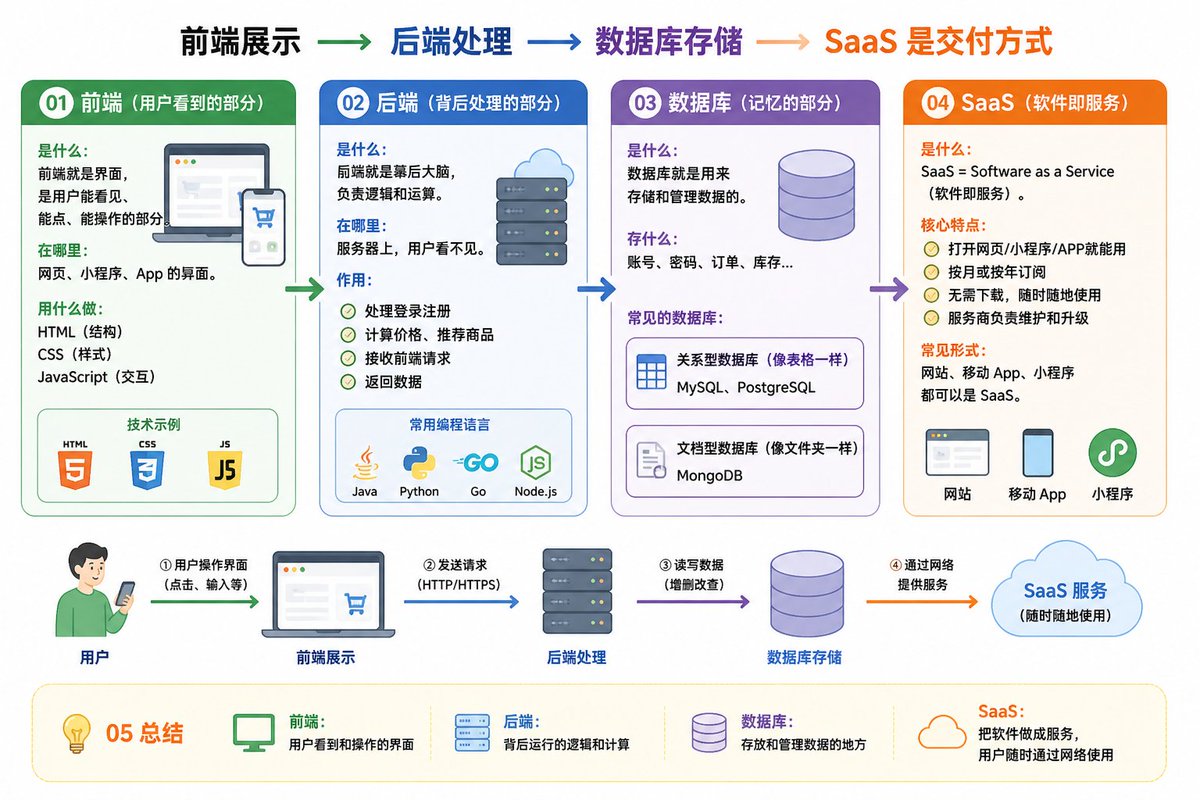
IT Architecture Knowledge Infographic
An educational prompt that uses a detailed breakdown of frontend, backend, database, and SaaS concepts to generate a clear, easy-to-understand conceptual infographic map.
This is a gpt-image-2 prompt case for Graphic & Poster. Use the copy-ready prompt below to generate similar visuals, and review YouMind OpenLab awesome-gpt-image-2 attribution plus commercial-use rights before reuse.
Prompt
Copy-ready prompt
01 Frontend (User-visible part) Definition: The interface that users can see, click, and interact with. Application scenarios: Website, mini-program, and app interfaces. Tools: HTML (structure), CSS (style), JavaScript (interaction). 02 Backend (Behind-the-scenes processing part) Definition: The brain behind the scenes, responsible for logic and calculation. Application scenarios: On the server side, invisible to the user. Functions: Handling login and registration, calculating prices and recommending products, receiving frontend requests and returning data. Common languages: Java, Python, Go, JavaScript (Node.js) 03 Database (Memory part) Definition: Used to store and manage data. Stored content: Accounts, passwords, orders, inventory, etc. Common databases: MySQL, PostgreSQL (relational, similar to tables), MongoDB (document-based, similar to folders) 04 SaaS (Software as a Service) Definition: SaaS = Software as a Service. Core characteristics: Can be used through web pages, mini-programs, or apps. Monthly or yearly subscriptions. Common forms: Websites, mobile apps, and mini-programs can all be SaaS. 05 Summary Frontend: The user-visible interface Backend: The underlying logic and computation Database: Data storage and management SaaS: A service model for delivering software over the network Frontend presentation → Backend processing → Database storage → SaaS delivery method Please draw an easy-to-understand diagram based on the above content.
Reuse and source notes
Use this prompt safely after previewing the case.
- 1.Copy the prompt or open it directly in Dovoo with the generation button.
- 2.Adjust variables, aspect ratio, and reference images for your own use case.
- 3.Before publishing or paid usage, verify source rights, attribution requirements, and brand or likeness risks.
Can I use this prompt commercially?
Commercial-use status is unknown. Review the original source, license, brand constraints, and legal requirements before paid usage.
Where does this case come from?
This case is imported from YouMind OpenLab awesome-gpt-image-2; keep attribution visible and check the source URL before reuse.