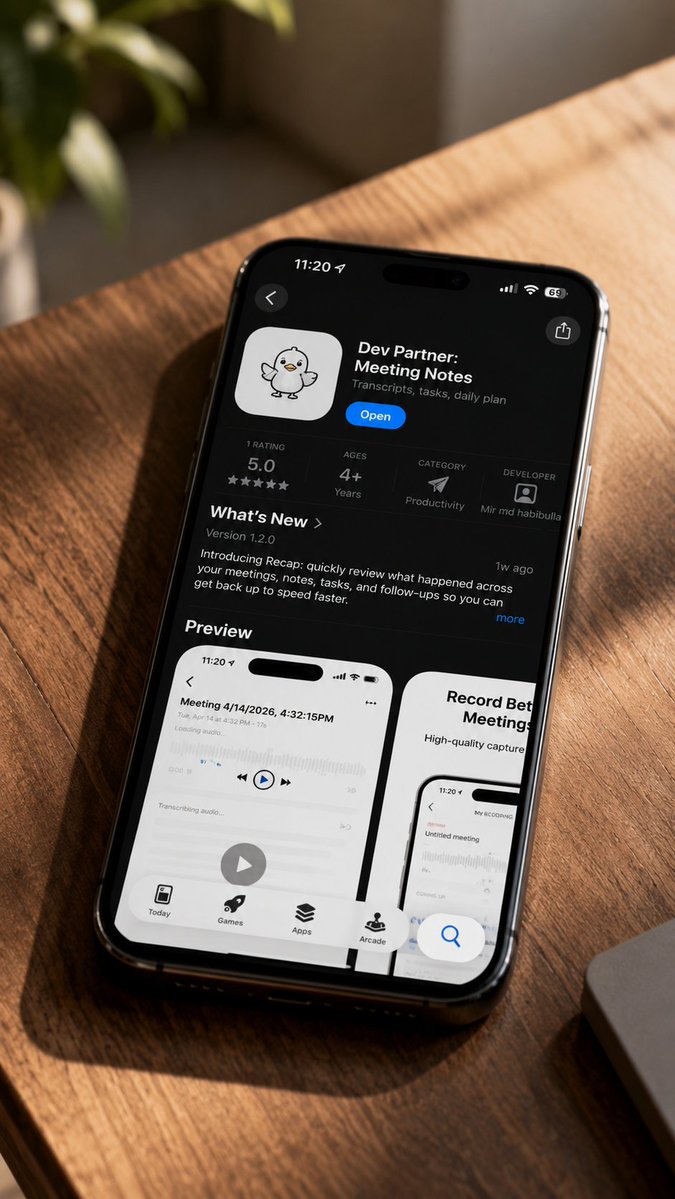
iPhone App Store Mockup on Desk
A realistic lifestyle mockup showing an iPhone App Store listing for a meeting notes app on a sunlit wooden desk.
This is a gpt-image-2 prompt case for 产品商业. Use the copy-ready prompt below to generate similar visuals, and review YouMind OpenLab awesome-gpt-image-2 attribution plus commercial-use rights before reuse.
Prompt
Copy-ready prompt
Create a realistic home-style product mockup photo. In the image, a black iPhone is placed diagonally on a warm-toned wooden table bathed in golden sunlight. The photo is taken from a slightly tilted, overhead angle, creating a shallow depth of field effect. The phone screen displays the iOS App Store app details page in dark mode; the app name is {argument name="app name" default="Dev Partner: Meeting Notes"} It features a cute white app icon with a hand-drawn duck/chick mascot, a blue "Open" button, and a subtitle.{argument name="app subtitle" default="Transcripts, tasks, daily plan"} The iPhone's top status bar displays 11:20, cellular/Wi-Fi/battery icons, and a dynamic island; the top left corner contains a back arrow, and the top right corner contains a share icon. The app information bar must include four separate statistics: a rating of 5.0 or five stars, an age rating of 4+, a category of "Productivity" with a paper airplane icon, and the developer's name as Mir md habibulla with a small avatar. Below is the "New Features" section, version number 1.2.0, a brief update paragraph introducing the Recap feature for quickly reviewing meetings, notes, tasks, and follow-ups, along with a "10,000 years ago" tag and a "More" link. Below, the "Preview" title appears, displaying two visible preview cards: the left card is a white screenshot titled "Meeting 4/14/2026, 4:32:15PM," including audio waveforms, playback controls, a large circular play button, and a bottom tab bar; the right card, partially visible, is titled "Record Better Meetings" and displays a screenshot. The App Store screen displays four navigation tabs at the bottom: Today, Games, Apps, and Arcade, with a floating blue search button near the bottom right corner. Environment: The upper left corner features blurred green plants in the background, while the lower right corner shows the edge of a silver laptop. Strong diagonal sunlight and wood grain shadows are projected onto the desktop. High-end documentary-style technology photography with high detail; natural reflections on the phone's glass; no hands, no additional devices, and no watermark.Prompt variables
Editable argument placeholders found in the prompt, with their default values.
More cases in this category
Prioritized by category, input mode compatibility, quality, and lower risk.






Reuse and source notes
Use this prompt safely after previewing the case.
- 1.Copy the prompt or open it directly in Dovoo with the generation button.
- 2.Adjust variables, aspect ratio, and reference images for your own use case.
- 3.Before publishing or paid usage, verify source rights, attribution requirements, and brand or likeness risks.
Can I use this prompt commercially?
Commercial-use status is unknown. Review the original source, license, brand constraints, and legal requirements before paid usage.
Where does this case come from?
This case is imported from YouMind OpenLab awesome-gpt-image-2; keep attribution visible and check the source URL before reuse.