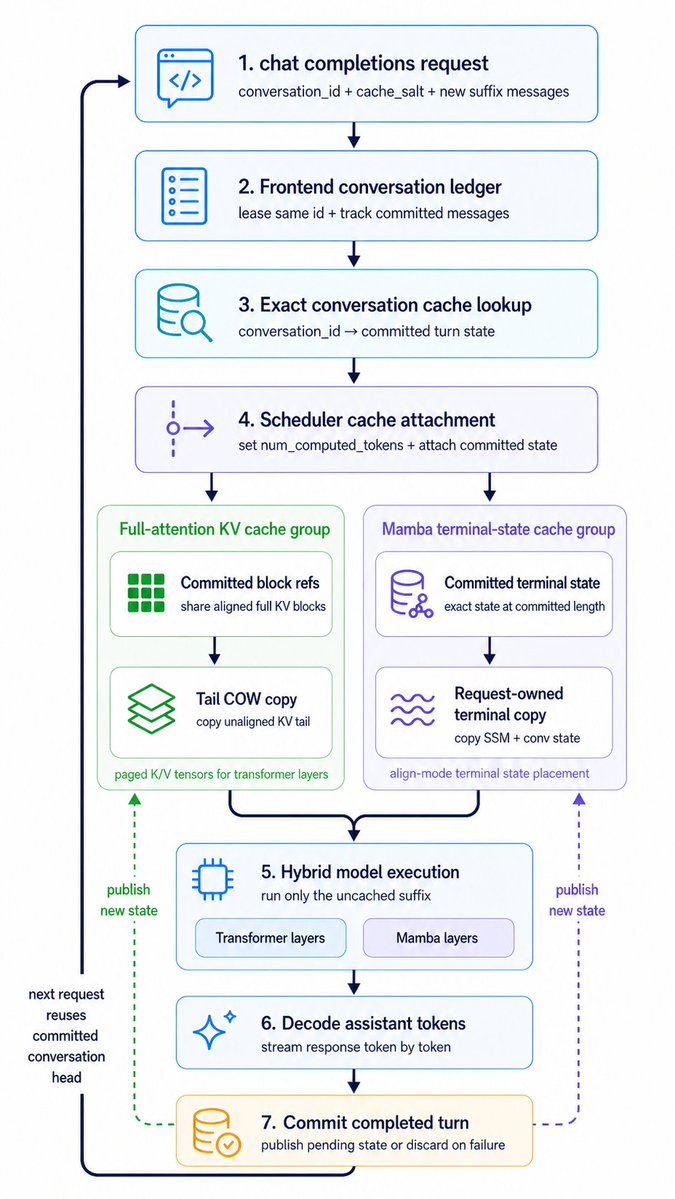
Hybrid Cache Execution Flowchart
A polished vertical systems-architecture infographic showing a seven-step cached chat inference pipeline with dual cache branches, suitable for technical explainers and product presentations.
This is a gpt-image-2 prompt case for 平面海报. Use the copy-ready prompt below to generate similar visuals, and review YouMind OpenLab awesome-gpt-image-2 attribution plus commercial-use rights before reuse.
Prompt
Copy-ready prompt
Create a clean, vertical technical workflow infographic with a light gray background, employing a minimalist modern product chart style. Use rounded white cards, thin colored outlines, simple vector line icons, dark blue text, and dark blue connecting arrows. The overall composition is a centered, top-to-bottom flowchart containing 7 numbered main steps, and 2 parallel cache group panels branching from step 4 to step 5. A dark, thick return arrow loops from the bottom to the top on the far left. Use a clean sans-serif font, maintain ample spacing, and use soft, light colors without gradients or shadows to ensure clarity for the presentation slides. Place the step 1 card at the top center with a blue outline and a code/chat icon on the left. Title text: "1."{argument name="step 1 title" default="Chat completion request"} The subtitle is: "conversation_id + cache_salt + new suffix message". Below this is the Step 2 card, with a blue outline and document/list icon. Title: "2. Front-end Conversation Ledger". Subtitle: "Renting Same ID + Tracking Committed Messages". Below this is the Step 3 card, with a cyan outline and a database icon with a magnifying glass. Title: "3. Precise Conversation Cache Lookup". Subtitle: "conversation_id Committed Round Status". Below this is the Step 4 card, with a purple outline and branch scheduler icon. Title: "4. Scheduler Cache Attachment". Subtitle: "Setting num_computed_tokens + Attaching Committed Status". From Step 4, it branches down into two side-by-side group panels. Left group panel: a light green rounded container, titled "Full-attention KV Cache Group". Inside, two inner cards are stacked. The first inner card has a green block grid icon, titled "Committed Block Reference", and subtitled "Shared Aligned Full KV". The first internal card, the second one below, has a green layered paper icon, titled "Tail COW Copy," with the subtitle "Copying Unaligned KV Tail." A small footer is added to the bottom of the green panel: "Paging K/V Tensors for Transformer Layers." The right-hand group panel is a light purple rounded container titled "Mamba Terminal State Cache Group." It contains two stacked internal cards. The first card has a purple database/network icon, titled "Committed Terminal State," with the subtitle "Exact State at Committed Length." The second card below has a purple wavy line icon, titled "Requesting Ownership of Terminal Copy," with the subtitle "Copying SSM + Dialogue State." A small footer is added to the bottom of the purple panel: "Aligned Mode Terminal State Placement." The outputs of the two group panels are merged into the centered Step 5 card, with a blue outline and microchip icon. The title is: "5. Hybrid Model Execution." The subtitle is: "Run Only Uncached Suffixes." At the bottom of this card, two capsule-shaped labels are placed side-by-side: "Transformer Layer" and "Mamba Layer." Step 6 is placed below. Step 1: A card with a blue outline and a glittering icon. Title: "6. Decoding Assistant Token". Subtitle: "Streaming Response Token by Token". Below this is Step 7: A card with a warm yellow-orange outline and a checked database icon. Title: "7. Round of Commit Completion". Subtitle: "Publish Suspended State or Discard on Failure". Add a thick, dark blue looping arrow on the far left, leading from the upper left to Step 1 and back up from Step 7 at the bottom. Loop along this left side, placing stacked comment text near the lower half: "Reuse the committed dialog header on the next request". Add two upward dashed publish arrows from Step 7 toward the cache group panels: a green dashed arrow on the left pointing to the green cache panel, labeled "Publish New State"; and a purple dashed arrow on the right pointing to the purple cache panel, also labeled "Publish New State". Maintain the total number of 7 numbered main cards, 2 cache group panels, 4 internal cache cards, and 2 capsule labels. Maintain a vertical scale similar to the conference slides architecture diagram.Prompt variables
Editable argument placeholders found in the prompt, with their default values.
More cases in this category
Prioritized by category, input mode compatibility, quality, and lower risk.






Reuse and source notes
Use this prompt safely after previewing the case.
- 1.Copy the prompt or open it directly in Dovoo with the generation button.
- 2.Adjust variables, aspect ratio, and reference images for your own use case.
- 3.Before publishing or paid usage, verify source rights, attribution requirements, and brand or likeness risks.
Can I use this prompt commercially?
Commercial-use status is unknown. Review the original source, license, brand constraints, and legal requirements before paid usage.
Where does this case come from?
This case is imported from YouMind OpenLab awesome-gpt-image-2; keep attribution visible and check the source URL before reuse.