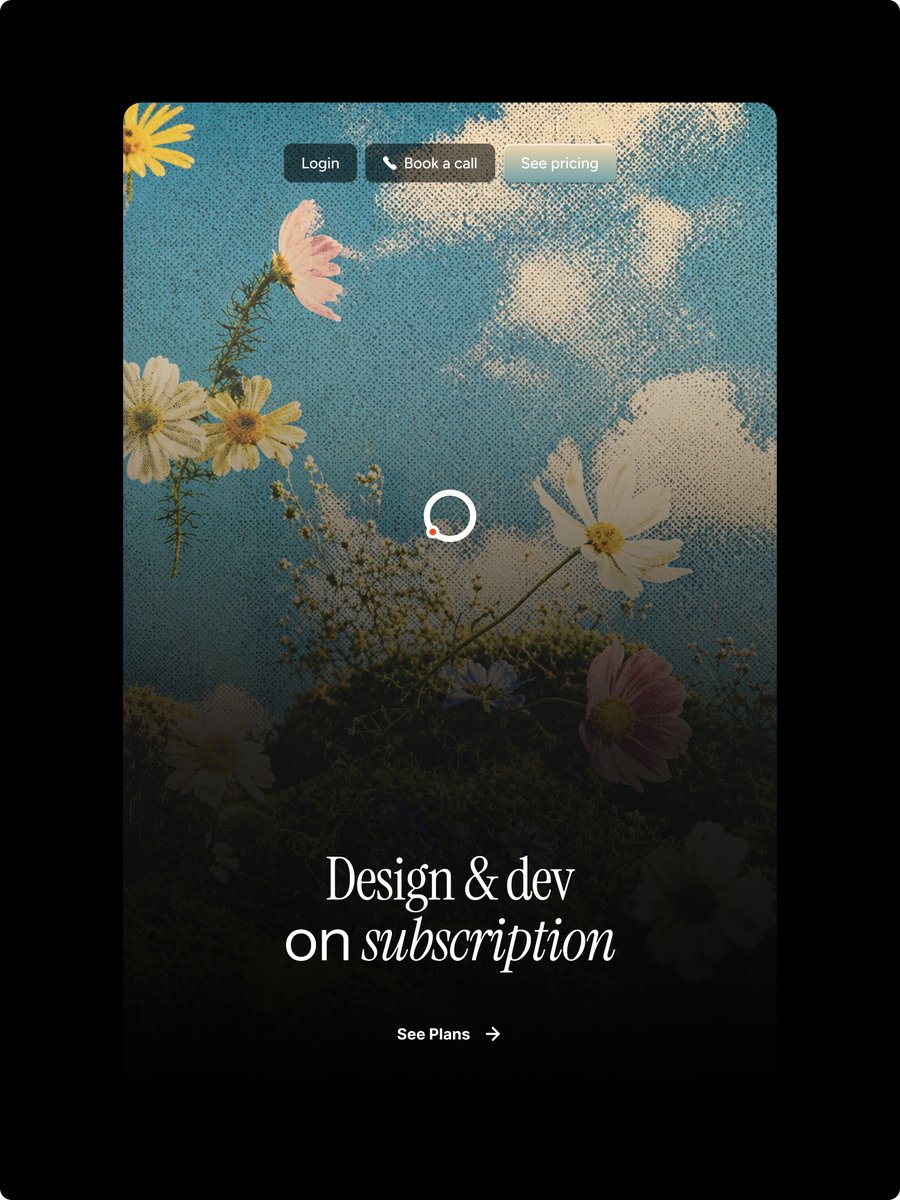
Halftone Floral Landing Page Hero
Generates a vintage halftone floral website hero mockup for a design subscription landing page.
This is a gpt-image-2 prompt case for 产品商业. Use the copy-ready prompt below to generate similar visuals, and review YouMind OpenLab awesome-gpt-image-2 attribution plus commercial-use rights before reuse.
Prompt
Copy-ready prompt
Objective: To create a sophisticated vertical landing page mockup for a subscription service, showcasing a retro halftone editing style and Figma-esque web design precision. Canvas: 3:4 vertical image with a pure black outer background. A tall, rounded rectangular website card is placed in the center of the image, occupying most of the space, surrounded by a wide black margin. Main visual: Inside the card, a dreamy, upward-looking scene depicts wildflowers under a blue sky and white clouds. A strong retro halftone dot texture is applied across the entire card image. A deep black gradient overlay is added from the bottom up, giving the lower half a deep and legible effect while maintaining the bright sky blue of the upper half. The visible floral elements should precisely include 9 main flowers: one partial yellow flower in the top left corner, one pink flower in the upper left corner, two clusters of white daisies in the center left, one large white cosmos in the center right, one white daisy near the bottom left, one small pale blue flower near the bottom center, one pink flower in the bottom right corner, and one partially hidden dark white flower at the bottom right edge, plus slender stems and tiny baby's breath buds. Top navigation: Place 3 small capsule buttons at the top center of the card, with a delicate frosted/blurred style and soft shadows. Button 1 text: "{argument name="login button text" default="Log in"} Located on a dark charcoal gray capsule. Button 2 Text: "{argument name="booking button text" default="Schedule a call"} The text is preceded by a small white telephone icon and is located on a warm-toned, dark, semi-transparent capsule. Button 3 text: "{argument name="pricing button text" default="View price"} Located on a light matte gray-blue capsule, it uses a simple, small sans-serif white font. Central detail: A loading circle is added to the center of the card, consisting of a white ring with a small orange-red dot in the lower left corner. Maintaining a clean and crisp look. First screen layout: In the lower third, an elegant, large white serif title is placed in the center, containing the text "..."{argument name="headline text" default="Design and Development\nSubscription Services"} The first line displays "Design and Development"; the second line displays "Subscription Service," with the word "Subscription" in italic serif font. The use of sophisticated high-contrast fonts and ample letter spacing creates a luxurious editorial feel. Call to Action (CTA): Below the headline, a small white CTA is placed in the center, containing the text "..."{argument name="call to action text" default="View the plan"} ", followed by a thin, right-pointing arrow. Maintain a minimalist style and align with the title. Style constraints: High-end webpage design, realistic floral sky background, halftone print texture, dark cinematic gradient at the bottom, rounded cards, no browser borders, no extra logo, no watermark, and no additional text other than 3 navigation buttons, the title, and the CTA.Prompt variables
Editable argument placeholders found in the prompt, with their default values.
Variable
login button text
Default
Log in
Variable
booking button text
Default
Schedule a call
Variable
pricing button text
Default
View price
Variable
headline text
Default
Design and Development\nSubscription Services
Variable
call to action text
Default
View the plan
More cases in this category
Prioritized by category, input mode compatibility, quality, and lower risk.

Premium Sports Editorial Poster
Text to Imageunknown

Hyper Realistic FIFA Football Poster
Text to Imageunknown

Direct Flash Editorial Portrait
Text to Imageunknown

Vintage Film Projection Portrait
Image to Imageunknown

Cosmic Big Bang Snooze Comic
Text to Imageunknown

Hand-Drawn Sketch Photo Annotation
Text to Imageunknown
Reuse and source notes
Use this prompt safely after previewing the case.
- 1.Copy the prompt or open it directly in Dovoo with the generation button.
- 2.Adjust variables, aspect ratio, and reference images for your own use case.
- 3.Before publishing or paid usage, verify source rights, attribution requirements, and brand or likeness risks.
Can I use this prompt commercially?
Commercial-use status is unknown. Review the original source, license, brand constraints, and legal requirements before paid usage.
Where does this case come from?
This case is imported from YouMind OpenLab awesome-gpt-image-2; keep attribution visible and check the source URL before reuse.