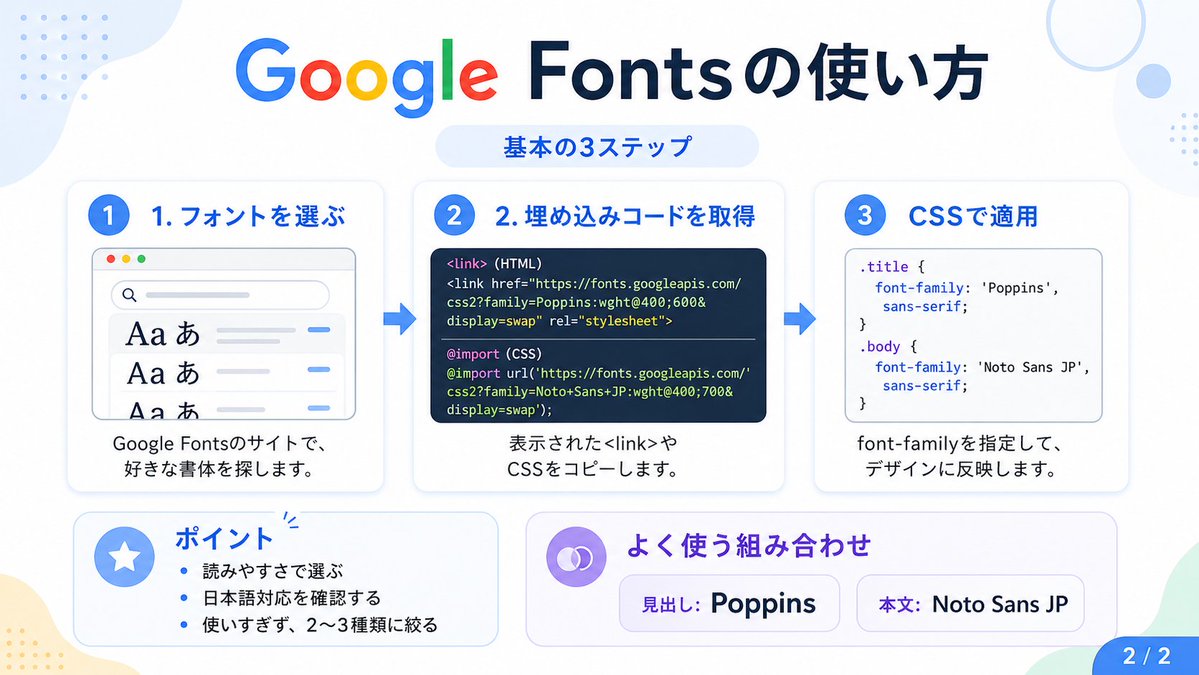
Google Fonts Japanese Tutorial Infographic
This prompt generates a clean Japanese infographic explaining the three basic steps for using Google Fonts, suitable for social posts, tutorials, and presentation slides.
This is a gpt-image-2 prompt case for 平面海报. Use the copy-ready prompt below to generate similar visuals, and review YouMind OpenLab awesome-gpt-image-2 attribution plus commercial-use rights before reuse.
Prompt
Copy-ready prompt
{
  "type": "Japanese Infographic",
  "topic": "How to use Google Fonts",
  "style": "The design features a clean, modern flat style with a white background, soft light blue and mint green corner blocks, rounded corner cards with subtle shadows, a tech tutorial aesthetic, and crisp vector typography and UI illustrations.",
  "canvas": {
    "aspect_ratio": "16:9"
  },
  "headline": {
    "main": "How to use Google Fonts",
    "sub": "Basic 3 steps"
  },
  "layout": {
    "sections": [
      {
        "title": "1. Select font",
        "position": "left",
        "count": 1,
        "labels": [
          "1. Select font"
        ],
        "card_style": "Rounded white panel with light blue border/shadow",
        "icon": "Blue number 1 circle",
        "illustration": "A browser window displays the font search interface, with three visible font previews, featuring large Aa and あ samples, a search bar at the top, small colored window buttons, light gray interface lines, and blue accent lines.",
        "body_text": "Search for your favorite fonts on the Google Fonts website."
      },
      {
        "title": "2. Obtain the embedded code",
        "position": "center",
        "count": 1,
        "labels": [
          "2. Obtain the embedded code"
        ],
        "card_style": "Rounded white panel with light blue border/shadow",
        "icon": "Blue number 2 circle",
        "illustration": "The dark code panel contains two labeled code examples separated by a thin separator.",
        "code_blocks": {
          "count": 2,
          "labels": [
            "<link> (HTML)",
            "@import (CSS)"
          ],
          "content": [
            "<link href=\"https://fonts.googleapis.com/css2?family=Poppins:wght@400;600&display=swap\" rel=\"stylesheet\">",
            "@import url('https://fonts.googleapis.com/css2?family=Noto+Sans+JP:wght@400;700&display=swap');"
          ]
        },
        "body_text": "Copy display<link> Or CSS code."
      },
      {
        "title": "3. Applying in CSS",
        "position": "right",
        "count": 1,
        "labels": [
          "3. Applying in CSS"
        ],
        "card_style": "Rounded white panel with light blue border/shadow",
        "icon": "Blue number 3 circle",
        "illustration": "A white code card containing CSS, with two selectors and a font-family rule.",
        "code_blocks": {
          "count": 2,
          "labels": [
            ".title",
            "body"
          ],
          "content": [
            ".title { font-family: 'Poppins', sans-serif; }",
            "body { font-family: 'Noto Sans JP', sans-serif; }"
          ]
        },
        "body_text": "Specify the font-family and apply it to the design."
      },
      {
        "title": "Key Points",
        "position": "bottom-left",
        "count": 3,
        "labels": [
          "Choose based on readability",
          "Confirm if Japanese is supported.",
          "Do not overuse; limit to 2-3 types."
        ],
        "card_style": "Rounded white panel with light blue undertones",
        "icon": "Blue star in the circle",
        "body_format": "Bullet List"
      },
      {
        "title": "Common combinations",
        "position": "bottom-center-right",
        "count": 2,
        "labels": [
          "Title: Poppins",
          "Main text: Noto Sans JP"
        ],
        "card_style": "Rounded white panel with a light purple hue",
        "icon": "Purple chain symbol",
        "body_format": "Two sample boxes in pill shape"
      }
    ],
    "connectors": {
      "count": 2,
      "style": "Large blue right arrow between the 3 top cards"
    },
    "pagination": {
      "text": "2 / 2",
      "position": "bottom-right",
      "style": "Blue rounded corner label"
    }
  },
  "text_language": "Japanese",
  "color_palette": {
    "primary_blue": "#2f80ff",
    "navy": "#0f2b5b",
    "google_colors": [
      "#4285F4",
      "#DB4437",
      "#F4B400",
      "#0F9D58"
    ],
    "lavender": "#8b6cff",
    "background": "#ffffff"
  }
}
More cases in this category
Prioritized by category, input mode compatibility, quality, and lower risk.

Premium Sports Editorial Poster
Text to Imageunknown

Hyper Realistic FIFA Football Poster
Text to Imageunknown

Hand-Drawn Sketch Photo Annotation
Text to Imageunknown

Cosmic Big Bang Snooze Comic
Text to Imageunknown

Direct Flash Editorial Portrait
Text to Imageunknown

Vintage Film Projection Portrait
Image to Imageunknown
Reuse and source notes
Use this prompt safely after previewing the case.
- 1.Copy the prompt or open it directly in Dovoo with the generation button.
- 2.Adjust variables, aspect ratio, and reference images for your own use case.
- 3.Before publishing or paid usage, verify source rights, attribution requirements, and brand or likeness risks.
Can I use this prompt commercially?
Commercial-use status is unknown. Review the original source, license, brand constraints, and legal requirements before paid usage.
Where does this case come from?
This case is imported from YouMind OpenLab awesome-gpt-image-2; keep attribution visible and check the source URL before reuse.