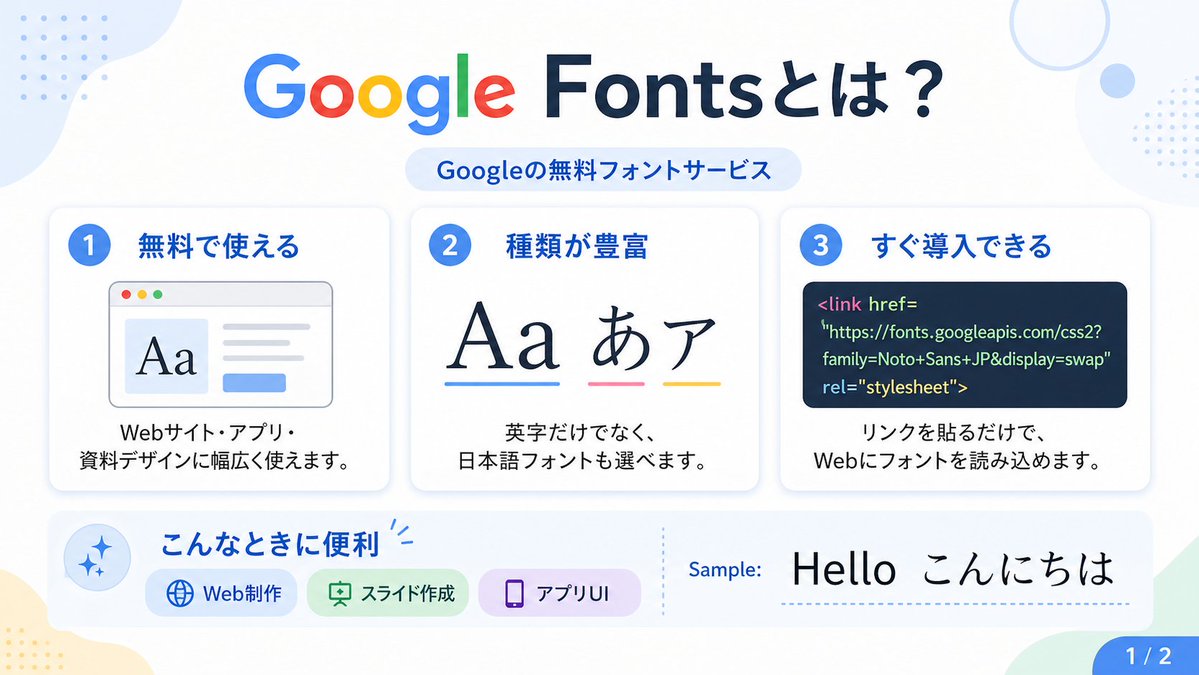
Google Fonts Japanese Infographic
A clean Japanese presentation-style infographic explaining Google Fonts, suitable for social posts, slides, or educational design content.
This is a gpt-image-2 prompt case for Graphic & Poster. Use the copy-ready prompt below to generate similar visuals, and review YouMind OpenLab awesome-gpt-image-2 attribution plus commercial-use rights before reuse.
Prompt
Copy-ready prompt
{
  "type": "Japanese infographic poster",
  "topic": "Introduction to Google Fonts",
  "style": {
    "look": "Simple, flat, modern presentation slides",
    "palette": "White background, accented with soft light blue, green, yellow and lavender.",
    "aspect_ratio": "16:9",
    "lighting": "Bright and uniform digital graphic lighting effects",
    "finish": "Clear vector-style infographics with subtle shadows and rounded corners."
  },
  "text": {
    "headline": "{argument name=\"headline text\" default=\"What are Google Fonts?\"}",
    "subheadline": "Google's free font service",
    "sample_label": "Example:",
    "sample_text": "{argument name=\"sample text\" default=\"Hello こんにちは\"}",
    "page_indicator": "1 / 2"
  },
  "layout": {
    "sections": [
      {
        "title": "Top title",
        "position": "Centered at the top",
        "count": 2,
        "labels": [
          "What are Google Fonts?",
          "Google's free font service"
        ]
      },
      {
        "title": "Function cards",
        "position": "middle row",
        "count": 3,
        "labels": [
          "1. Free to use",
          "2. Abundant variety",
          "3. Rapid Deployment"
        ]
      },
      {
        "title": "Use the scene bar",
        "position": "Bottom left to center",
        "count": 4,
        "labels": [
          "Applicable Scenarios",
          "Web Production",
          "Slides creation",
          "Application UI"
        ]
      },
      {
        "title": "Example area",
        "position": "Bottom right",
        "count": 2,
        "labels": [
          "Example:",
          "Hello こんにちは"
        ]
      },
      {
        "title": "Page markup",
        "position": "bottom right corner",
        "count": 1,
        "labels": [
          "1 / 2"
        ]
      }
    ],
    "background_decorations": {
      "count": 7,
      "items": [
        "Light blue organic-shaped color block in the upper left corner",
        "The blue dot grid in the upper left corner",
        "Light blue thin ring in the upper right corner",
        "The small light blue dot near the top right corner",
        "The blue dot grid at the top right edge",
        "The pale yellow organic-shaped color block in the lower left corner",
        "The light green angular shape in the lower right corner"
      ]
    }
  },
  "cards": [
    {
      "number": "1",
      "title": "Free to use",
      "description": "It can be widely used in website, application and presentation design.",
      "visual": "A white card with rounded corners and a slight shading, featuring a blue number badge; a browser window illustration on the left displays a large serif font \"Aa\", a gray text line on the right, and a small blue button below."
    },
    {
      "number": "2",
      "title": "A wide variety",
      "description": "Not only are there English fonts, but you can also choose Japanese fonts.",
      "visual": "A white card with rounded corners and a slight shading, featuring a blue number badge and a large typographical example of Aa あア, with blue, pink, and yellow underlines below."
    },
    {
      "number": "3",
      "title": "Rapid deployment",
      "description": "Simply add a link to load the font on the web.",
      "visual": "A white card with rounded corners and a slight shading, featuring a blue number badge and a dark navy blue code panel containing an HTML link tag for Google Fonts."
    }
  ],
  "lower_band": {
    "left_icon": "Blue flashing icon inside light blue circle",
    "title": "Applicable Scenarios",
    "chips": {
      "count": 3,
      "items": [
        {
          "label": "Web Production",
          "color": "light blue",
          "icon": "globe"
        },
        {
          "label": "Slides creation",
          "color": "Light green",
          "icon": "presentation board"
        },
        {
          "label": "Application UI",
          "color": "Light purple",
          "icon": "smartphone"
        }
      ]
    },
    "divider": "Vertical dashed line",
    "sample_preview": "Large black typography example on a white background"
  },
  "typography": {
    "headline_font": "{argument name=\"headline font\" default=\"A rounded sans-serif font similar to Google Sans\"}",
    "body_font": "{argument name=\"body font\" default=\"Simple Japanese sans-serif font\"}",
    "notes": "The word \"Google\" in the title uses the official multicolor Google logo style: blue G, red o, yellow o, blue g, green l, and red e; the rest of the title is dark navy blue."
  }
}
Prompt variables
Editable argument placeholders found in the prompt, with their default values.
Variable
headline text
Default
What are Google Fonts?
Variable
sample text
Default
Hello こんにちは
Variable
headline font
Default
A rounded sans-serif font similar to Google Sans
Variable
body font
Default
Simple Japanese sans-serif font
Reuse and source notes
Use this prompt safely after previewing the case.
- 1.Copy the prompt or open it directly in Dovoo with the generation button.
- 2.Adjust variables, aspect ratio, and reference images for your own use case.
- 3.Before publishing or paid usage, verify source rights, attribution requirements, and brand or likeness risks.
Can I use this prompt commercially?
Commercial-use status is unknown. Review the original source, license, brand constraints, and legal requirements before paid usage.
Where does this case come from?
This case is imported from YouMind OpenLab awesome-gpt-image-2; keep attribution visible and check the source URL before reuse.