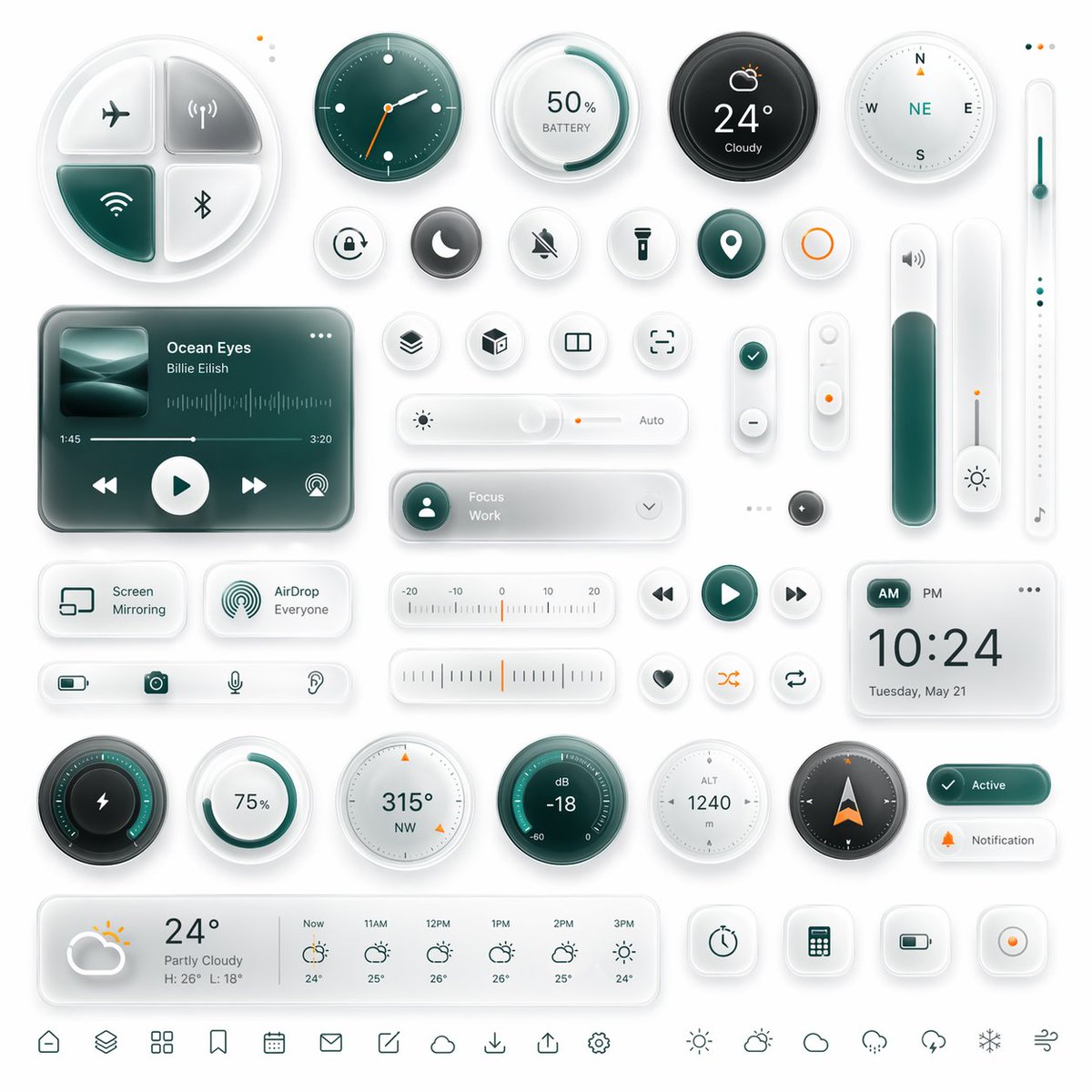
Glassmorphism Smart UI Kit
A polished futuristic dashboard interface kit with many glassmorphism widgets, ideal for app UI concept renders, product mockups, and design showcases.
This is a gpt-image-2 prompt case for 产品商业. Use the copy-ready prompt below to generate similar visuals, and review YouMind OpenLab awesome-gpt-image-2 attribution plus commercial-use rights before reuse.
Prompt
Copy-ready prompt
{
  "type": "Frosted glass and biomimetic style smart dashboard UI kit",
  "style": {
    "theme": "Simple, futuristic mobile interface components",
    "background": "Soft light grayish-white",
    "materials": "Frosted glass, translucent acrylic, soft shadows, subtle internal glow, rounded corners, embossed and recessed details.",
    "accent color": "{argument name=\"accent color\" default=\"Deep blue-green\"}",
    "secondary accent": "warm orange",
    "lighting": "Soft studio lighting in the upper left corner, gentle ambient reflections, and high gloss.",
    "rendering": "Ultra-detailed 3D UI models, advanced Dribbble-style product design"
  },
  "layout": {
    "canvas": "Square composition",
    "arrangement": "Evenly distributed grid of independent components and controls",
    "density": "Information-dense but with ample white space.",
    "sections": [
      {
        "title": "Top control row",
        "position": "top",
        "count": 6,
        "labels": [
          "Four-quadrant connection panel",
          "Analog clock",
          "50% battery level ring gauge",
          "24° Cloudy Weather Dial",
          "compass",
          "Vertical temperature slider"
        ]
      },
      {
        "title": "Small round shortcut button",
        "position": "Upper Mid-to-Upper",
        "count": 11,
        "labels": [
          "Alarm clock",
          "moon",
          "Silent bell",
          "flashlight",
          "Positioning pins",
          "Orange circular button",
          "Layers",
          "cube",
          "Split-screen view",
          "Focus box",
          "Check the icon"
        ]
      },
      {
        "title": "Central Components",
        "position": "Central",
        "count": 8,
        "labels": [
          "Music Player Card",
          "Brightness slider with automatic adjustment",
          "Focus on work drop-down capsule",
          "Vertical joystick",
          "Vertical toggle switch with orange dot",
          "High volume slider",
          "Small dark round button",
          "A slim vertical light slider with a musical note icon"
        ]
      },
      {
        "title": "Auxiliary cards and controls",
        "position": "Mid-lower part",
        "count": 11,
        "labels": [
          "Screen mirroring card",
          "AirDrop All Cards",
          "Bottom toolbar (containing battery, camera, microphone, and hearing icons)",
          "Horizontal temperature scale",
          "Media Back Button",
          "Media Playback Button",
          "Media forward button",
          "Heart-shaped button",
          "Random play button",
          "loop playback button",
          "Digital clock cards"
        ]
      },
      {
        "title": "Bottom gauges and status",
        "position": "bottom",
        "count": 11,
        "labels": [
          "Lightning Ring Power Supply Instrument",
          "75% Circular Progress",
          "315° Northwest Compass Dial",
          "dB -18 dB meter",
          "1240 meters above sea level",
          "Navigation compass arrow",
          "Active status capsule",
          "Notification Capsule",
          "Weekly Weather Forecast Card",
          "4 square tool buttons",
          "Bottom navigation icon row"
        ]
      }
    ],
    "bottom navigation count": 13
  },
  "objects": {
    "connectivity pad": {
      "shape": "Large rounded four-way disk",
      "quadrants": 4,
      "icons": [
        "Flight mode",
        "wireless signal",
        "WiFi",
        "Bluetooth"
      ],
      "active quadrants": 1
    },
    "music player": {
      "artist": "{argument name=\"artist name\" default=\"Billie Eilish\"}",
      "track": "{argument name=\"song title\" default=\"Ocean Eyes\"}",
      "artwork": "Cyan abstract wave image",
      "controls": 4,
      "timeline": "1:45 to 3:20",
      "extra": "audio waveform"
    },
    "weather main": {
      "temperature": "{argument name=\"temperature\" default=\"24°\"}",
      "condition": "partly cloudy"
    },
    "digital clock": {
      "time": "{argument name=\"clock time\" default=\"10:24\"}",
      "date": "Tuesday, May 21",
      "period toggle": "Morning and afternoon"
    },
    "forecast": {
      "current": "24°C, cloudy, high 26°C, low 18°C",
      "hourly count": 6,
      "hours": [
        "Now",
        "11AM",
        "12PM",
        "1PM",
        "2PM",
        "3PM"
      ]
    },
    "utility buttons": {
      "count": 4,
      "icons": [
        "timer",
        "calculator",
        "Battery",
        "recording"
      ]
    }
  },
  "color palette": {
    "count": 5,
    "colors": [
      "White",
      "Light gray",
      "Deep blue-green",
      "Dark charcoal gray",
      "Soft orange"
    ]
  },
  "camera": {
    "view": "Front view and top view",
    "framing": "The edges of the entire UI suite are visible."
  }
}
Prompt variables
Editable argument placeholders found in the prompt, with their default values.
More cases in this category
Prioritized by category, input mode compatibility, quality, and lower risk.






Reuse and source notes
Use this prompt safely after previewing the case.
- 1.Copy the prompt or open it directly in Dovoo with the generation button.
- 2.Adjust variables, aspect ratio, and reference images for your own use case.
- 3.Before publishing or paid usage, verify source rights, attribution requirements, and brand or likeness risks.
Can I use this prompt commercially?
Commercial-use status is unknown. Review the original source, license, brand constraints, and legal requirements before paid usage.
Where does this case come from?
This case is imported from YouMind OpenLab awesome-gpt-image-2; keep attribution visible and check the source URL before reuse.