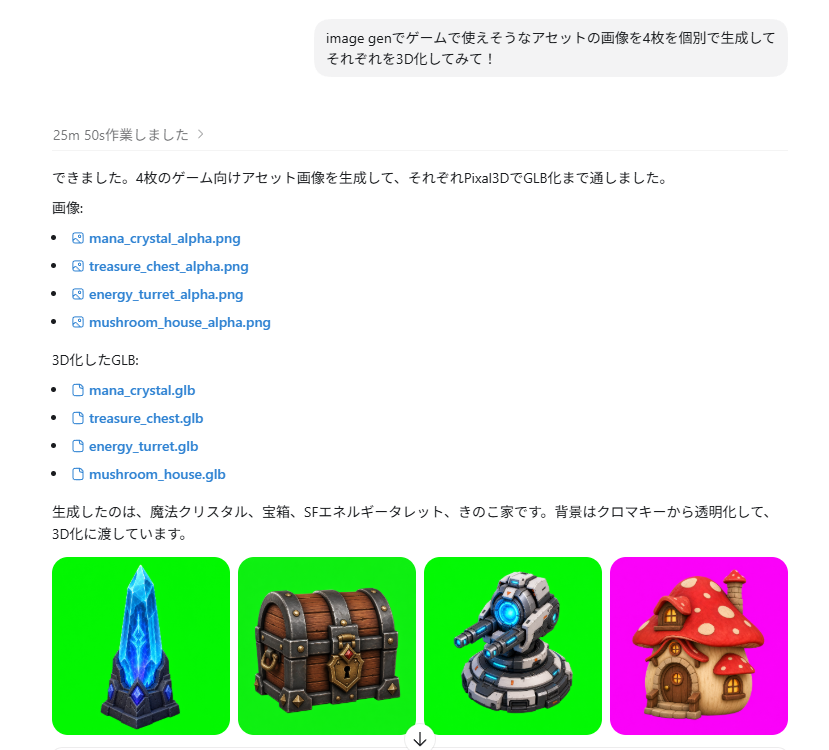
ChatGPT Game Asset Generation Screenshot
A prompt for recreating a Japanese ChatGPT-style result screen showing four game asset thumbnails and their PNG and GLB download links.
This is a gpt-image-2 prompt case for Graphic & Poster. Use the copy-ready prompt below to generate similar visuals, and review YouMind OpenLab awesome-gpt-image-2 attribution plus commercial-use rights before reuse.
Prompt
Copy-ready prompt
Objective: Create a realistic ChatGPT-style webpage screenshot showcasing the generated images of game assets, including Japanese UI text and four generated asset thumbnails. Canvas: Landscape browser/application screenshot, approximately 797×750 pixels, white background, minimalist interface, cropped to only show the assistant's reply area and the image row at the bottom. Layout: A rounded light gray user message bubble is placed at the top center, containing the following content:{argument name="user request text" default="Use ImageGen to individually generate four images that could be used as assets in a game, and then try turning each of them into a 3D model!"} Below this, aligned to the left, a line of small gray text appears in the status bar: "25m 50s 作业しました〉", followed by a thin horizontal dividing line. Below this, a Japanese assistant reply is created, containing a file list and blue clickable file links. The text content includes the assistant paragraph: "できました。4枚のゲーム向けアセット影像を生成して、それぞれPixal3DでGLB化まで通しました。". This is followed by the tag "影像:", followed by four list links with small image/file icons: 1) mana_crystal_alpha.png, 2) treasure_chest_alpha.png, 3) energy_turret_alpha.png, 4) mushroom_house_alpha.png. Next is the tag "3D-ified GLB:", followed by four list links with document icons: 1) mana_crystal.glb, 2) treasure_chest.glb, 3) energy_turret.glb, 4) mushroom_house.glb. Finally, the closing text is added: "Generated is a magical crystal, a treasure chest, an SF energy treasure chest, a home. The background is transparent and 3D-ified." The bottom image bar displays four rounded square thumbnail cards in a horizontal row, each approximately 178 x 178 pixels, with moderate spacing. Thumbnail 1 features a vibrant green chroma key background and stylized fantasy.{argument name="asset one" default="blue mana crystal obelisk on a dark stone base"} Thumbnail 2 features a vibrant green chroma key background and{argument name="asset two" default="wooden treasure chest with dark metal bands, gold lock, and red jewel"} Thumbnail 3 features a vibrant green chroma key background and{argument name="asset three" default="gray sci-fi energy turret with blue glowing core and cannon barrel"} Thumbnail 4 has a bright magenta chroma key background and{argument name="asset four" default="cute mushroom house with red spotted cap roof, wooden door, and warm windows"} All four assets are exquisitely crafted 3D game art icons, featuring transparent cutout lighting, centered, and displayed independently. Visual Style: Modern ChatGPT interface screenshots, Japanese font, black body text, blue link text, small monochrome icons, ample white space, and delicate dividing lines. Asset thumbnails should resemble high-quality mobile game items, rendered in a richly colored, semi-realistic 3D style. Constraints: A total of 8 file links are required, specifically 4 PNG links and 4 GLB links, plus 4 asset thumbnails. Do not add extra panels, watermarks, browser borders, avatars, or irrelevant UI controls.Prompt variables
Editable argument placeholders found in the prompt, with their default values.
Variable
user request text
Default
Use ImageGen to individually generate four images that could be used as assets in a game, and then try turning each of them into a 3D model!
Variable
asset one
Default
blue mana crystal obelisk on a dark stone base
Variable
asset two
Default
wooden treasure chest with dark metal bands, gold lock, and red jewel
Variable
asset three
Default
gray sci-fi energy turret with blue glowing core and cannon barrel
Variable
asset four
Default
cute mushroom house with red spotted cap roof, wooden door, and warm windows
Reuse and source notes
Use this prompt safely after previewing the case.
- 1.Copy the prompt or open it directly in Dovoo with the generation button.
- 2.Adjust variables, aspect ratio, and reference images for your own use case.
- 3.Before publishing or paid usage, verify source rights, attribution requirements, and brand or likeness risks.
Can I use this prompt commercially?
Commercial-use status is unknown. Review the original source, license, brand constraints, and legal requirements before paid usage.
Where does this case come from?
This case is imported from YouMind OpenLab awesome-gpt-image-2; keep attribution visible and check the source URL before reuse.