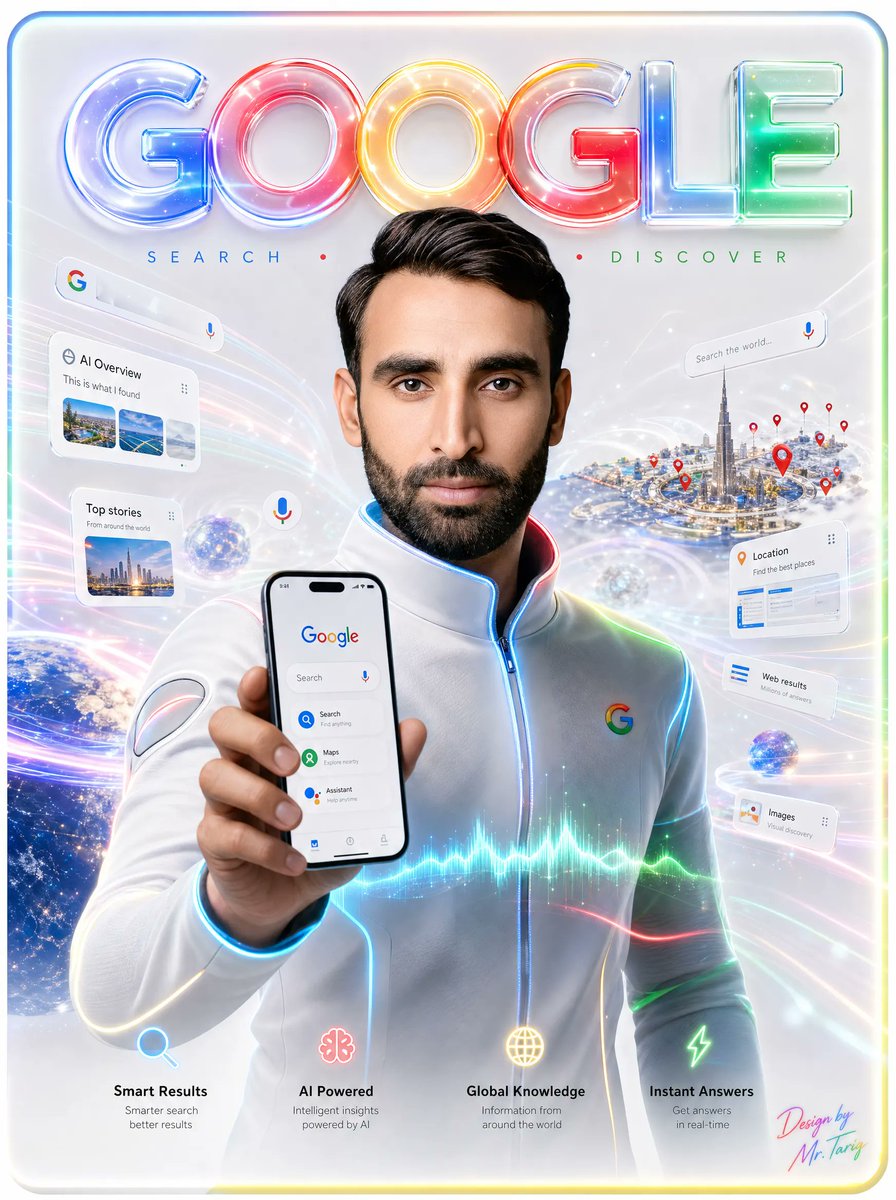
Futuristic Google Search Poster
Creates a glossy vertical tech advertisement featuring a central figure holding a Google phone interface amid holographic search cards, maps, AI icons, and neon data effects.
This is a gpt-image-2 prompt case for Graphic & Poster. Use the copy-ready prompt below to generate similar visuals, and review YouMind OpenLab awesome-gpt-image-2 attribution plus commercial-use rights before reuse.
This prompt is designed for multiple reference images. We will open Dovoo with the prompt and the available preview image; add the remaining references in Dovoo before generating.

Prompt
Copy-ready prompt
{
  "type": "futuristic Google search promotional poster",
  "format": "vertical glossy tech advertisement",
  "main_subject": {
    "description": "a centered young man from chest up, facing forward, wearing a sleek white futuristic zip-up jacket with subtle seams and glowing blue piping along the zipper, collar, shoulders, and sleeves",
    "face": "face area intentionally covered by a flat vertical blurred rectangular privacy block in warm beige-brown tones",
    "pose": "left arm extended toward the viewer, holding a smartphone upright in front of his chest",
    "jacket_logo": "small multicolor Google G logo on the right chest"
  },
  "headline": {
    "text": "{argument name=\"headline text\" default=\"GOOGLE\"}",
    "position": "top center",
    "style": "huge inflated translucent 3D glass letters, each letter glowing in Google colors: blue G, red O, yellow O, red G, blue L, green E, with glossy reflections, neon rims, sparkles, and soft internal highlights"
  },
  "tagline": {
    "position": "under headline",
    "text": "SEARCH • DISCOVER",
    "style": "widely spaced thin uppercase letters, blue SEARCH, red center dot, green DISCOVER"
  },
  "phone_screen": {
    "count": 1,
    "position": "foreground lower center-left in the subject's hand",
    "content": "Google home screen with the Google logo at top, a search bar with microphone icon, and three visible app-like options: Search, Maps, Assistant; clean white interface with small bottom navigation icons"
  },
  "floating_ui_cards": {
    "count": 7,
    "items": [
      {
        "label": "AI Overview",
        "position": "upper left",
        "details": "white rounded search card with Google icon, the heading AI Overview, a small menu dots icon, and three image thumbnails"
      },
      {
        "label": "Top stories",
        "position": "left middle",
        "details": "white rounded news card with a city thumbnail and short text"
      },
      {
        "label": "Search the world...",
        "position": "upper right",
        "details": "thin white search bar with a microphone icon"
      },
      {
        "label": "Location",
        "position": "right middle",
        "details": "white rounded card with orange location pin icon and blue list elements"
      },
      {
        "label": "Web results",
        "position": "right lower-middle",
        "details": "small white card with blue list lines"
      },
      {
        "label": "Images",
        "position": "right lower",
        "details": "small white card with a thumbnail icon and image search text"
      },
      {
        "label": "floating microphone bubble",
        "position": "center-left near the phone",
        "details": "small circular white button with a multicolor microphone icon"
      }
    ]
  },
  "background": {
    "setting": "bright white-silver futuristic digital space filled with sweeping rainbow light trails, translucent data waves, star particles, lens flares, holographic arcs, and a soft rounded rectangular border with faint rainbow glow",
    "left_element": "partial view of Earth from space at the lower left, blue oceans and city lights visible",
    "right_element": "miniature futuristic city island resembling Dubai with a very tall Burj Khalifa-like tower, surrounded by many red location pins",
    "additional_objects": "two small glowing digital globes hovering in the scene"
  },
  "bottom_feature_row": {
    "count": 4,
    "items": [
      {
        "title": "Smart Results",
        "icon": "blue magnifying glass",
        "subtitle": "Smarter search better results",
        "position": "bottom left"
      },
      {
        "title": "AI Powered",
        "icon": "pink AI brain or neural flower",
        "subtitle": "Intelligent insights powered by AI",
        "position": "bottom center-left"
      },
      {
        "title": "Global Knowledge",
        "icon": "yellow globe grid",
        "subtitle": "Information from around the world",
        "position": "bottom center-right"
      },
      {
        "title": "Instant Answers",
        "icon": "green lightning bolt",
        "subtitle": "Get answers in real-time",
        "position": "bottom right"
      }
    ]
  },
  "visual_style": "ultra-polished commercial poster, high-detail 3D rendering mixed with photorealistic portrait, luminous neon Google color palette, clean Apple-like glassmorphism UI cards, cinematic lighting, radiant highlights, soft bokeh, sharp foreground phone, premium tech launch aesthetic",
  "signature": {
    "text": "{argument name=\"signature text\" default=\"Design by Mr. Tariq\"}",
    "position": "bottom right",
    "style": "small colorful handwritten signature in pink, cyan, and yellow"
  },
  "customization": {
    "subject_gender": "{argument name=\"subject gender\" default=\"young man\"}",
    "outfit_color": "{argument name=\"outfit color\" default=\"white\"}",
    "brand_name": "{argument name=\"brand name\" default=\"Google\"}"
  }
}
Prompt variables
Editable argument placeholders found in the prompt, with their default values.
Reuse and source notes
Use this prompt safely after previewing the case.
- 1.Copy the prompt or open it directly in Dovoo with the generation button.
- 2.Adjust variables, aspect ratio, and reference images for your own use case.
- 3.Before publishing or paid usage, verify source rights, attribution requirements, and brand or likeness risks.
Can I use this prompt commercially?
Commercial-use status is unknown. Review the original source, license, brand constraints, and legal requirements before paid usage.
Where does this case come from?
This case is imported from YouMind OpenLab awesome-gpt-image-2; keep attribution visible and check the source URL before reuse.