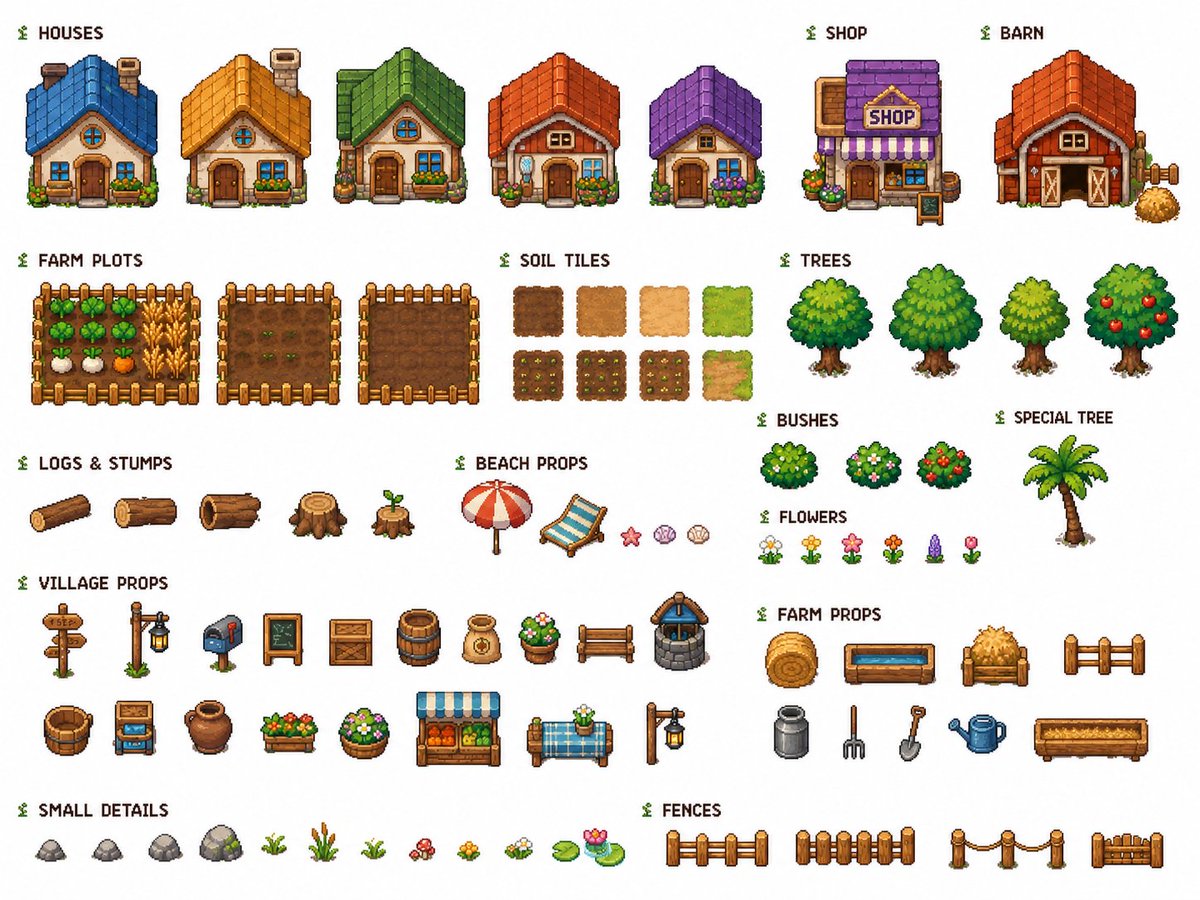
Cozy Farming Village Pixel Asset Sheet
Generates a neatly labeled pixel-art tileset sheet of houses, farm plots, terrain tiles, trees, props, and details for a cozy farming game.
This is a gpt-image-2 prompt case for 动漫游戏. Use the copy-ready prompt below to generate similar visuals, and review YouMind OpenLab awesome-gpt-image-2 attribution plus commercial-use rights before reuse.
Prompt
Copy-ready prompt
Objective: To create a clean, reusable 2D pixel-style game asset set for a cozy farm village, labeled and laid out on a pure white background. Use crisp 32-bit pixel art, orthographic/frontal RPG perspective, consistent proportions, soft outlines, warm, saturated colors, and no shadows outside the sprite images. Theme:{argument name="tileset theme" default="cozy farming village"} Canvas: Landscape layout, 4:3 aspect ratio, white background, neat row and column spacing. Add a small green sprout icon before each section label. Use a dark pixel font for English labeling. Layout and required sections: - HOUSES: 5 small cottages, all from the front, with different roof colors and details: 1 blue-roofed cottage, 1 golden-roofed cottage, 1 green-roofed cottage with a flower box, 1 orange-red-roofed cottage with flowers, and 1 purple-roofed cottage with flowers. - SHOP: 1 shop building with a purple roof, purple striped awning, a "SHOP" sign, flower pots, and a small sidewalk sign. - BARN: 1 red barn with an orange roof, large double doors, side hardware, and a pile of hay. - FARM PLOTS: 3 rectangular fenced farmlands: 1 planted field with vegetables, wheat, and root crops; 1 cultivated field with small sprouts; 1 empty cultivated soil field. - SOIL TILES: 8 square topographic tiles arranged in 2 rows: the top row contains 4 base tiles showing dark soil, medium mud, light sand, and grassland; the bottom row contains 4 planted or transitional tiles showing soil changes after planting and the transition from mud to grassland. - TREES: 4 leafy fruit/deciduous trees: 1 round dark green tree, 1 large bright green tree, 1 small yellowish-green tree, and 1 apple tree with red fruit. - BUSHES: 3 round shrubs: 1 common green shrub, 1 shrub with pale flowers, and 1 berry shrub with red berries. - SPECIAL TREE: 1 palm tree with a brown, crooked trunk and green leaves. - LOGS & STUMPS: 5 items: 1 long log, 1 cut log, 1 hollow log, 1 large stump, 1 small stump with sprouting buds. - BEACH PROPS: 5 items: 1 red and white beach umbrella, 1 blue striped lounge chair, 1 pink starfish, 1 pink seashell, 1 beige seashell. - FLOWERS: 6 small flower sprites: white daisy, yellow flower, pink flower, orange-red flower, purple lavender, and a pink tulip. - VILLAGE PROPS: 18 village items, arranged in two rows: wooden road sign, lamppost, mailbox, blackboard sign, wooden crate, barrel, sack, flower pot, wooden bench, stone well, bucket, produce cart, terracotta pot, wooden flower box, round flower pot, market stall, blue checkered table with flowers, and another lamppost. - FARM PROPS: 9 farm items: hay bales, blue water trough, hay cart, short wooden fence section, milk jug, hay pitchfork, shovel, blue watering can, and long wooden flower box. - SMALL DETAILS: 12 ground detail sprites: 4 rocks, 1 tiny sprout, 1 clump of tall reeds, 1 clump of grass, 1 clump of red mushrooms, 1 yellow flower patch, 1 white flower patch, 1 water lily leaf, and 1 leaf with pink water lilies. - FENCES: 4 fence sprites: Baluster Fence, Vertical Plank Fence, Rope Post Fence, Short Gate/Fence Segment. Visual Style:{argument name="visual style" default="cute high-quality pixel art game tileset"} Keep each asset independent, centered within its own space for easy cropping during game use. Use consistent outlines, a uniform top-left light source, and ensure sprite images do not overlap. Text labels should use pixel fonts and be named strictly according to the listed part names. Avoid adding extra decorative background elements, watermarks, mockup UIs, or perspective distortion.Prompt variables
Editable argument placeholders found in the prompt, with their default values.
More cases in this category
Prioritized by category, input mode compatibility, quality, and lower risk.






Reuse and source notes
Use this prompt safely after previewing the case.
- 1.Copy the prompt or open it directly in Dovoo with the generation button.
- 2.Adjust variables, aspect ratio, and reference images for your own use case.
- 3.Before publishing or paid usage, verify source rights, attribution requirements, and brand or likeness risks.
Can I use this prompt commercially?
Commercial-use status is unknown. Review the original source, license, brand constraints, and legal requirements before paid usage.
Where does this case come from?
This case is imported from YouMind OpenLab awesome-gpt-image-2; keep attribution visible and check the source URL before reuse.