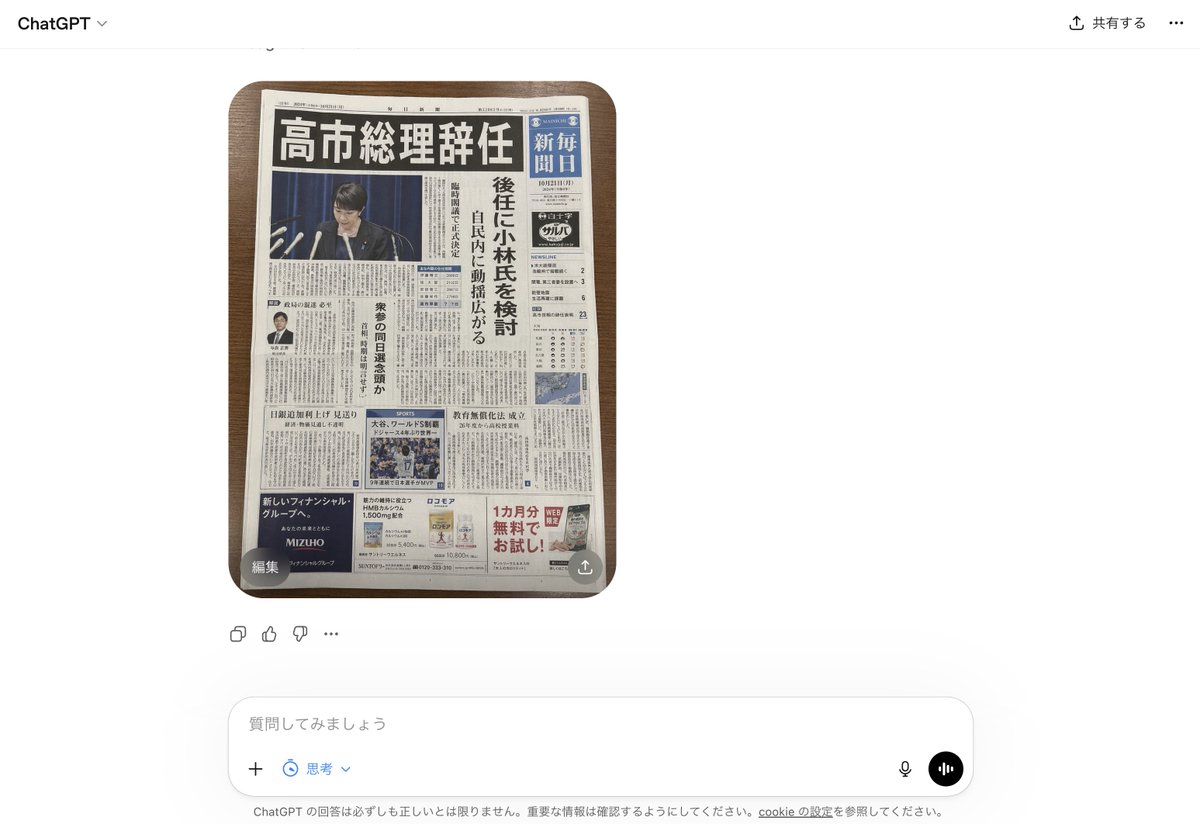
Fake Japanese Newspaper in ChatGPT UI
This generates a photorealistic screenshot of the ChatGPT interface displaying a fabricated but convincing Japanese newspaper front page, useful for mockups about AI-generated fake news.
This is a gpt-image-2 prompt case for 产品商业. Use the copy-ready prompt below to generate similar visuals, and review YouMind OpenLab awesome-gpt-image-2 attribution plus commercial-use rights before reuse.
Prompt
Copy-ready prompt
A realistic screenshot of the ChatGPT Japanese web version on a smartphone, against a clean white background. In the center of the chat interface is a generated image: a photo taken from directly above showing a Japanese newspaper neatly arranged on a dark wooden table, its rounded edges visible. The newspaper dominates the image, looking incredibly realistic, like a fictional yet convincing breaking news front page. The masthead area is compact and traditional, with a striking black bold Japanese headline at the top: "Premier Takaichi Resigns." Below is a large main image showing a politician on a press conference podium, with multiple microphones in front of him; his face is deliberately blurred or obscured against a dark blue backdrop. To the right is a vertical blue newspaper name bar with white Japanese text reminiscent of mainstream national daily newspapers. Next to the main image is a vertical column of Japanese subheadings, hinting at discussions about potential successors. The front page features four clearly visible advertising blocks at the bottom and lower sides, a small portrait of a man in a suit on the left side of the article, a sports news image block in the center below, and a weather or data box on the right. The entire page is filled with dense Japanese text. The newspaper should present a realistic and serious editorial style, with a realistic print quality, slight paper curl, subtle shadows, and believable Japanese typography. Visible ChatGPT UI elements should surround the images: "ChatGPT" in the upper left corner, a Japanese sharing control in the upper right corner, a small circular overlay button labeled "Edit" in the lower left corner of the image, a small share icon in the lower right corner of the image, reaction/action icons below the image, and an input bar at the bottom containing the Japanese placeholder text "质問してみましょう" (What are you asking?) as well as microphone and voice buttons. Overall style: photorealistic screenshots, modern web application interface, fake news newspaper front page, clear and easy-to-read layout, natural lighting and shadows, and minimal perspective distortion.
More cases in this category
Prioritized by category, input mode compatibility, quality, and lower risk.






Reuse and source notes
Use this prompt safely after previewing the case.
- 1.Copy the prompt or open it directly in Dovoo with the generation button.
- 2.Adjust variables, aspect ratio, and reference images for your own use case.
- 3.Before publishing or paid usage, verify source rights, attribution requirements, and brand or likeness risks.
Can I use this prompt commercially?
Commercial-use status is unknown. Review the original source, license, brand constraints, and legal requirements before paid usage.
Where does this case come from?
This case is imported from YouMind OpenLab awesome-gpt-image-2; keep attribution visible and check the source URL before reuse.