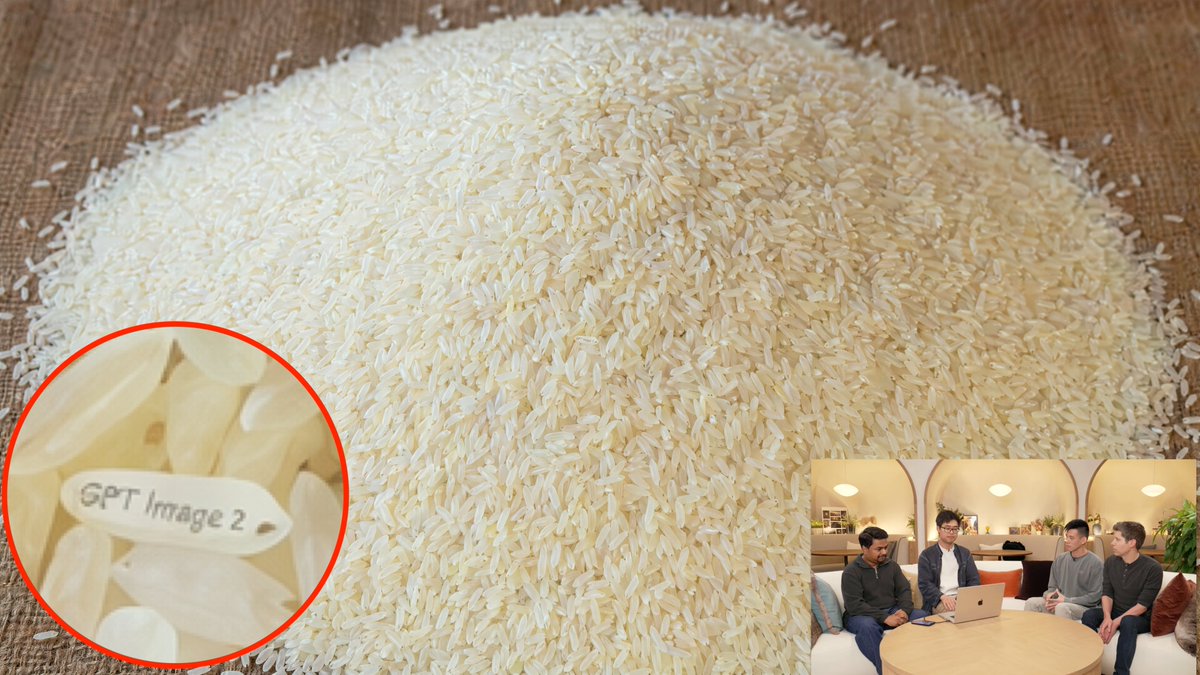
Hidden Engraved Rice Grain
This prompt generates a realistic close-up of a pile of rice with one engraved grain highlighted by a magnified callout, useful for easter-egg visuals or AI demo imagery.
This is a gpt-image-2 prompt case for Other Inspiration. Use the copy-ready prompt below to generate similar visuals, and review YouMind OpenLab awesome-gpt-image-2 attribution plus commercial-use rights before reuse.
Prompt
Copy-ready prompt
A photorealistic close-up of a tabletop scene showcases a massive pile of raw white long-grain rice spilled onto a warm brown wooden surface, almost filling the entire frame. The camera is positioned slightly high and tilted towards the rice pile, creating a broad dome in the center of the image, with thousands of grains clearly visible and softly illuminated by warm indoor light. Hidden within the rice pile is a small Easter egg: near the lower left corner, a special grain of rice is horizontally rotated, its surface neatly engraved with…{argument name="engraved text" default="GPT Image 2"} The text should be clearly legible. Add a large, circular marker with a bright red outline in the lower left corner to focus on the engraved grain of rice, ensuring the text is clearly visible. Additionally, add a picture-in-picture window in the lower right corner showcasing a casual indoor live stream or interview scene: four people sitting around a round wooden table with an open laptop on it, warm lighting, and slightly blurred faces; this window should be a secondary background thumbnail, much smaller than the main image. Prioritize realistic textures, convincing macro details, natural shadows, subtle ivory variations in the rice grain, and clear, believable engraving on the highlighted grain.Prompt variables
Editable argument placeholders found in the prompt, with their default values.
Reuse and source notes
Use this prompt safely after previewing the case.
- 1.Copy the prompt or open it directly in Dovoo with the generation button.
- 2.Adjust variables, aspect ratio, and reference images for your own use case.
- 3.Before publishing or paid usage, verify source rights, attribution requirements, and brand or likeness risks.
Can I use this prompt commercially?
Commercial-use status is unknown. Review the original source, license, brand constraints, and legal requirements before paid usage.
Where does this case come from?
This case is imported from YouMind OpenLab awesome-gpt-image-2; keep attribution visible and check the source URL before reuse.