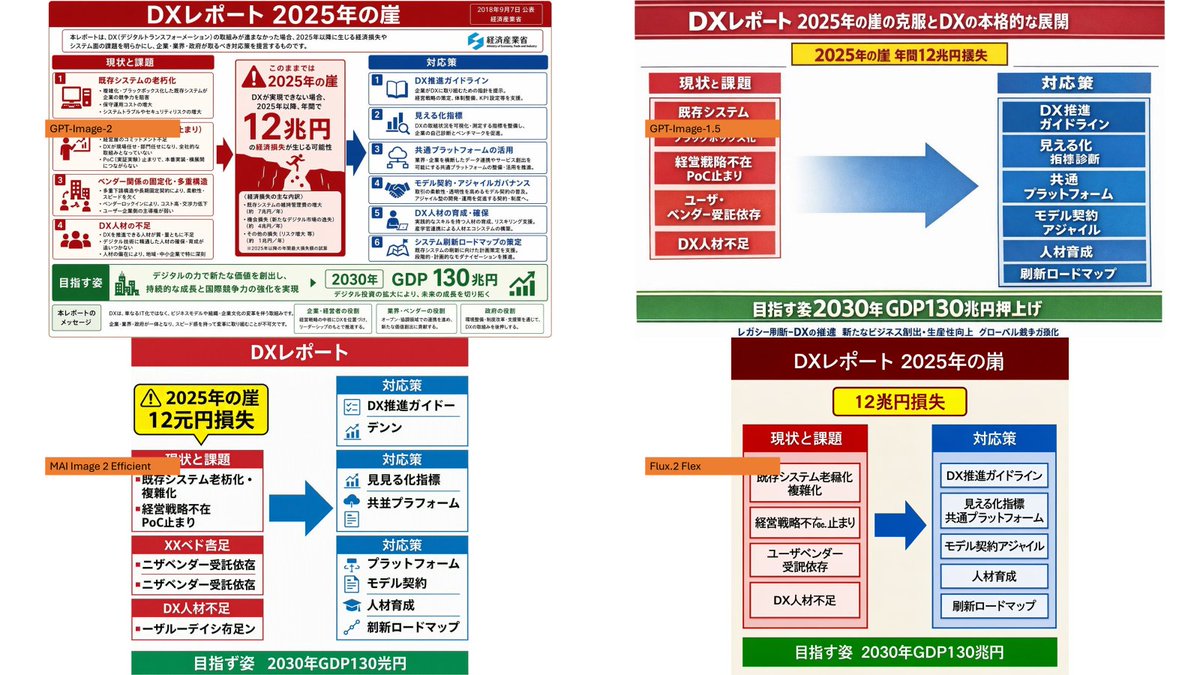
DX Infographic Model Comparison
Creates a four-panel comparison collage showing different model-style recreations of a Japanese DX Report infographic from a reference image.
This is a gpt-image-2 prompt case for Graphic & Poster. Use the copy-ready prompt below to generate similar visuals, and review YouMind OpenLab awesome-gpt-image-2 attribution plus commercial-use rights before reuse.

Prompt
Copy-ready prompt
Using the provided reference image as the source infographic, create a 16:9 white background contrast mosaic demonstrating how different image models reproduce the same Japanese DX Report infographic. Layout: Arrange four independent panels in a 2x2 mosaic format: top left, top right, bottom left, and bottom right. Sufficient white space should be maintained between panels. Panels: 1. Top Left: Display a scaled-down infographic that is largely faithful to the original image, retaining the dense Japanese text, the red/blue/green government report layout, the central warning of "2025 cliff/12 trillion yen loss," the issues on the left, the countermeasures on the right, and the 2030 GDP target at the bottom. Add an orange label in the center left area, with the content {argument name="top left model label" default="GPT-Image-2"} 2. Top Right: Create a simpler "pontificate" style version, including a red title bar, a yellow warning bar, a red stacked "Current Issue" box on the left, a large blue arrow in the center, a blue stacked "Countermeasures" box on the right, and a green target bar at the bottom. Add an orange label near the left issue box with the following content:{argument name="top right model label" default="GPT-Image-1.5"} 3. Bottom Left: Create a more distorted, simplified vertical version, including a red "DX Report" title, a yellow warning box, a red issue block on the left, a blue countermeasure box on the right, a large blue arrow, and a green bottom target bar. Add an orange label on the left with the following content:{argument name="bottom left model label" default="MAI Image 2 Efficient"} 4. Bottom Right: Create a simplified version with a beige background, including a dark red title, a yellow "12 Trillion Yen Loss" warning, a red question column, a blue countermeasure column, a large blue arrow, and a green bottom target bar. Add an orange label near the question column on the left, with the following content:{argument name="bottom right model label" default="Flux.2 Flex"} Concepts to be retained: Comparisons should clearly reference [specific sources].{argument name="report topic" default="DX Report 2025 Cliff"} Maintain a core logical flow from current issues to solutions and the 2030 GDP growth target. The top left panel should be the most accurate and dense; the other three panels should be visually simpler and less faithful to the text to highlight the model comparison. Constraints: Four panels and four orange model labels must be used. Maintain the style and readability of the Japanese infographic as much as possible, and do not add additional watermarks or irrelevant objects.Prompt variables
Editable argument placeholders found in the prompt, with their default values.
Variable
top left model label
Default
GPT-Image-2
Variable
top right model label
Default
GPT-Image-1.5
Variable
bottom left model label
Default
MAI Image 2 Efficient
Variable
bottom right model label
Default
Flux.2 Flex
Variable
report topic
Default
DX Report 2025 Cliff
Reuse and source notes
Use this prompt safely after previewing the case.
- 1.Copy the prompt or open it directly in Dovoo with the generation button.
- 2.Adjust variables, aspect ratio, and reference images for your own use case.
- 3.Before publishing or paid usage, verify source rights, attribution requirements, and brand or likeness risks.
Can I use this prompt commercially?
Commercial-use status is unknown. Review the original source, license, brand constraints, and legal requirements before paid usage.
Where does this case come from?
This case is imported from YouMind OpenLab awesome-gpt-image-2; keep attribution visible and check the source URL before reuse.