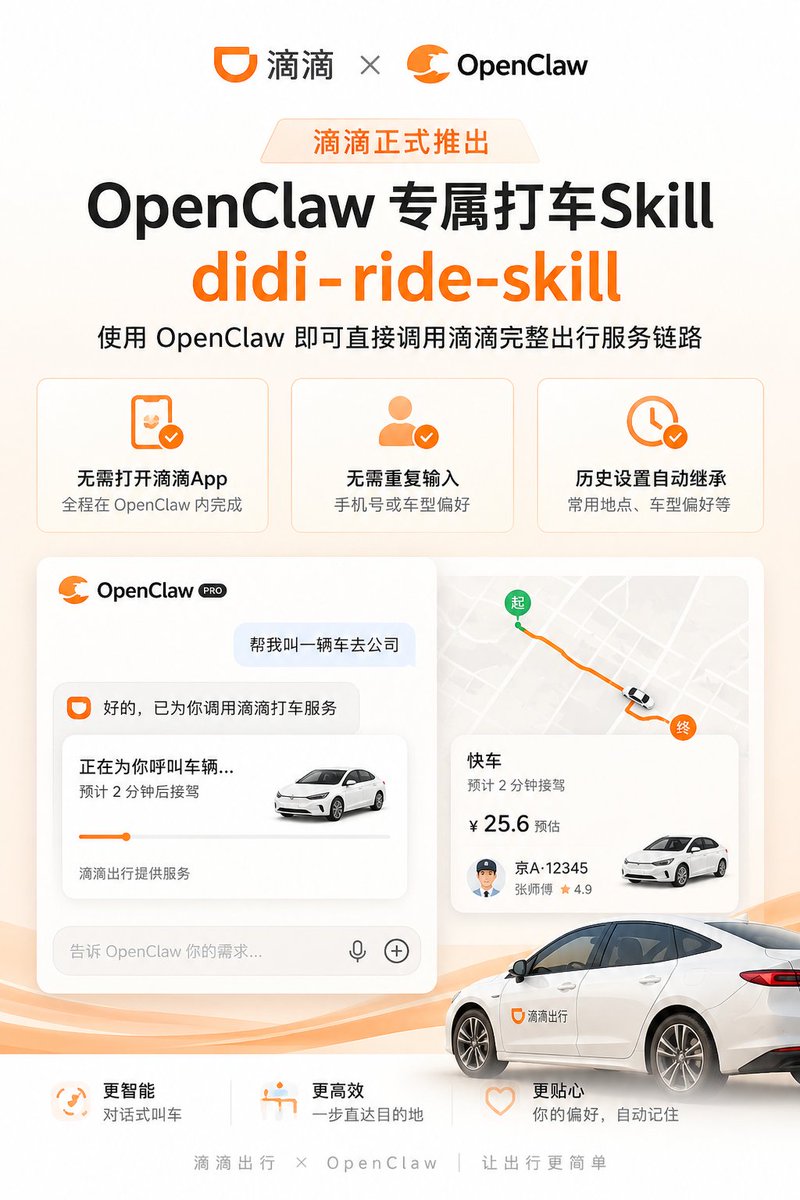
Didi OpenClaw Ride Skill Poster
Generates a polished Chinese product launch poster for an OpenClaw ride-hailing skill with feature cards, app UI mockups, map route, and branded car visual.
This is a gpt-image-2 prompt case for 平面海报. Use the copy-ready prompt below to generate similar visuals, and review YouMind OpenLab awesome-gpt-image-2 attribution plus commercial-use rights before reuse.
Prompt
Copy-ready prompt
{
  "type": "Concise Chinese tech product launch poster / Announcement of ride-hailing AI skills integration product",
  "format": "3:4 Vertical Social Media Poster",
  "style": "Modern SaaS marketing style, warm white and light orange gradient background, rounded cards, soft shadows, orange brand accents, bold black typography, exquisite vector UI presentation, high-resolution business design.",
  "color_palette": "White, cream, bright orange, black, light gray, subtle peach waves",
  "branding": {
    "top_logos": {
      "count": 2,
      "items": [
        "Didi logo and text on the left",
        "The OpenClaw orange claw logo and text label are on the right."
      ],
      "separator": "The two logos are separated by a gray multiplication sign."
    },
    "main_badge": "{argument name=\"launch badge text\" default=\"Didi officially launched\"}",
    "headline": "{argument name=\"headline text\" default=\"OpenClaw Exclusive Ride-Hailing Skill\"}",
    "english_skill_name": "{argument name=\"skill name\" default=\"didi-ride-skill\"}",
    "subheadline": "{argument name=\"subheadline text\" default=\"OpenClaw allows you to directly access Didi's complete ride-hailing service chain.\"}"
  },
  "layout": {
    "top_section": "The logo is centered at the top, below which is a small orange release badge, a large bold title, extra-large orange skill names, and a single-line subtitle.",
    "feature_cards": {
      "position": "Upper Mid-to-Upper",
      "count": 3,
      "cards": [
        {
          "icon": "Orange smartphone with a checkmark",
          "title": "No need to open the Didi app",
          "description": "The entire process was completed within OpenClaw."
        },
        {
          "icon": "Orange user silhouette with checkmark",
          "title": "No need to re-enter",
          "description": "Phone number or car model preference"
        },
        {
          "icon": "Orange clock with a checkmark",
          "title": "Historical settings are automatically inherited.",
          "description": "Frequently used locations, vehicle preferences, etc."
        }
      ]
    },
    "main_demo_area": {
      "position": "center",
      "count": 2,
      "panels": [
        {
          "panel": "Left-side chat UI cards",
          "header": "OpenClaw PRO",
          "elements": [
            "User message bubble: Call me a car to the company.",
            "Assistant replied: Okay, Didi Chuxing service has been activated for you.",
            "Trip status card title: Calling a vehicle for you...",
            "Status details: Expected pick-up in 2 minutes",
            "Small white sedan pictures",
            "Orange progress bar",
            "Footer text: Didi Chuxing provides services",
            "Input field placeholders: tell OpenClaw your needs...",
            "microphone icon",
            "plus icon"
          ]
        },
        {
          "panel": "Map and itinerary information card on the right",
          "elements": [
            "Light gray city map",
            "Orange Route",
            "Green starting point marker (labeled: Start)",
            "Orange finish line marker (label: End)",
            "Small vehicle markings on the route",
            "Trip Card Title: Express",
            "Arrival text: Expected pick-up time: 2 minutes",
            "Estimated price: ¥25.6",
            "司机车牌:京A·12345",
            "Driver's Name and Rating: Mr. Zhang ★ 4.9",
            "Small white sedan pictures"
          ]
        }
      ]
    },
    "vehicle_visual": "In the lower right foreground, there is a large, realistic white sedan, partially cropped, with an orange Didi logo and the words \"Didi Chuxing\" printed on the front door, parked on a flowing orange wave graphic.",
    "bottom_benefits": {
      "position": "The bottom above the footer",
      "count": 3,
      "items": [
        {
          "icon": "Orange circular smart icon",
          "title": "Smarter",
          "description": "Conversational ride-hailing"
        },
        {
          "icon": "Orange destination/seat icon",
          "title": "More efficient",
          "description": "Directly to the destination"
        },
        {
          "icon": "Orange heart-shaped outline",
          "title": "More considerate",
          "description": "Your preferences, automatically remembered"
        }
      ]
    },
    "footer": "Didi Chuxing × OpenClaw | Making travel simpler"
  },
  "typography": "Large, bold, black sans-serif Chinese font; bright orange, bold English skill names; smaller gray body text; uniform rounded corner UI font.",
  "composition": "Ample white space, symmetrical top hierarchy, neatly arranged cards, a central UI demo occupying most of the poster area, vehicles overlapping with the demo area to add depth, and subtle orange waves at the bottom.",
  "rendering_notes": "Ensure all Chinese text is clear and legible, using authentic app-style rounded rectangles and shadows to avoid clutter and maintain a high-end, official product release feel."
}
Prompt variables
Editable argument placeholders found in the prompt, with their default values.
More cases in this category
Prioritized by category, input mode compatibility, quality, and lower risk.






Reuse and source notes
Use this prompt safely after previewing the case.
- 1.Copy the prompt or open it directly in Dovoo with the generation button.
- 2.Adjust variables, aspect ratio, and reference images for your own use case.
- 3.Before publishing or paid usage, verify source rights, attribution requirements, and brand or likeness risks.
Can I use this prompt commercially?
Commercial-use status is unknown. Review the original source, license, brand constraints, and legal requirements before paid usage.
Where does this case come from?
This case is imported from YouMind OpenLab awesome-gpt-image-2; keep attribution visible and check the source URL before reuse.