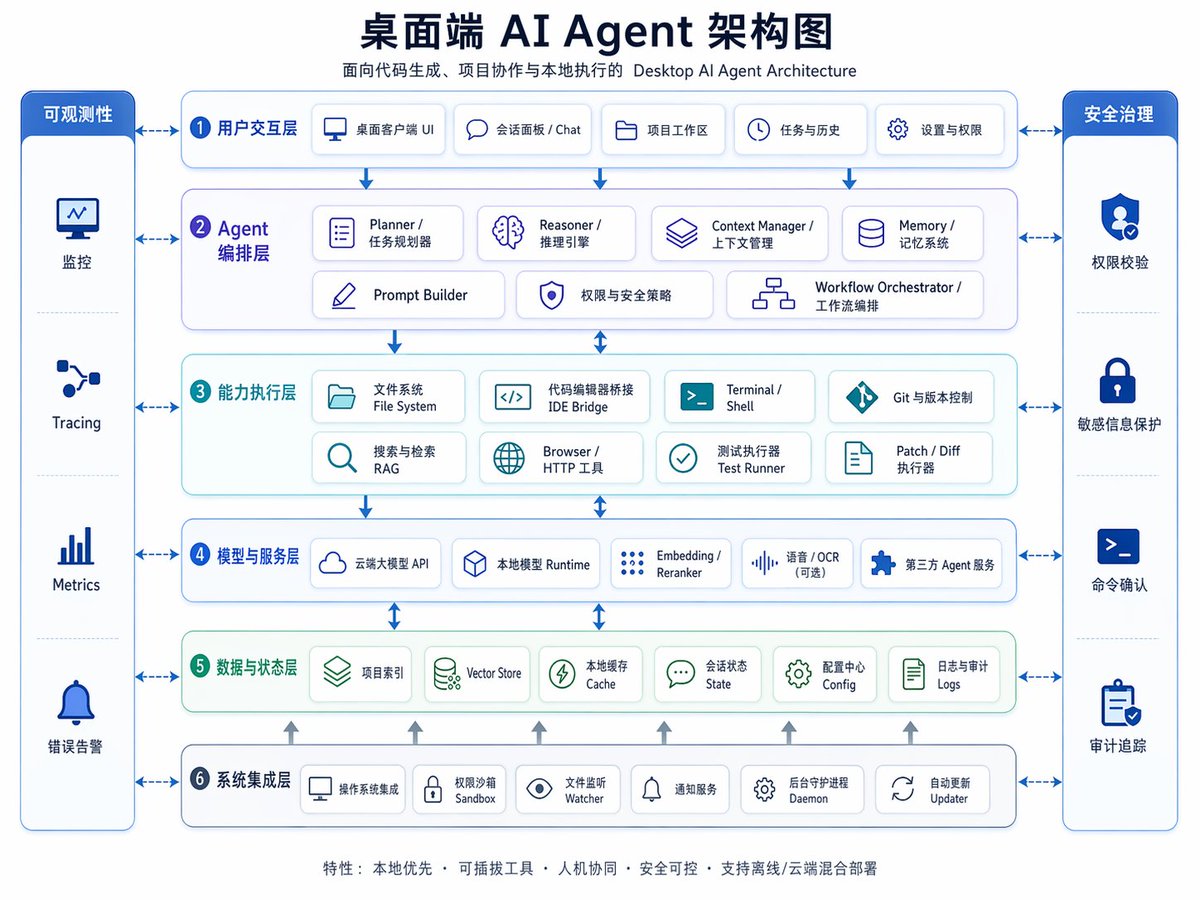
Desktop AI Agent Architecture Diagram
A polished bilingual Chinese-English enterprise architecture infographic for presentations, product planning, or explaining the layered design of a desktop AI agent system.
This is a gpt-image-2 prompt case for Graphic & Poster. Use the copy-ready prompt below to generate similar visuals, and review YouMind OpenLab awesome-gpt-image-2 attribution plus commercial-use rights before reuse.
Prompt
Copy-ready prompt
{
  "type": "Bilingual Enterprise Architecture Infographic",
  "topic": "{argument name=\"headline text\" default=\"Desktop AI Agent Architecture Diagram\"}",
  "subtitle": "Desktop AI Agent Architecture for Code Generation, Project Collaboration, and Local Execution",
  "style": {
    "look": "Concise and modern SaaS architecture diagram, enterprise presentation style, vector infographic.",
    "background": "light gray-white",
    "palette": {
      "primary": "Deep Navy Blue",
      "secondary": "medium blue",
      "accent": "Blue-green",
      "support": "Soft gray",
      "security": "Bright sapphire blue"
    },
    "typography": "Bold Chinese titles paired with small bilingual labels, clear sans-serif font, highly legible.",
    "icons": "The rounded white card contains a minimalist line icon with subtle shadows and a blue outline.",
    "geometry": "Symmetrical grid, rounded rectangles, thin connecting arrows, uniform module spacing"
  },
  "layout": {
    "orientation": "4:3 aspect ratio presentation slides",
    "header": {
      "title_centered": true,
      "title_size": "large",
      "subtitle_below": true
    },
    "sections": [
      {
        "title": "Observability",
        "position": "Leftmost vertical sidebar",
        "count": 4,
        "labels": [
          "monitor",
          "Tracing",
          "Metrics",
          "Error alert"
        ],
        "container": "A blue panel with rounded corners, containing four stacked cells and icons."
      },
      {
        "title": "Security Management",
        "position": "Rightmost vertical sidebar",
        "count": 4,
        "labels": [
          "Permission verification",
          "Sensitive information protection",
          "Command confirmation",
          "Audit trail"
        ],
        "container": "A blue panel with rounded corners, containing four stacked cells and icons."
      },
      {
        "title": "1 User Interaction Layer",
        "position": "Top horizontal layer",
        "count": 5,
        "labels": [
          "Desktop client UI",
          "Chat panel",
          "Project work area",
          "Mission and History",
          "Settings and Permissions"
        ],
        "container": "Wide, rounded white panel with blue border"
      },
      {
        "title": "2 Agent Orchestration Layer",
        "position": "Second horizontal layer",
        "count": 7,
        "labels": [
          "Planner / Task Planner",
          "Reasoner / Reasoning Engine",
          "Context Manager",
          "Memory / Memory System",
          "Prompt Builder",
          "Permissions and Security Policies",
          "Workflow Orchestrator"
        ],
        "container": "Wide, rounded white panel with a pale purple-blue tint"
      },
      {
        "title": "3 Capability Execution Layer",
        "position": "Third level",
        "count": 8,
        "labels": [
          "File System",
          "Code Editor Bridge IDE",
          "Terminal / Shell",
          "Git and version control",
          "Search and retrieve RAG",
          "Browser / HTTP Tools",
          "Test Runner",
          "Patch / Diff executor"
        ],
        "container": "Wide, rounded white panel with a light blue tint"
      },
      {
        "title": "4. Model and Service Layer",
        "position": "Fourth level",
        "count": 5,
        "labels": [
          "Cloud-based large model API",
          "Local Model Runtime",
          "Embedding / Reranker",
          "Voice/OCR (optional)",
          "Third-party agent services"
        ],
        "container": "Wide, rounded white panel with blue border"
      },
      {
        "title": "5. Data and State Layer",
        "position": "Fifth level",
        "count": 6,
        "labels": [
          "Project Index",
          "Vector Store",
          "Local Cache",
          "Session State",
          "Configuration Center",
          "Logs and Audit Logs"
        ],
        "container": "Wide, rounded white panel with a light green tint"
      },
      {
        "title": "6 System Integration Layer",
        "position": "Bottom horizontal layer",
        "count": 6,
        "labels": [
          "Operating system integration",
          "Permission Sandbox",
          "File Watcher",
          "Notification service",
          "background daemon process",
          "Automatic Updater"
        ],
        "container": "Wide, rounded white panel with blue border"
      }
    ],
    "centerpiece": "The middle layer is a stacked architecture with governance sidebars on both sides.",
    "connectors": "Dashed double-headed arrows connect each core layer to the sidebars; vertical blue arrows flow downwards between the core layers; small gray upward arrows rise from the bottom integration layer to the data layer.",
    "footer": {
      "count": 1,
      "text": "Features: Local-first; Pluggable tools; Human-machine collaboration; Secure and controllable; Supports hybrid offline/cloud deployment",
      "position": "Centered at the bottom"
    }
  },
  "rendering": {
    "flat_vector": true,
    "high_resolution": true,
    "sharp_lines": true,
    "balanced_whitespace": true,
    "professional_pitch_deck_quality": true
  }
}
Prompt variables
Editable argument placeholders found in the prompt, with their default values.
Reuse and source notes
Use this prompt safely after previewing the case.
- 1.Copy the prompt or open it directly in Dovoo with the generation button.
- 2.Adjust variables, aspect ratio, and reference images for your own use case.
- 3.Before publishing or paid usage, verify source rights, attribution requirements, and brand or likeness risks.
Can I use this prompt commercially?
Commercial-use status is unknown. Review the original source, license, brand constraints, and legal requirements before paid usage.
Where does this case come from?
This case is imported from YouMind OpenLab awesome-gpt-image-2; keep attribution visible and check the source URL before reuse.