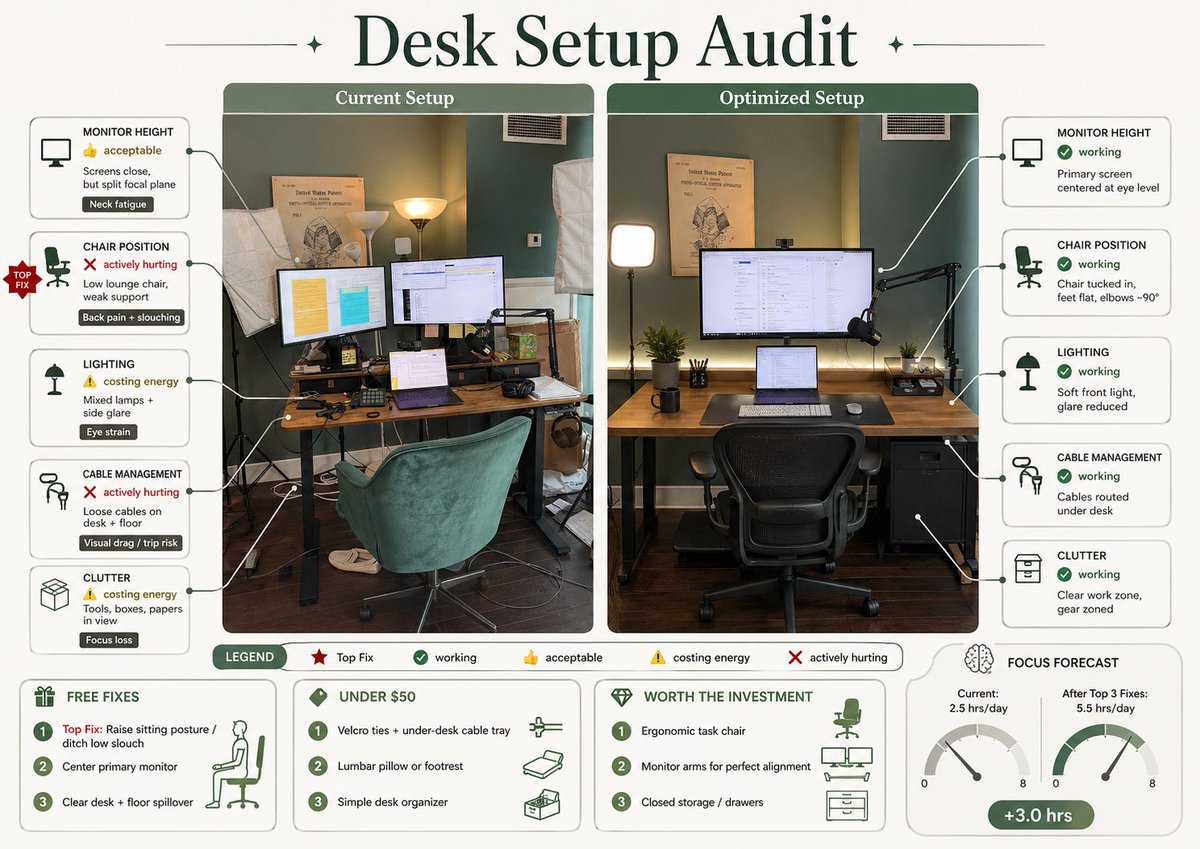
Desk Setup Audit Infographic
This prompt turns a desk photo into a polished side-by-side ergonomic audit infographic for workspace improvement and social sharing.
This is a gpt-image-2 prompt case for Graphic & Poster. Use the copy-ready prompt below to generate similar visuals, and review YouMind OpenLab awesome-gpt-image-2 attribution plus commercial-use rights before reuse.
Prompt
Copy-ready prompt
Using REFERENCE_0, transform the accompanying desktop photo and its text description into a concise, edit-style infographic poster. Create a left-right comparison chart with two labeled photo panels: the left side, "Current Arrangement," uses the original scene; the right side, "Optimized Arrangement," showcases an ideal, improved version of the same room and desktop from a matching angle. Add a prominent, large serif font title at the top with the following text:{argument name="headline text" default="Desktop layout audit"} Around the left panel, add five issue label cards connected by guide lines: 1) Monitor Height — 👍 Acceptable — “Screen distance is acceptable, but eye focus is scattered” — Label “Neck fatigue”; 2) Seating Position — ❌ Severe Impact — “Low recliner, insufficient support” — Label “Back pain + hunchback”; 3) Lighting — ⚠️ Energy-draining — “Mixed light sources + side glare” — Label “Eye strain”; 4) Cable Management — ❌ Severe Impact — “Cluttered cables on the desktop and floor” — Label “Visual distraction/tripping risk”; 5) Clutter — ⚠️ Energy-draining — “Tools, boxes, and papers piled up” — Label “Distracting attention”. Add a red “Priority Fix” badge to the seating position issue. Around the right panel, add five improved tabs: 1) Monitor Height — ✅ Good — “Main screen centered, eye level”; 2) Seat Position — ✅ Good — “Seated with feet flat, elbows approximately 90°”; 3) Lighting — ✅ Good — “Soft front lighting, reduced glare”; 4) Cable Management — ✅ Good — “Cables stored under the desk”; 5) Clutter — ✅ Good — “Workspace tidy, equipment clearly zoned”. The optimized panel visually demonstrates the improvements: the main monitor is centered, the laptop is below, an ergonomic office chair is provided, the desktop is tidier, cables are hidden under the desk, the lighting is soft and balanced, and a small drawer cabinet has been added to the right while maintaining the original room layout. Add a legend at the bottom containing five items: “Legend,” “Priority Fix,” “Good,” “Acceptable,” “Energy-Consuming,” and “Severe Impact.” Four boxed areas have been added at the bottom: 1) "Free Fixes" includes 3 items: "Primary Fixes: Adjust Posture/Say Goodbye to Slouching", "Center Main Monitor", "Clean Up Desktop and Floor Clutter"; 2) "Under $50" includes 3 items: "Velcro Cable Ties + Under-Desk Cable Management", "Lumbar Support or Footrest", "Minimalist Desktop Organizer"; 3) "Worth the Investment" includes 3 items: "Ergonomic Office Chair", "Monitor Stand for Perfect Alignment", "Closed Locker/Drawer"; 4) "Focus Prediction" displays two dashboards labeled "Current: 2.5 hours/day" and "After Completing the First 3 Fixes: 5.5 hours/day", with a green capsule label showing "+3.0 hours". It adopts a sophisticated magazine infographic aesthetic, using soft green and cream tones, paired with rounded borders, minimalist text, clear icons, thin connecting lines, and beautiful typography suitable for social media sharing.Prompt variables
Editable argument placeholders found in the prompt, with their default values.
Variable
headline text
Default
Desktop layout audit
Reuse and source notes
Use this prompt safely after previewing the case.
- 1.Copy the prompt or open it directly in Dovoo with the generation button.
- 2.Adjust variables, aspect ratio, and reference images for your own use case.
- 3.Before publishing or paid usage, verify source rights, attribution requirements, and brand or likeness risks.
Can I use this prompt commercially?
Commercial-use status is unknown. Review the original source, license, brand constraints, and legal requirements before paid usage.
Where does this case come from?
This case is imported from YouMind OpenLab awesome-gpt-image-2; keep attribution visible and check the source URL before reuse.