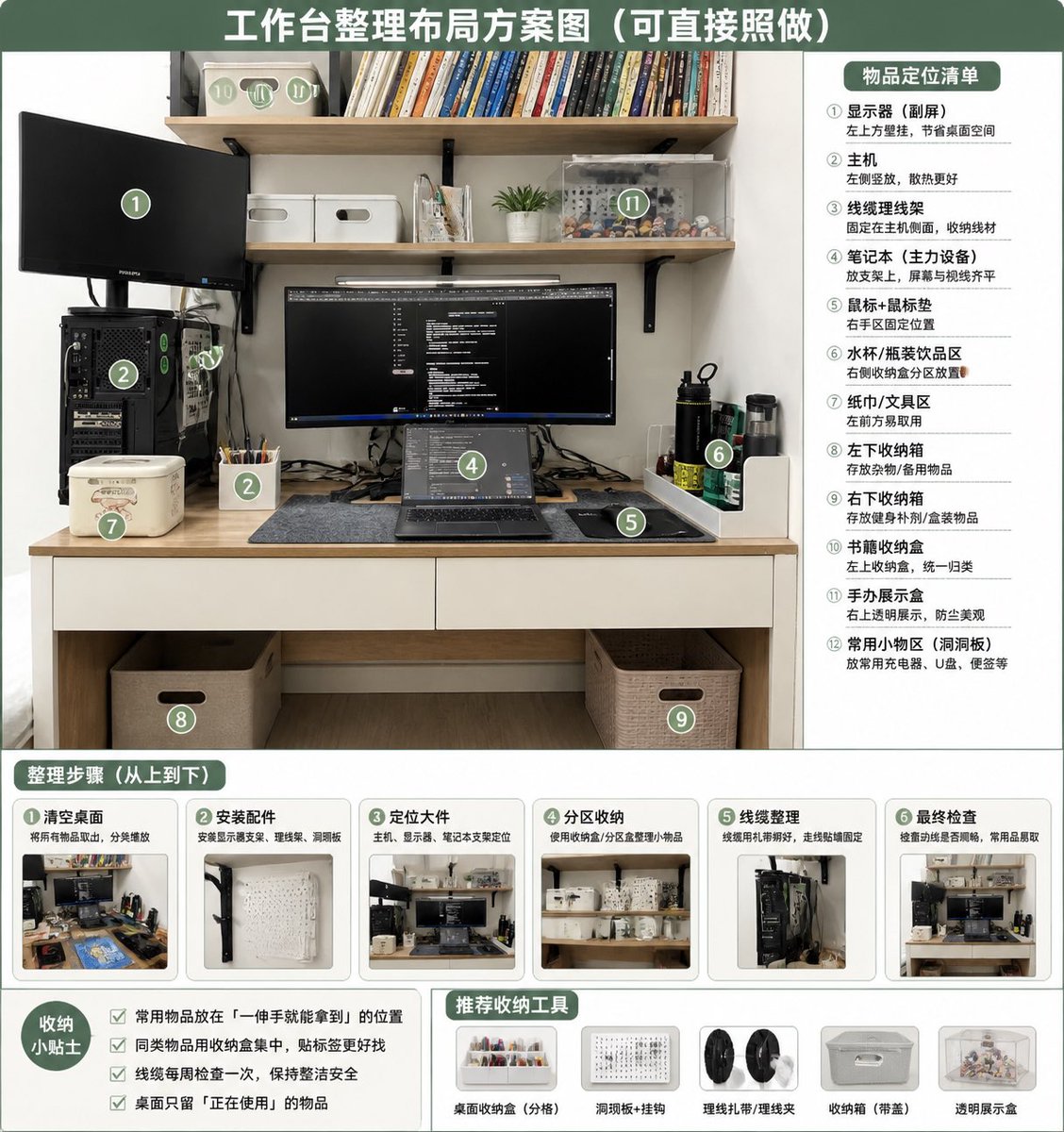
Desk Organization Layout Infographic
Transforms a cluttered desk photo into a tidy, numbered organization plan with zones, steps, tips, and recommended storage tools.
This is a gpt-image-2 prompt case for 平面海报. Use the copy-ready prompt below to generate similar visuals, and review YouMind OpenLab awesome-gpt-image-2 attribution plus commercial-use rights before reuse.
This prompt is designed for multiple reference images. We will open Dovoo with the prompt and the available preview image; add the remaining references in Dovoo before generating.

Prompt
Copy-ready prompt
Using REFERENCE_0 as the source photo, create a clean and realistic infographic of a "post-organized" desktop layout. Maintain the original desk, shelves, monitor/laptop settings, CPU location, and overall room view, but tidy up the workspace: organize cables, clean the desktop, place items in designated storage areas, and add matching storage boxes/baskets, pegboards/accessory areas, pen holders, book storage boxes, transparent display cases, and dedicated areas for water cups/tissues/small tools. Adopt a green and white color scheme, similar to an educational poster, with a large title at the top:{argument name="headline text" default="Workbench layout plan (can be directly copied)"} Overlay 12 green circular numbered markers onto the edited photo and add a title to the right panel.{argument name="right panel title" default="Item location list"} The layout is divided into 12 distinct areas: ① Monitor/Secondary Screen, ② Main Unit, ③ Cable Management, ④ Laptop Workspace, ⑤ Mouse Pad/Mouse Area, ⑥ Water Cup/Bottle Area, ⑦ Tissue/Tool Area, ⑧ Left Side Under-Table Storage Box, ⑨ Right Side Under-Table Storage Box, ⑩ Book Storage Box, ⑪ Figurine Display Area, ⑫ Frequently Used Small Items Area/Pegboard. A title is added at the bottom:{argument name="steps title" default="Organization steps (from top to bottom)"} The section contains 6 step-by-step cards, each with a small before-and-after thumbnail and a brief Chinese label: ① Clean the desktop, ② Install accessories, ③ Place large items, ④ Organize by section, ⑤ Cable management, ⑥ Final check. A title is added to the bottom left corner.{argument name="tips title" default="Storage Tips"} The prompt box contains four checkbox suggestions: Keep frequently used items within easy reach, group similar items together, check cables weekly, and only keep currently used items on your desktop. A title is added to the bottom center/right side:{argument name="tools title" default="Recommended storage tools"} The recommended section includes five product icons: desktop storage tray, pegboard with hooks, cable ties/cable clips, storage box with handle, and transparent display box. The overall design needs to be neat, practical, bright, and directly operable, like a home office organization guide generated based on the original photo.Prompt variables
Editable argument placeholders found in the prompt, with their default values.
More cases in this category
Prioritized by category, input mode compatibility, quality, and lower risk.






Reuse and source notes
Use this prompt safely after previewing the case.
- 1.Copy the prompt or open it directly in Dovoo with the generation button.
- 2.Adjust variables, aspect ratio, and reference images for your own use case.
- 3.Before publishing or paid usage, verify source rights, attribution requirements, and brand or likeness risks.
Can I use this prompt commercially?
Commercial-use status is unknown. Review the original source, license, brand constraints, and legal requirements before paid usage.
Where does this case come from?
This case is imported from YouMind OpenLab awesome-gpt-image-2; keep attribution visible and check the source URL before reuse.