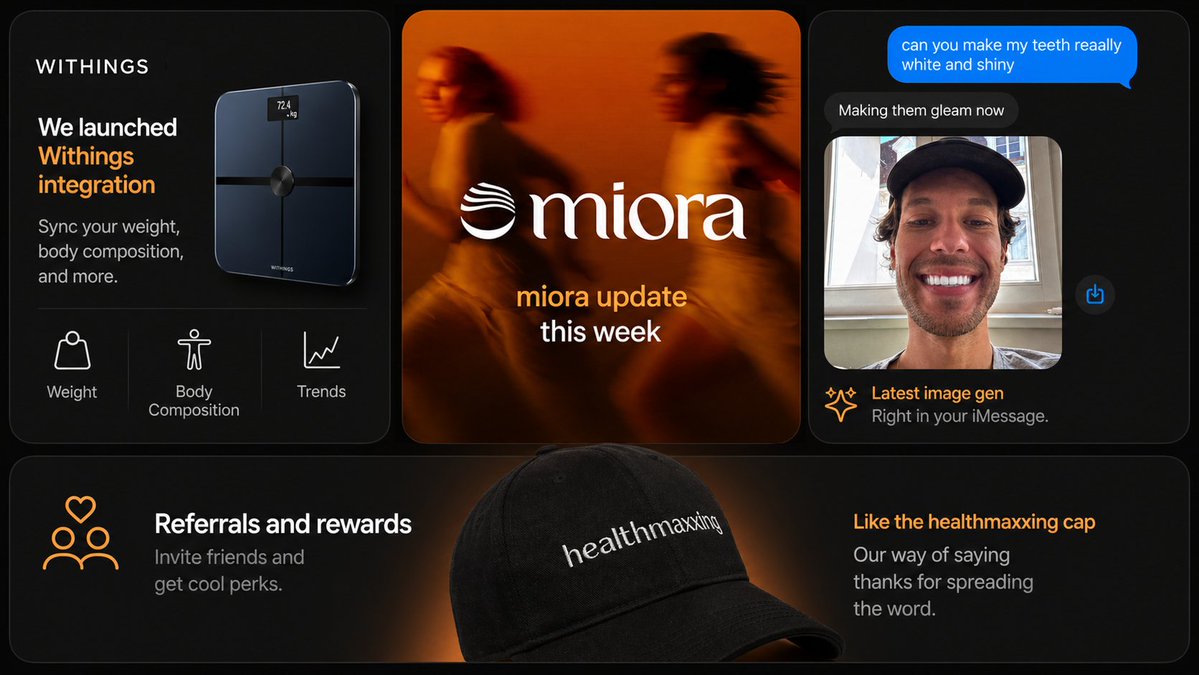
Dark Tech Marketing Slide Collage
A premium multi-panel startup marketing slide featuring app integration, brand update, AI image chat, and referral merchandise, suitable for social posts or presentation decks.
This is a gpt-image-2 prompt case for 平面海报. Use the copy-ready prompt below to generate similar visuals, and review YouMind OpenLab awesome-gpt-image-2 attribution plus commercial-use rights before reuse.
Prompt
Copy-ready prompt
{
  "type": "Modern Marketing Slides Collage",
  "style": "High-end dark mode tech brand presentation, fashionable product marketing, soft lighting effects, rounded corners, delicate gradients, high contrast, exquisite startup aesthetics.",
  "canvas": {
    "aspect_ratio": "16:9",
    "background": "Deep black with subtle warm orange accents."
  },
  "brand": {
    "name": "{argument name=\"brand name\" default=\"WITHINGS\"}",
    "accent_color": "warm orange"
  },
  "layout": {
    "structure": "The top row has 3 cards, and the bottom row has 1 full-width banner card.",
    "card_count": 4,
    "sections": [
      {
        "title": "Smart Scale Product Card",
        "position": "Top left",
        "count": 3,
        "labels": [
          "body weight",
          "Body composition",
          "trend"
        ],
        "content": "The card is dark, with the brand name in the top left corner and a large white and orange headline reading 'We launched Withings integration,' followed by a smaller subheading 'Sync your weight, body composition, and more.' A glossy black smart scale with a tiny glowing screen floats on the right, displaying '72.4 kg.' The bottom feature line, separated by a thin dividing line, displays three white line icons and labels."
      },
      {
        "title": "Brand Update Card",
        "position": "Centered at the top",
        "count": 1,
        "labels": [
          "miora Weekly Update"
        ],
        "content": "A blurred lifestyle image in warm orange tones shows two runners with a large white serif logo in the center.{argument name=\"center brand\" default=\"miora\"} The logo on the left features a wavy design, with stacked text below; the first line is orange, and the second line is white."
      },
      {
        "title": "Chat Image Generate Cards",
        "position": "Top right",
        "count": 4,
        "labels": [
          "Can you make my teeth very white and shiny?",
          "Beautifying your device",
          "Latest image generation",
          "Use it directly in iMessage."
        ],
        "content": "The phone's chat interface features a dark iMessage style, with a bright blue message bubble at the top, a dark gray reply bubble below, and a portrait photo preview showing a person wearing a black hat in front of a window, their face obscured by a rectangular blur. A small blue share icon floats on the right, and the footer includes a sparkle icon for the title, an orange main title, and a gray subtitle."
      },
      {
        "title": "Recommended banner cards",
        "position": "Bottom full width",
        "count": 2,
        "labels": [
          "Recommendations and Rewards",
          "I like this healthmaxxing hat"
        ],
        "content": "A wide, dark-colored banner features a black baseball cap in the center foreground, with a soft orange spotlight behind it. The cap is embroidered with white lettering.{argument name=\"cap text\" default=\"healthmaxxing\"} On the left are orange line icons of three people with a heart above them, along with a white title and gray subtitle, \"Invite friends and get cool perks.\" On the right is an orange title and gray subtitle, \"Our way of saying thanks for spreading the word.\""
      }
    ]
  },
  "design_details": {
    "corners": "Each card features large rounded corners.",
    "borders": "Delicate gray thin border",
    "spacing": "The cards are evenly spaced",
    "typography": "The UI and marketing copy use a clean sans-serif font, while the central logo uses an elegant serif font.",
    "lighting": "A deep black background, accented with orange-edged lighting and a halo.",
    "product_rendering": "High-end, realistic 3D product and accessory rendering",
    "ui_style": "Minimalist High-End App/Store Promotion Aesthetics"
  },
  "text_overrides": {
    "top_left_brand": "{argument name=\"headline brand\" default=\"WITHINGS\"}",
    "center_update_line": "{argument name=\"update text\" default=\"miora update this week\"}"
  }
}
Prompt variables
Editable argument placeholders found in the prompt, with their default values.
More cases in this category
Prioritized by category, input mode compatibility, quality, and lower risk.






Reuse and source notes
Use this prompt safely after previewing the case.
- 1.Copy the prompt or open it directly in Dovoo with the generation button.
- 2.Adjust variables, aspect ratio, and reference images for your own use case.
- 3.Before publishing or paid usage, verify source rights, attribution requirements, and brand or likeness risks.
Can I use this prompt commercially?
Commercial-use status is unknown. Review the original source, license, brand constraints, and legal requirements before paid usage.
Where does this case come from?
This case is imported from YouMind OpenLab awesome-gpt-image-2; keep attribution visible and check the source URL before reuse.