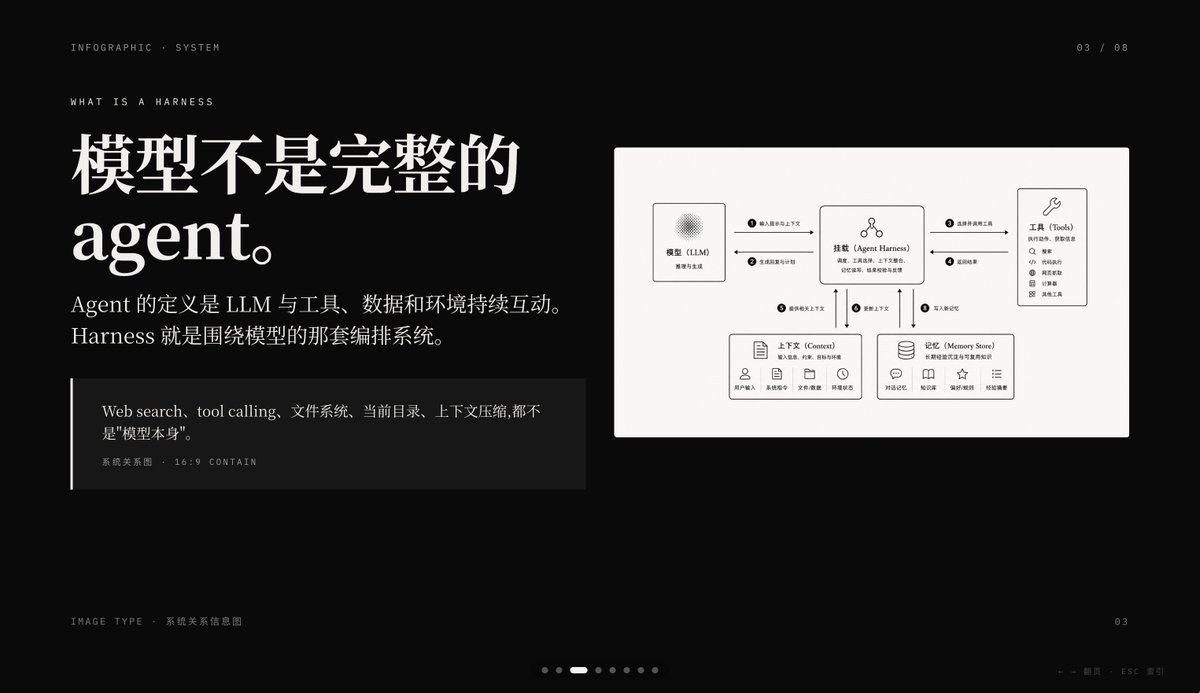
Dark AI Harness Infographic Slide
A premium black-background presentation slide that explains an AI agent harness with large Chinese editorial typography and a clean system relationship diagram, ideal for PPT covers or concept explanation pages.
This is a gpt-image-2 prompt case for 平面海报. Use the copy-ready prompt below to generate similar visuals, and review YouMind OpenLab awesome-gpt-image-2 attribution plus commercial-use rights before reuse.
Prompt
Copy-ready prompt
{
  "type": "Dark Editing Style Infographics Slides",
  "style": "A premium Keynote presentation page with a minimalist Swiss-style layout, high contrast, elegant serif headings paired with small uppercase sans-serif metadata, ample white space, a cinematic black background with subtle graininess, refined white typography, and monochrome charts and cards.",
  "aspect_ratio": "16:9",
  "background": {
    "color": "Dark black"
  },
  "layout": {
    "sections": [
      {
        "title": "Top Metadata",
        "position": "Top edge",
        "count": 3,
        "labels": [
          "Infographic System",
          "03 / 08",
          "What is Harness?"
        ]
      },
      {
        "title": "Main text block",
        "position": "Left side",
        "count": 3,
        "labels": [
          "The model is not a complete agent.",
          "An Agent is defined as an LLM that continuously interacts with tools, data, and the environment. Harness is the orchestration system surrounding the model.",
          "Web search, tool calling, file system, current directory, and context compression are not \"the model itself\"."
        ]
      },
      {
        "title": "Chart Cards",
        "position": "right side",
        "count": 5,
        "labels": [
          "Model (LLM)",
          "Agent Harness",
          "Tools",
          "Context",
          "Memory Store"
        ]
      },
      {
        "title": "footer",
        "position": "bottom edge",
        "count": 4,
        "labels": [
          "Image Type & System Relationship Infographic",
          "03",
          "← → Turn page ESC Close",
          "7 pagination points, the 3rd one is highlighted."
        ]
      }
    ],
    "centerpiece": "On the right is a large gray-white rectangular card containing a clear system relationship diagram."
  },
  "typography": {
    "headline_font": "High-contrast serif font, extra large, bold",
    "body_font": "Modern serif font for Chinese body text",
    "meta_font": "Thin uppercase sans-serif font with wide letter spacing"
  },
  "diagram": {
    "card_color": "Warm light gray",
    "border": "None or extremely fine",
    "line_style": "Thin black connecting arrow",
    "icon_style": "Simple outline icons",
    "nodes": [
      {
        "name": "Model (LLM)",
        "position": "Top left of the card",
        "details": "Small squares with a background featuring subtle radial textures; the subtitle hints at reasoning and generation."
      },
      {
        "name": "Agent Harness",
        "position": "The top center of the card",
        "details": "The central layout box features a small person icon above the title and a brief descriptive text below."
      },
      {
        "name": "Tools",
        "position": "Upper right corner of the card",
        "details": "A tall box with a wrench icon contains a vertical list of 8 tool items."
      },
      {
        "name": "Context",
        "position": "The bottom left of the card",
        "details": "A wide box with a document icon, containing a description line and five small labeled icons at the bottom."
      },
      {
        "name": "Memory Store",
        "position": "The bottom right corner of the card",
        "details": "A wide box with a database icon, containing a description row and five small labeled icons at the bottom."
      }
    ],
    "connections": {
      "count": 8,
      "description": "The numbered circular markers on the connecting arrows show the orchestration flow between the five nodes, including bidirectional links from the central Harness to tools, contexts, and memories, and a single link from the model to the Harness."
    }
  },
  "color_palette": {
    "count": 4,
    "colors": [
      "black background",
      "White title text",
      "Soft gray body text",
      "Warm light gray chart panel"
    ]
  },
  "customization": {
    "headline": "{argument name=\"headline text\" default=\"The model is not a complete agent.\"}",
    "page_index": "{argument name=\"page number\" default=\"03 / 08\"}",
    "section_kicker": "{argument name=\"section label\" default=\"What is Harness?\"}",
    "diagram_topic": "{argument name=\"diagram topic\" default=\"System Relationship Infographic\"}",
    "quote": "{argument name=\"quote\" default=\"Web search, tool calling, file system, current directory, and context compression are not "the model itself".\"}"
  }
}
Prompt variables
Editable argument placeholders found in the prompt, with their default values.
More cases in this category
Prioritized by category, input mode compatibility, quality, and lower risk.






Reuse and source notes
Use this prompt safely after previewing the case.
- 1.Copy the prompt or open it directly in Dovoo with the generation button.
- 2.Adjust variables, aspect ratio, and reference images for your own use case.
- 3.Before publishing or paid usage, verify source rights, attribution requirements, and brand or likeness risks.
Can I use this prompt commercially?
Commercial-use status is unknown. Review the original source, license, brand constraints, and legal requirements before paid usage.
Where does this case come from?
This case is imported from YouMind OpenLab awesome-gpt-image-2; keep attribution visible and check the source URL before reuse.