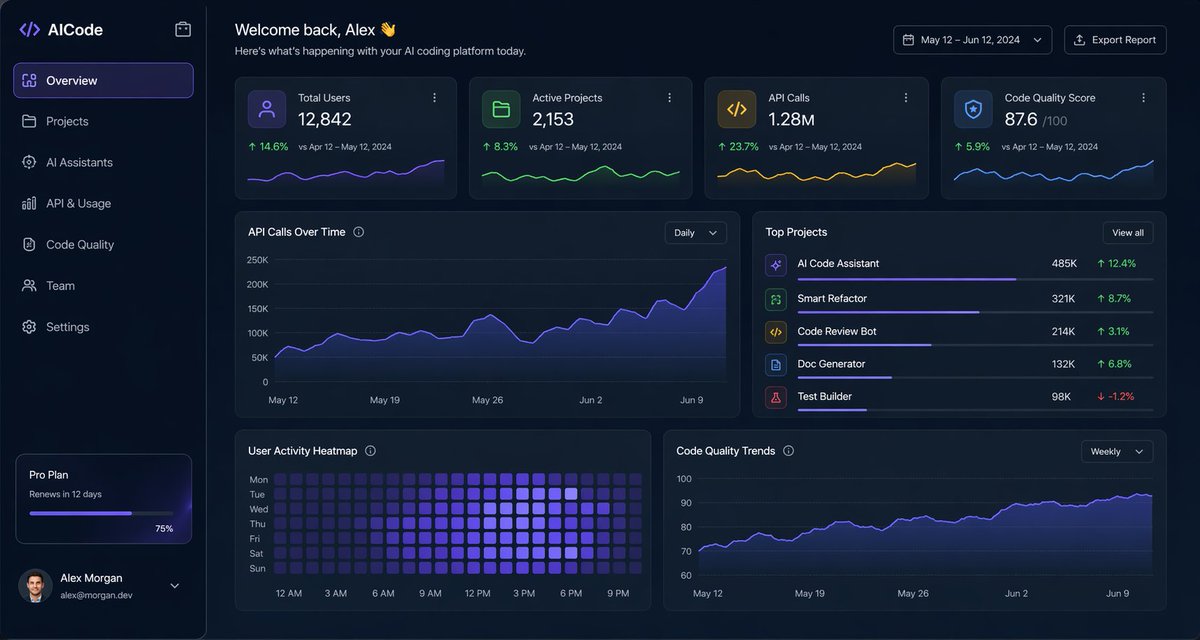
Dark AI Coding Dashboard UI
A polished dark-mode analytics dashboard for an AI coding platform, suitable for SaaS product design mockups, admin panels, and data-rich web UI presentations.
This is a gpt-image-2 prompt case for Other Inspiration. Use the copy-ready prompt below to generate similar visuals, and review YouMind OpenLab awesome-gpt-image-2 attribution plus commercial-use rights before reuse.
Prompt
Copy-ready prompt
{
  "type": "Dark SaaS Analytics Dashboard UI",
  "product": {
    "brand": "{argument name=\"brand name\" default=\"AICode\"}",
    "theme": "The interface features a deep navy blue frosted glass texture with subtle gradients, soft lighting, rounded cards, and thin borders, embodying modern developer tool aesthetics."
  },
  "canvas": {
    "aspect_ratio": "16:9",
    "background": "Deep midnight blue, with subtle vignetting and soft radial lighting effects."
  },
  "layout": {
    "structure": "Left sidebar plus main content area",
    "sections": [
      {
        "title": "Sidebar",
        "position": "Left side",
        "count": 8,
        "labels": [
          "AICode",
          "Overview",
          "project",
          "AI Assistants",
          "API and Usage",
          "Code quality",
          "team",
          "set up"
        ],
        "details": "The logo is displayed at the top, and \"Overview\" is highlighted in purple when selected. The subscription card at the bottom shows the Pro Plan, which expires in 12 days. A horizontal progress bar shows 75%. The user profile at the bottom includes an avatar.{argument name=\"user name\" default=\"Alex Morgan\"} and email address [email protected]"
      },
      {
        "title": "Header",
        "position": "Top Main Area",
        "count": 4,
        "labels": [
          "Welcome back, Alex 👋",
          "This is today's update from your AI programming platform.",
          "May 12, 2024 – June 12, 2024",
          "Export Report"
        ],
        "details": "The left side features a large greeting, while the right side displays a date range selector and an export button."
      },
      {
        "title": "Indicator Card",
        "position": "First line below the header",
        "count": 4,
        "labels": [
          "Total number of users",
          "Active projects",
          "API call volume",
          "Code quality rating"
        ],
        "values": [
          "12,842",
          "2,153",
          "1.28M",
          "876"
        ],
        "details": "Each card includes a small icon, a large main value, and text comparing the period from April 12th to May 12th, 2024, showing positive growth percentages of 14.6%, 8.3%, 23.7%, and 5.9%, respectively. A mini line chart is displayed at the bottom; the colors are purple, green, amber, and blue."
      },
      {
        "title": "Main analysis panel",
        "position": "Middle and bottom rows",
        "count": 4,
        "labels": [
          "API call trends",
          "Popular Projects",
          "User activity heatmap",
          "Code quality trends"
        ],
        "details": "The \"API Call Trends\" chart is a wide area graph with a \"Daily\" dropdown menu; the purple line shows an upward trend, ending near 250K. \"Popular Items\" is a ranking list of 5 items, with progress bars and percentage changes. The \"User Activity Heatmap\" is a 7-row weekly heatmap with hourly labels from 12 PM to 9 PM. The \"Code Quality Trends\" chart is a line graph with a \"Weekly\" dropdown menu; the purple curve rises smoothly, from approximately 70 to just over 90."
      },
      {
        "title": "Popular Projects List",
        "position": "Middle right panel",
        "count": 5,
        "labels": [
          "AI Code Assistant",
          "Smart Refactor",
          "Code Review Bot",
          "Doc Generator",
          "Test Builder"
        ],
        "values": [
          "485K",
          "321K",
          "214K",
          "132K",
          "98K"
        ],
        "details": "The first four items showed positive growth in green, at 12.4%, 8.7%, 3.1%, and 6.8% respectively, while Test Builder showed negative growth in red, at -1.2%; each row had a colored square icon and a thin horizontal progress bar."
      }
    ]
  },
  "style": {
    "visual_language": "High-end financial technology and AI product design prototype",
    "rendering": "A clear, high-fidelity UI prototype, subtle shadows, neon edge lighting effects, exquisite charts, and a clean sans-serif font.",
    "primary_accent": "{argument name=\"accent color\" default=\"Electric Violet\"}",
    "secondary_accents": [
      "Emerald Green",
      "Amber Yellow",
      "Cyan"
    ],
    "density": "Information-rich and spatially balanced, with a well-balanced grid and high readability."
  }
}
Prompt variables
Editable argument placeholders found in the prompt, with their default values.
Variable
brand name
Default
AICode
Variable
user name
Default
Alex Morgan
Variable
accent color
Default
Electric Violet
Reuse and source notes
Use this prompt safely after previewing the case.
- 1.Copy the prompt or open it directly in Dovoo with the generation button.
- 2.Adjust variables, aspect ratio, and reference images for your own use case.
- 3.Before publishing or paid usage, verify source rights, attribution requirements, and brand or likeness risks.
Can I use this prompt commercially?
Commercial-use status is unknown. Review the original source, license, brand constraints, and legal requirements before paid usage.
Where does this case come from?
This case is imported from YouMind OpenLab awesome-gpt-image-2; keep attribution visible and check the source URL before reuse.