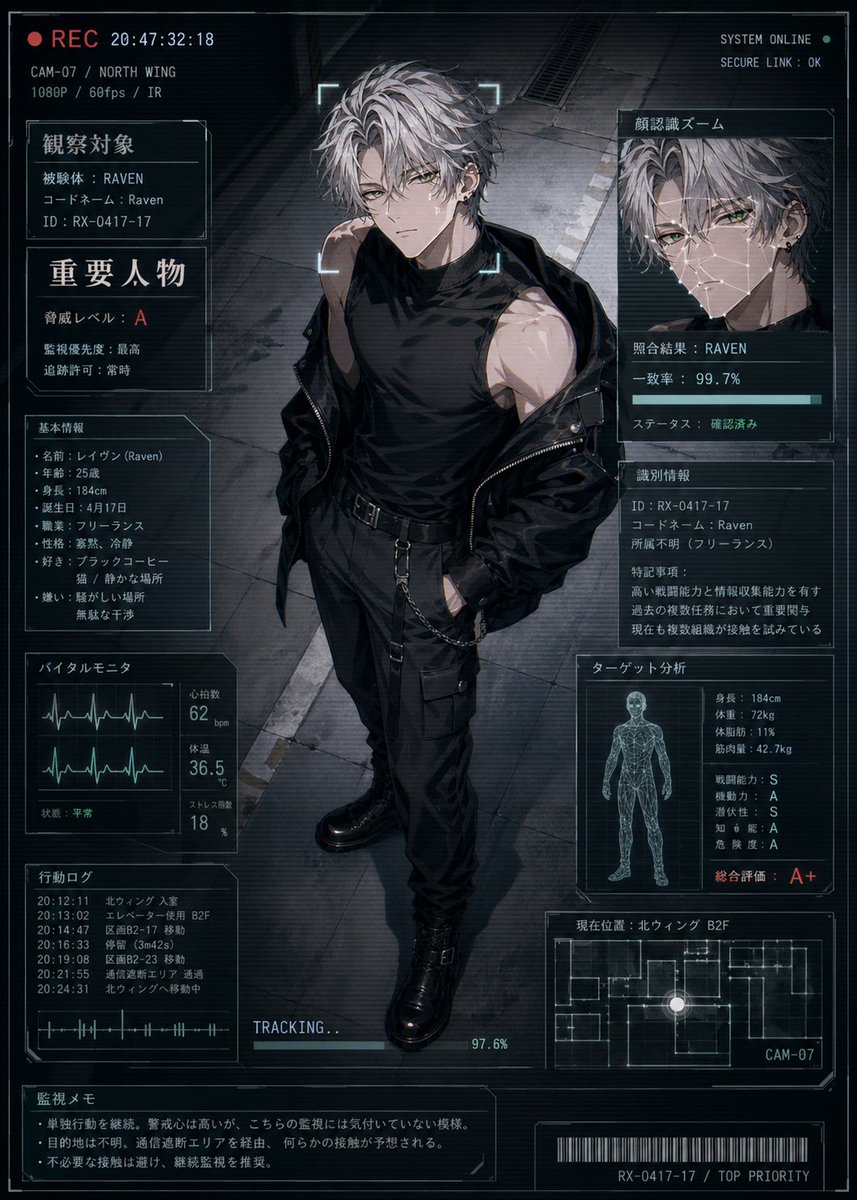
Cyberpunk Character Status Screen
A futuristic anime surveillance dossier showing a full-body operative with dense Japanese HUD panels, ideal for character status cards, sci-fi profiles, and covert-agent introductions.
This is a gpt-image-2 prompt case for 动漫游戏. Use the copy-ready prompt below to generate similar visuals, and review YouMind OpenLab awesome-gpt-image-2 attribution plus commercial-use rights before reuse.
Prompt
Copy-ready prompt
A futuristic surveillance screen with a cinematic, anime-style aesthetic displays a full-body image of a young man standing in the center of a dark industrial corridor. The slightly elevated angle suggests he's being captured by a surveillance camera. Tall, lean, and muscular, with messy, short, silver-gray hair and pale skin, he exudes a cold and dangerous aura. He wears a black sleeveless turtleneck, black tactical trousers with straps and side pockets, a black belt with chain details, heavy black tactical boots, and a black jacket that has slipped off his shoulders. His expression is serious and inscrutable, surrounded by glowing scanning frames, as if locked onto a target in real time. The overall effect is a high-tech HUD overlay, using blue-gray and black tones, accented with subtle cyan interface lines, screen noise, and scan lines, creating a cyberpunk thriller atmosphere. The layout around the character includes 10 different UI panels: a top-left recording bar with a red REC indicator, timestamp, camera code, location, and video specifications; a top-left identification panel labeled "Observation Target," containing key data such as the codename Raven and ID; a center-left warning panel labeled "Important Person," displaying risk level A and other threat notes; a bottom-left basic information panel labeled "Basic Information," listing name, age, height, date of birth, occupation, personality, likes, and dislikes; a bottom-left vital signs monitoring panel labeled "Vessel Monitor," containing two waveform graphs and digital readings of heart rate, body temperature, and stress; a bottom-left action log panel labeled "Action Log," containing 6 timestamped records; and a large top-right facial recognition panel labeled "Facial Recognition Mode," displaying a magnified cropped image of the person and RAVEN. The system displays the matching results, a 99.7% accuracy progress bar, and a verified status; a right-center identification details panel labeled "Identification Information," including ID, code, unknown affiliation, and a short note; a bottom-right target analysis panel labeled "Target Analysis," containing a wireframe human model and various statistical data, including height, weight, body fat, muscle mass, combat strength, mobility, intelligence, danger level, and a large overall rating of A+; a bottom-right current location panel labeled "Current Location," including a small floor plan, a glowing location point, and the camera tag CAM-07. A tracking progress bar displaying "TRACKING..." with a progress of 97.6% is added to the bottom center; a monitoring memo box labeled "Monitoring Memo" is added to the bottom left corner, containing three brief key points; and a barcode with the code RX-0417-17 / TOP PRIORITY is added to the bottom. The upper right corner contains small system text such as SYSTEM ONLINE and SECURE LINK : OK. The entire interface uses Japanese text, clear thin-lined sci-fi borders, layered transparent screens, and realistic character lighting, presenting exquisite GPT-Image-2 anime illustration quality, as if it were a character codenamed {argument name="character name" default="Raven"} A classified character status display interface created by secret agents.Prompt variables
Editable argument placeholders found in the prompt, with their default values.
More cases in this category
Prioritized by category, input mode compatibility, quality, and lower risk.






Reuse and source notes
Use this prompt safely after previewing the case.
- 1.Copy the prompt or open it directly in Dovoo with the generation button.
- 2.Adjust variables, aspect ratio, and reference images for your own use case.
- 3.Before publishing or paid usage, verify source rights, attribution requirements, and brand or likeness risks.
Can I use this prompt commercially?
Commercial-use status is unknown. Review the original source, license, brand constraints, and legal requirements before paid usage.
Where does this case come from?
This case is imported from YouMind OpenLab awesome-gpt-image-2; keep attribution visible and check the source URL before reuse.