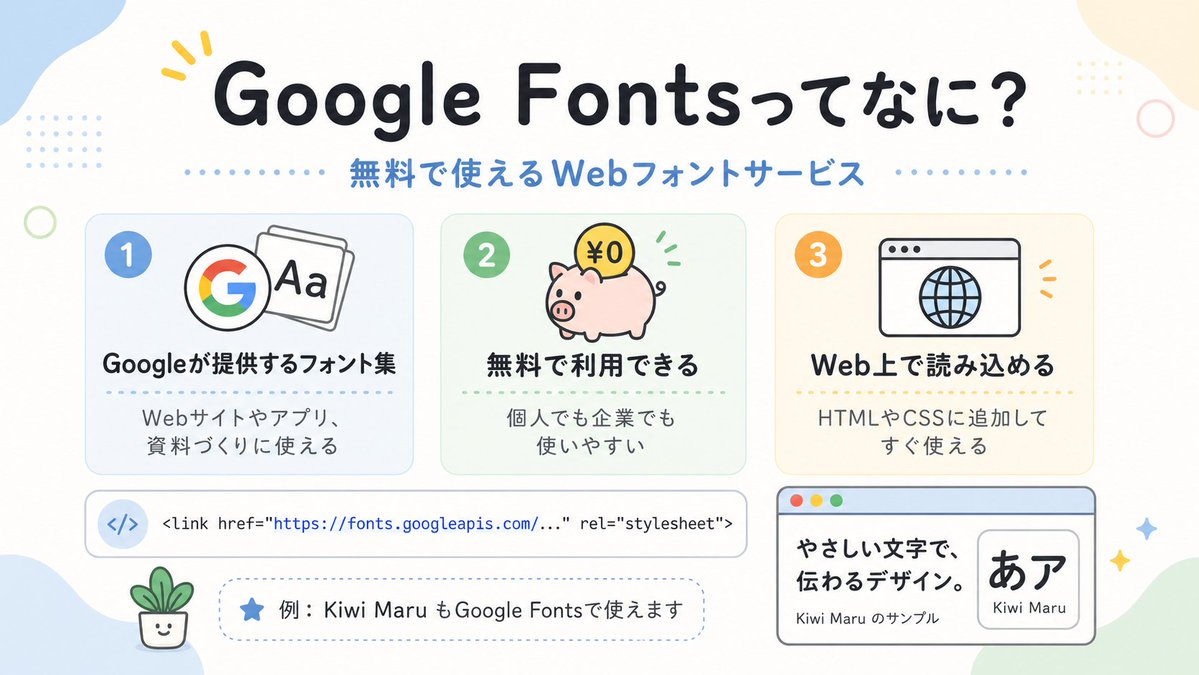
Cute Google Fonts Japanese Infographic
A pastel Japanese explainer infographic introducing Google Fonts, ideal for social posts, slides, or beginner-friendly web design education visuals.
This is a gpt-image-2 prompt case for 平面海报. Use the copy-ready prompt below to generate similar visuals, and review YouMind OpenLab awesome-gpt-image-2 attribution plus commercial-use rights before reuse.
Prompt
Copy-ready prompt
This is a simple and cute Japanese infographic, featuring a soft off-white background, rounded pastel abstract corner blocks, and small decorative dots and rings, reminiscent of a user-friendly web design poster. A large, bold, rounded Japanese title is placed at the top center.{argument name="headline text" default="Google Fontsってなに?"} The color is dark navy blue, with a small yellow emphasis mark near the first word. Directly below it, a medium-sized blue subheading is added.{argument name="subheadline text" default="Free web font service"} The card is divided by dotted lines on both sides. In the middle section, three rounded rectangular function cards are arranged horizontally with even spacing. Card 1 is light blue with a blue number badge "1" in the upper left corner. The icon shows a colorful Google Google logo. Next to it is a page with the words "Aa" in bold Japanese title "Googleが提供するフォント集" (Google provides collection of information). Below it is smaller text "Web site ya app リ、资料づくりに使える" (Web site provides information). Card 2 is light mint green with a green number badge "2". The icon is a pink piggy bank with a coin marked "¥0" and a small green animated mark. The bold title is "无料で利用できる" (Free to use). Below it is text "个人でも企业でも使いやすい" (You can use it personally or as a business). Card 3 is a light warm cream color with an orange number badge "3". The icon is a simple browser window with a globe, and the bold title reads "Web上で読み込める" (Read on the Web), with the text below reading "HTMLやCSSに附加してすぐ使える" (Use HTML and CSS as an addendum). Below the three cards is a wide, horizontal white code bar with rounded corners and subtle outlines; the left side contains a...</> A light blue circular icon with a line of code in monospaced font displayed on the right: "<link href=\"https://fonts.googleapis.com/...\" rel=\"stylesheet\"> The URL is highlighted in blue. Below it, a dashed, rounded pill-shaped annotation box is added, containing a blue star icon and Japanese text.{argument name="example text" default="For example, Kiwi Maru is also available on Google Fonts."} In the bottom left corner, place a tiny smiling bonsai illustration. In the bottom right corner, add a larger browser-style sample panel with a light blue title bar and three traffic light-style dots in the top left corner; inside, on the left side, displays the bold Japanese sample text “やさしい文字で、伝わるデザイン.” and the smaller text “Kiwi Maru のサンプル”, while on the right side is a rounded white embedded card displaying the large black Japanese character “あア”, with the font name labeled below.{argument name="font sample name" default="Kiwi Maru"} Four small glitter/star decorations are scattered in the lower right corner. The design features a flat vector illustration style, clean outlines, a soft pastel color palette, centered composition, ample spacing, a rounded sans-serif font, and a cheerful, beginner-friendly STEM aesthetic.Prompt variables
Editable argument placeholders found in the prompt, with their default values.
More cases in this category
Prioritized by category, input mode compatibility, quality, and lower risk.






Reuse and source notes
Use this prompt safely after previewing the case.
- 1.Copy the prompt or open it directly in Dovoo with the generation button.
- 2.Adjust variables, aspect ratio, and reference images for your own use case.
- 3.Before publishing or paid usage, verify source rights, attribution requirements, and brand or likeness risks.
Can I use this prompt commercially?
Commercial-use status is unknown. Review the original source, license, brand constraints, and legal requirements before paid usage.
Where does this case come from?
This case is imported from YouMind OpenLab awesome-gpt-image-2; keep attribution visible and check the source URL before reuse.