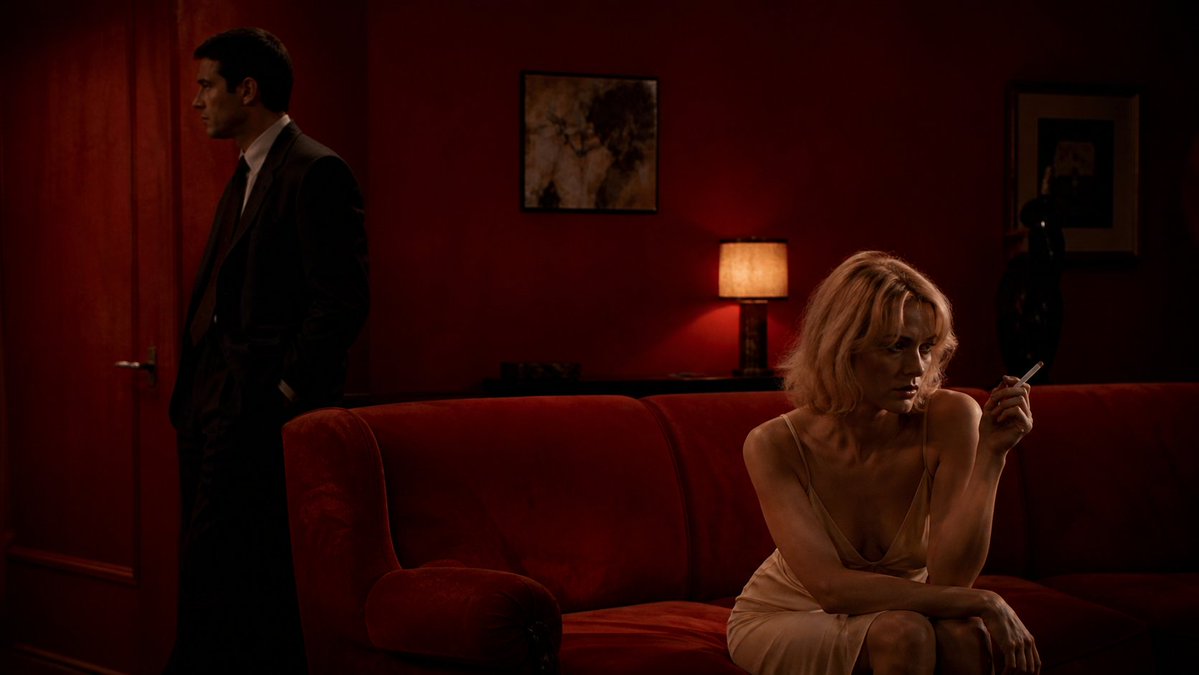
Crimson Noir Lounge Scene
A cinematic prompt for generating a tense, low-lit neo-noir lounge scene with two anonymized figures in a red velvet interior.
This is a gpt-image-2 prompt case for Interior & Architecture. Use the copy-ready prompt below to generate similar visuals, and review YouMind OpenLab awesome-gpt-image-2 attribution plus commercial-use rights before reuse.
Prompt
Copy-ready prompt
Create a cinematic neo-noir film still in a dark, intimate lounge with deep crimson walls and a plush red velvet sofa dominating the foreground. On the right, show {argument name="female subject" default="a blonde woman in a pale champagne silk slip dress"} seated on the sofa, leaning forward with one arm across her lap and holding a lit cigarette delicately in her raised hand; her face is intentionally obscured by a flat dark-brown rectangular privacy block. On the left, near a closed wooden door, place {argument name="male subject" default="a man in a dark suit and tie"} standing in profile with hands in his pockets, mostly in shadow, his face also obscured by a dark privacy block. The room should feel tense and secretive, with warm low-key lighting from a small table lamp behind the sofa casting amber light onto the red wall. Include two framed artworks on the wall, a dark statue or decorative object in the back right, heavy shadows, rich red and brown tones, soft film grain, shallow depth of field, and a widescreen 16:9 composition. Make it look like a moody 1970s psychological thriller scene, elegant but unsettling, with realistic photography, dramatic contrast, and no visible text.Prompt variables
Editable argument placeholders found in the prompt, with their default values.
Variable
female subject
Default
a blonde woman in a pale champagne silk slip dress
Variable
male subject
Default
a man in a dark suit and tie
Reuse and source notes
Use this prompt safely after previewing the case.
- 1.Copy the prompt or open it directly in Dovoo with the generation button.
- 2.Adjust variables, aspect ratio, and reference images for your own use case.
- 3.Before publishing or paid usage, verify source rights, attribution requirements, and brand or likeness risks.
Can I use this prompt commercially?
Commercial-use status is unknown. Review the original source, license, brand constraints, and legal requirements before paid usage.
Where does this case come from?
This case is imported from YouMind OpenLab awesome-gpt-image-2; keep attribution visible and check the source URL before reuse.