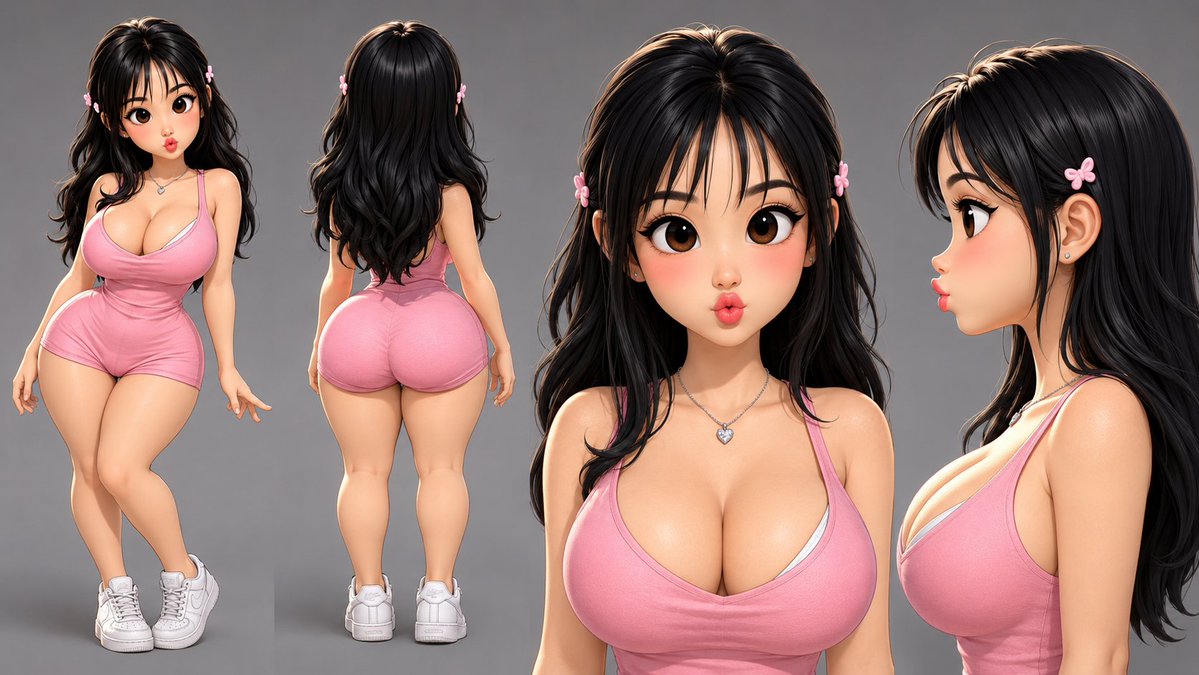
Consistent Character Reference Sheet
Generates a professional four-view character reference sheet maintaining identity, clothing, and proportions across all angles.
This is a gpt-image-2 prompt case for Portrait & Character. Use the copy-ready prompt below to generate similar visuals, and review YouMind OpenLab awesome-gpt-image-2 attribution plus commercial-use rights before reuse.

Prompt
Copy-ready prompt
Generate a reference image of the same character based on the attached reference image—ensuring that the character's identity, face, hairstyle, body type, age, skin tone, and clothing are completely consistent with the reference image in all four views. Display the four views against a neutral gray background: [View 1 - Full Body, Front] A three-quarter view of the character's full body from head to toe. [View 2 - Full Body, Back] A full body view of the same character from behind. Completely visible from head to toe. [View 3 - Front Close-up] A close-up of the head and shoulders from the front. Clearly shows skin texture, accessories, and clothing details. The chest and shoulder clothing are visible at the bottom of the image. [View 4 - Side Close-up] A close-up of the head and shoulders from the left side at a 90-degree angle. The neck and upper shoulder are visible. Lighting and Rendering: Clean studio lighting—a soft main light from the upper left and a soft fill light from the right. Ensure consistency in character identity, proportions, and clothing details across all four views. No text, no watermarks, no additional characters, and no background environment. Style as follows:{argument name="style" default="rubber hose animation style"} .Prompt variables
Editable argument placeholders found in the prompt, with their default values.
Variable
style
Default
rubber hose animation style
Reuse and source notes
Use this prompt safely after previewing the case.
- 1.Copy the prompt or open it directly in Dovoo with the generation button.
- 2.Adjust variables, aspect ratio, and reference images for your own use case.
- 3.Before publishing or paid usage, verify source rights, attribution requirements, and brand or likeness risks.
Can I use this prompt commercially?
Commercial-use status is unknown. Review the original source, license, brand constraints, and legal requirements before paid usage.
Where does this case come from?
This case is imported from YouMind OpenLab awesome-gpt-image-2; keep attribution visible and check the source URL before reuse.