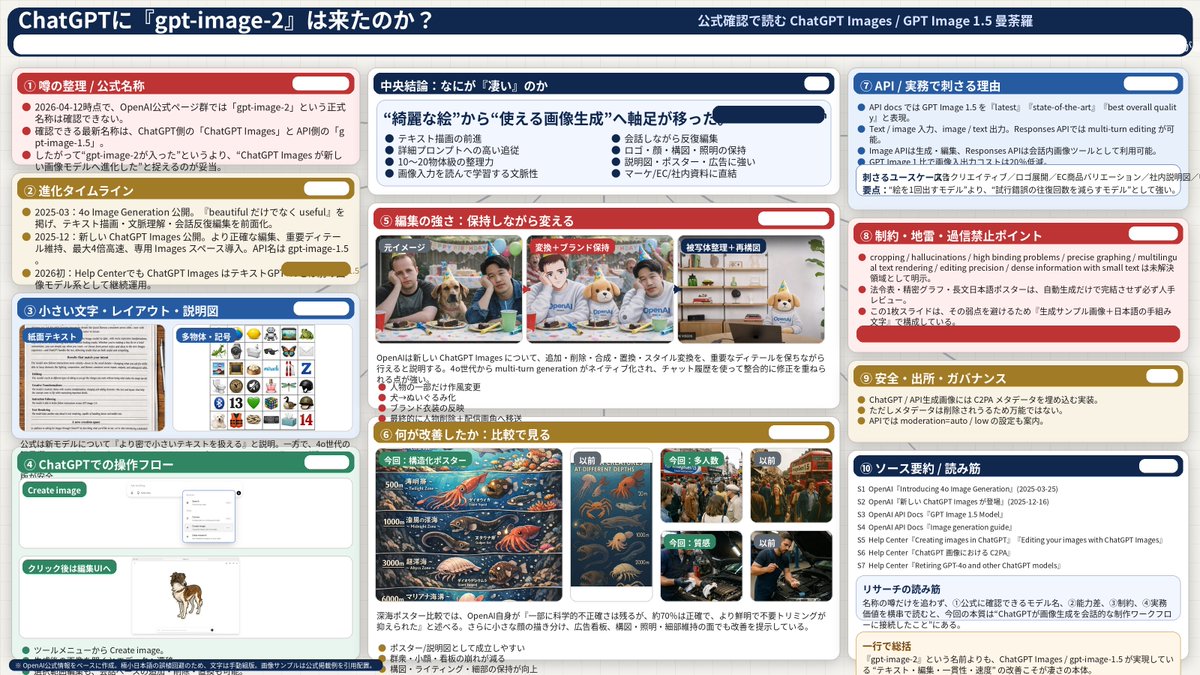
Complex AI Model Analysis Infographic
Generates a highly detailed, 3-column presentation slide analyzing AI model features with 10 distinct sections and embedded comparison images.
This is a gpt-image-2 prompt case for 平面海报. Use the copy-ready prompt below to generate similar visuals, and review YouMind OpenLab awesome-gpt-image-2 attribution plus commercial-use rights before reuse.

Prompt
Copy-ready prompt
{
  "type": "Infographic Dashboard",
  "style": "Enterprise presentation slides, dense information layout, flat design",
  "header": {
    "left_title": "{argument name=\"main title\" default=\"Has ChatGPT finally received the 'gpt-image-2' update?\"}",
    "right_subtitle": "{argument name=\"subtitle\" default=\"Officially confirmed interpretation of ChatGPT Images / GPT Image 1.5 Mandala\"}",
    "background_color": "{argument name=\"theme color 1\" default=\"Dark blue\"}"
  },
  "layout": {
    "columns": 3,
    "sections": [
      {
        "id": 1,
        "title": "① Rumor Summary / Official Name",
        "color": "{argument name=\"theme color 2\" default=\"red\"}",
        "content_type": "3 key points"
      },
      {
        "id": 2,
        "title": "② Evolutionary Timeline",
        "color": "gold",
        "content_type": "3 key points of the timeline"
      },
      {
        "id": 3,
        "title": "③ Small print, layout and explanatory diagrams",
        "color": "blue",
        "content_type": "2 Embedded images showing a text document and an icon grid"
      },
      {
        "id": 4,
        "title": "④ ChatGPT Operation Process",
        "color": "green",
        "content_type": "UI mockup displaying the chat interface and a dog image."
      },
      {
        "id": "central",
        "title": "Key conclusion: What exactly makes it \"powerful\"?",
        "color": "Dark blue",
        "subtitle": "{argument name=\"central conclusion\" default=\"The focus has shifted from "beautiful images" to "practical image generation".\"}",
        "content_type": "Two columns, four key points in each column."
      },
      {
        "id": 5,
        "title": "⑤ Editing ability: Making modifications while keeping the original appearance.",
        "color": "red",
        "content_type": "3 consecutive images showing the photo editing process"
      },
      {
        "id": 6,
        "title": "⑥ Areas for improvement: Comparative analysis",
        "color": "gold",
        "content_type": "Six comparison images (this vs. previous ones), covering posters, crowds, and textures."
      },
      {
        "id": 7,
        "title": "⑦ API / Core Value in Actual Business",
        "color": "blue",
        "content_type": "3 key points"
      },
      {
        "id": 8,
        "title": "⑧ Key points regarding limitations, pitfalls, and avoiding blind trust",
        "color": "red",
        "content_type": "3 key points"
      },
      {
        "id": 9,
        "title": "9. Safety, source and governance",
        "color": "gold",
        "content_type": "3 key points"
      },
      {
        "id": 10,
        "title": "⑩ Source Summary / Reading Guide",
        "color": "Dark blue",
        "content_type": "A list of 7 sources and a summary box."
      }
    ]
  }
}
Prompt variables
Editable argument placeholders found in the prompt, with their default values.
More cases in this category
Prioritized by category, input mode compatibility, quality, and lower risk.






Reuse and source notes
Use this prompt safely after previewing the case.
- 1.Copy the prompt or open it directly in Dovoo with the generation button.
- 2.Adjust variables, aspect ratio, and reference images for your own use case.
- 3.Before publishing or paid usage, verify source rights, attribution requirements, and brand or likeness risks.
Can I use this prompt commercially?
Commercial-use status is unknown. Review the original source, license, brand constraints, and legal requirements before paid usage.
Where does this case come from?
This case is imported from YouMind OpenLab awesome-gpt-image-2; keep attribution visible and check the source URL before reuse.