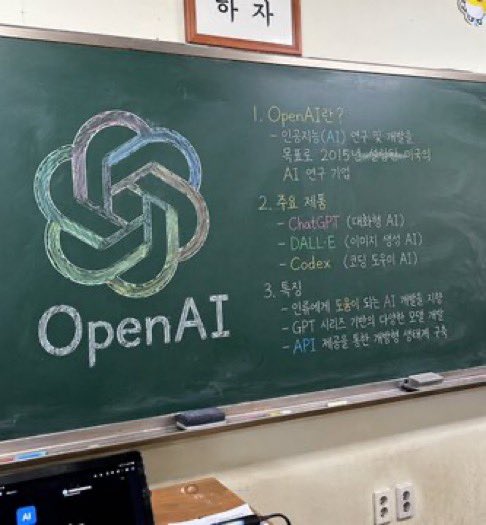
Classroom Chalkboard Lesson
Generates a photorealistic image of a classroom chalkboard featuring a colorful logo drawing and structured handwritten lesson notes.
This is a gpt-image-2 prompt case for Interior & Architecture. Use the copy-ready prompt below to generate similar visuals, and review YouMind OpenLab awesome-gpt-image-2 attribution plus commercial-use rights before reuse.
Prompt
Copy-ready prompt
A photorealistic, slightly angled snapshot of a classroom greenboard. To the left of the blackboard is a meticulously drawn chalk sketch showcasing…{argument name="company name" default="OpenAI"} The logo uses a mix of soft colors such as green, blue, and purple, with the words "..." written in neat white chalk below.{argument name="logo text" default="OpenAI"} On the right side of the blackboard is a handwritten text organized into three numbered sections. The first section is titled "{argument name="section one title" default="1. OpenAI란?"} This is followed by a brief explanatory text. Part 2 is titled "{argument name="section two title" default="2. 주요 제품"} The document lists three key points, including ChatGPT, DALL-E, and Codex. Part 3 is titled "{argument name="section three title" default="3. 특징"} The text describes three key features: a blackboard with a silver metal frame, two rectangular erasers and scattered chalk on a chalk tray, a gray-white wall below a two-pronged power outlet, and a dark laptop screen in the lower left foreground. Above the blackboard, a framed logo is cropped at the bottom edge of the image.Prompt variables
Editable argument placeholders found in the prompt, with their default values.
Variable
company name
Default
OpenAI
Variable
logo text
Default
OpenAI
Variable
section one title
Default
1. OpenAI란?
Variable
section two title
Default
2. 주요 제품
Variable
section three title
Default
3. 특징
Reuse and source notes
Use this prompt safely after previewing the case.
- 1.Copy the prompt or open it directly in Dovoo with the generation button.
- 2.Adjust variables, aspect ratio, and reference images for your own use case.
- 3.Before publishing or paid usage, verify source rights, attribution requirements, and brand or likeness risks.
Can I use this prompt commercially?
Commercial-use status is unknown. Review the original source, license, brand constraints, and legal requirements before paid usage.
Where does this case come from?
This case is imported from YouMind OpenLab awesome-gpt-image-2; keep attribution visible and check the source URL before reuse.