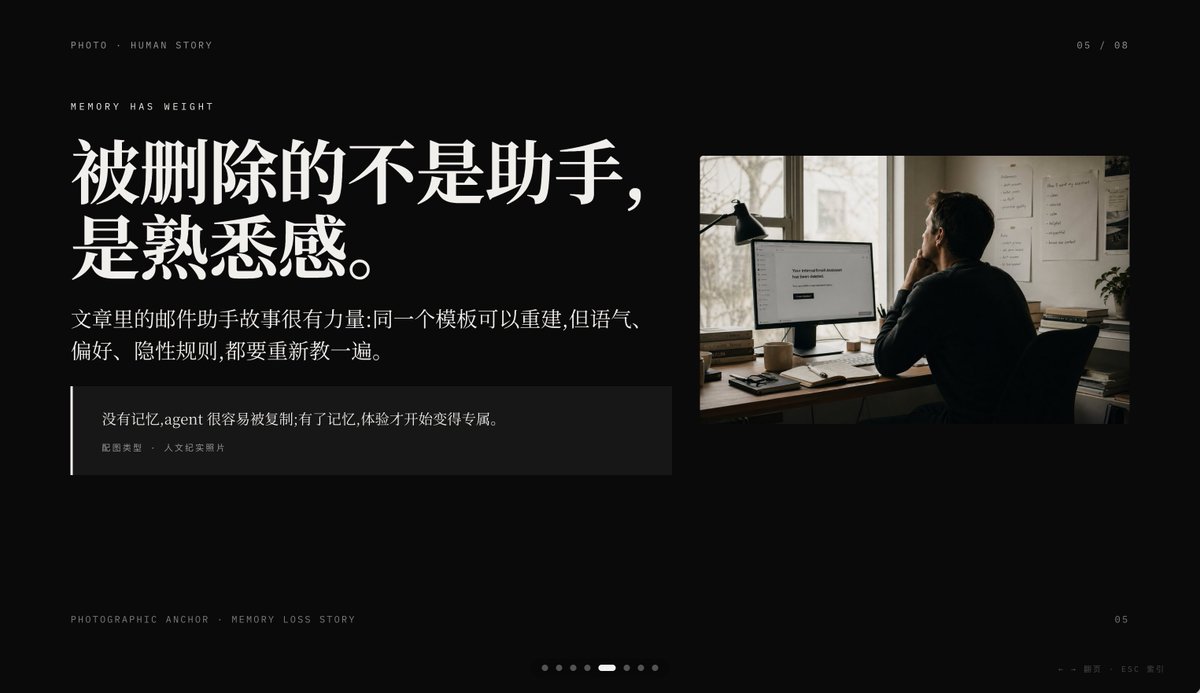
Cinematic Memory Loss PPT Slide
This prompt generates a premium black-background editorial presentation slide combining Chinese storytelling typography with a documentary-style office photo, ideal for keynote or PPT narrative pages.
This is a gpt-image-2 prompt case for 平面海报. Use the copy-ready prompt below to generate similar visuals, and review YouMind OpenLab awesome-gpt-image-2 attribution plus commercial-use rights before reuse.
Prompt
Copy-ready prompt
Create a minimalist, cinematic presentation slides with a deep black background and a high-end editorial style PowerPoint layout in a 16:9 widescreen aspect ratio. The layout employs an asymmetrical design, with a large block of text on the left and a documentary-style photograph in the upper right corner, leaving ample negative space. Use elegant, high-contrast Chinese fonts to create a high-end magazine feel. Place a line of small uppercase text in the upper left corner: “PHOTO • HUMAN STORY”. Below this, add another line of small uppercase text: “MEMORY HAS WEIGHT”. The main title on the left is in striking white bold Chinese font, divided into two lines:{argument name="headline text" default="What was deleted wasn't the assistant, but the sense of familiarity."} Below the title, place a small, two-line paragraph of Chinese text in white or light gray:{argument name="body text" default="The story of the email assistant in the article is very powerful: the same template can be rebuilt, but the tone, preferences, and implicit rules all need to be taught again."} Add a dark, semi-transparent quoting box below, with a thin white vertical line along the left edge; the box contains two layers of text: the Chinese quoting content.{argument name="quote" default="Without memory, an agent can be easily copied; with memory, the experience begins to become unique."} The image includes a smaller caption: "Image Type: Documentary Photograph." On the right, a warm-toned documentary photograph is inserted: an adult sits at a dimly lit office desk with their back to the camera, looking at a computer monitor; a desk lamp stands to the left of the monitor, documents are pasted on the wall, and soft sunlight streams in through the window. The monitor screen displays a simple white interface with the text centered in the center.{argument name="screen text" default="Your conversational Assistant has been deleted."} The photos should have a film-like quality, with soft brown and gray tones, creating an atmosphere that is private, deep, and slightly melancholic. Add similar interface details for pagination: "05 / 08" in the upper right corner, "PHOTOGRAPHIC ANCHOR · MEMORY LOSS STORY" in microtext in the lower left corner, "05" in small text in the lower right corner, and eight tiny pagination dots at the bottom center, with the fifth dot highlighted as a slender white capsule, and the rest as dark gray dots. Add a small navigation tooltip in the bottom right corner: "← → Page Turn · ESC Close". Overall atmosphere: editorial style, restraint, cinematic feel, memory and loss, high-end Keynote slide design, clean spacing, precise alignment, and sophisticated narrative presentation aesthetics.Prompt variables
Editable argument placeholders found in the prompt, with their default values.
More cases in this category
Prioritized by category, input mode compatibility, quality, and lower risk.






Reuse and source notes
Use this prompt safely after previewing the case.
- 1.Copy the prompt or open it directly in Dovoo with the generation button.
- 2.Adjust variables, aspect ratio, and reference images for your own use case.
- 3.Before publishing or paid usage, verify source rights, attribution requirements, and brand or likeness risks.
Can I use this prompt commercially?
Commercial-use status is unknown. Review the original source, license, brand constraints, and legal requirements before paid usage.
Where does this case come from?
This case is imported from YouMind OpenLab awesome-gpt-image-2; keep attribution visible and check the source URL before reuse.