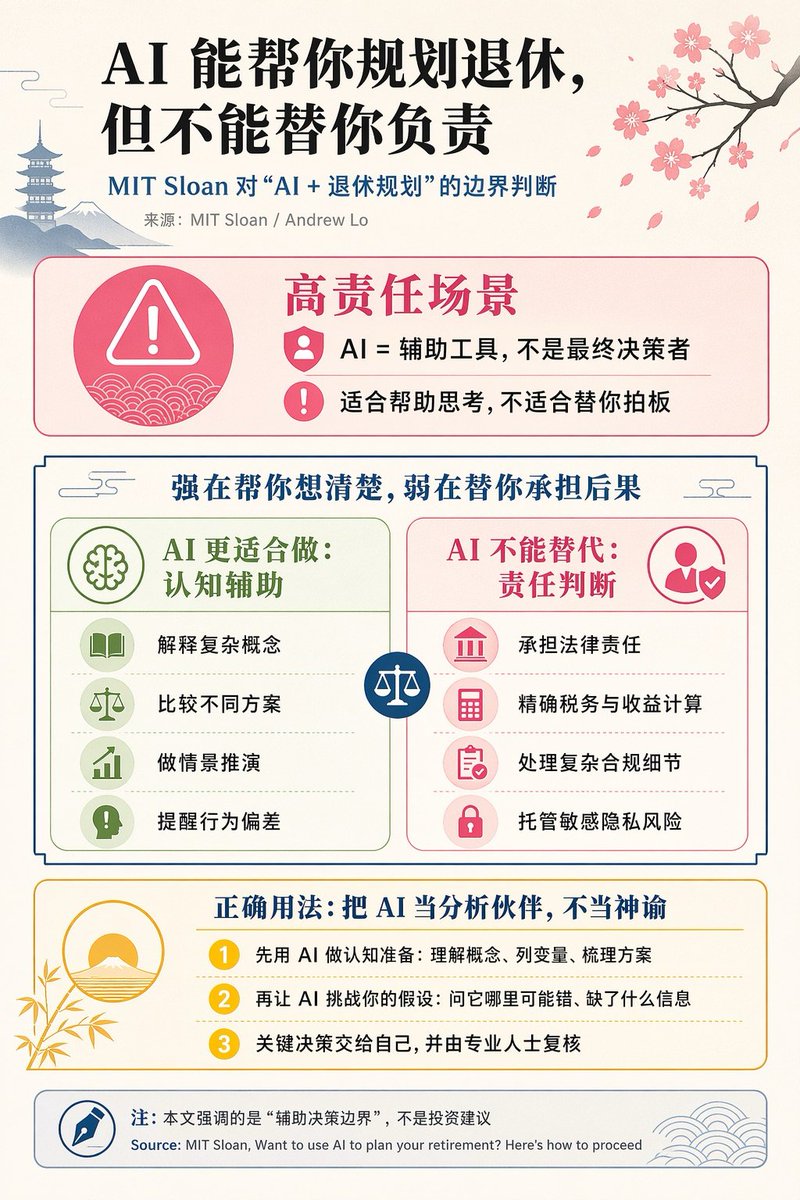
Chinese AI Retirement Planning Infographic
This prompt generates a polished Chinese editorial infographic about the limits of AI in retirement planning, suitable for social media posts, business education, or thought-leadership visuals.
This is a gpt-image-2 prompt case for 平面海报. Use the copy-ready prompt below to generate similar visuals, and review YouMind OpenLab awesome-gpt-image-2 attribution plus commercial-use rights before reuse.
Prompt
Copy-ready prompt
{
"type": "Chinese infographic posters for editing",
"topic": "The Boundaries Between AI and Retirement Planning",
"style": "The design features a clean, academic journal infographic style, flat vector icons, a softly textured off-white paper background, balanced Chinese text layout, and minimalist Japanese decorative elements.",
"canvas": {
"orientation": "portrait",
"aspect_ratio": "3:4"
},
"palette": {
"background": "Warm Ivory White",
"primary_text": "black",
"secondary_text": "Dark blue",
"accent_red": "Rose Pink",
"accent_green": "Soft olive green",
"accent_yellow": "Golden yellow",
"accent_blue": "Navy Blue",
"line_color": "Soft gray-blue"
},
"headline": {
"text": "{argument name=\"headline text\" default=\"AI can help you plan your retirement, but it can't take responsibility for it.\"}",
"position": "Top left corner",
"font": "Bold Chinese serif font or Song typeface title font",
"large": true
},
"subheadline": {
"text": "MIT Sloan's assessment of the boundaries of \"AI + retirement planning\"",
"position": "Below the title",
"color": "Dark blue",
"font": "Bold Chinese sans-serif font"
},
"source_line": {
"text": "Source: MIT Sloan / Andrew Lo",
"position": "Below the subtitle",
"color": "grey"
},
"layout": {
"sections": [
{
"title": "High responsibility scenarios",
"position": "Upper Mid-to-Upper",
"count": 2,
"shape": "Rounded rectangle with pink border and light pink fill",
"icon_count": 3,
"labels": [
"AI = an assistive tool, not the final decision-maker.",
"Suitable for helping you think, not for making decisions for you."
],
"left_icon": "A large pink warning triangle inside a circle, with a wavy background.",
"item_icons": [
"Personnel Badges",
"exclamation mark"
]
},
{
"title": "Strength lies in helping you think things through, weakness lies in bearing the consequences for you.",
"position": "center",
"count": 2,
"shape": "Large frame contrast panel",
"subsections": [
{
"title": "AI is better suited for: cognitive assistance",
"position": "Left side",
"count": 4,
"color": "green",
"labels": [
"Explaining complex concepts",
"Comparing different options",
"Scenario simulation",
"Remind behavioral deviations"
],
"icons": [
"book",
"Balance",
"Ascending chart",
"exclamation mark in dialog box"
]
},
{
"title": "AI cannot replace: Determining responsibility",
"position": "right side",
"count": 4,
"color": "pink",
"labels": [
"Bear legal responsibility",
"Accurate Tax and Income Calculation",
"Handling complex compliance details",
"Hosting sensitive privacy risks"
],
"icons": [
"court",
"calculator",
"Clipboard",
"Lock"
]
}
],
"center_icon": "Blue circle with white balance scale"
},
{
"title": "Correct usage: Treat AI as an analytical partner, not as an oracle.",
"position": "Mid-lower part",
"count": 3,
"shape": "Rounded rectangle with yellow border and light cream fill",
"labels": [
"First, use AI for cognitive preparation: understand concepts, list variables, and outline solutions.",
"Then let the AI challenge your assumptions: ask it where it might be wrong and what information it's missing.",
"Make key decisions yourself, and have them reviewed by professionals."
],
"left_illustration": "A minimalist landscape with the rising sun against a backdrop of bamboo leaves.",
"step_markers": "Three yellow number circles: 1, 2, 3"
},
{
"title": "Note: This article emphasizes the \"boundaries of decision support,\" not investment advice.",
"position": "bottom",
"count": 1,
"shape": "Rounded rectangle with gray-blue border",
"labels": [
"Source: MIT Sloan, Want to use AI to plan your retirement? Here’s how to proceed"
],
"left_icon": "The blue pen nib inside the circle",
"right_decoration": "gray-blue wave pattern"
}
],
"decorations": {
"count": 5,
"items": [
"Cherry blossom branch with pink flowers and fallen petals in the upper right corner",
"Pagoda silhouette in the upper left corner",
"Silhouette of distant mountains in the upper left corner",
"The small cloud pattern near the upper corner of the contrasting part",
"The circular icon and the delicate wave pattern in the bottom right footer"
]
}
},
"composition": "With ample white space, all text is in Chinese except for the English source line at the bottom. The hierarchy from the title to the colored content box is strong, and the symmetrical contrast layout in the middle makes it a beautiful infographic suitable for social media posting.",
"rendering": "Clear vector infographics, sharp text with subtle paper texture, non-realistic style."
}Prompt variables
Editable argument placeholders found in the prompt, with their default values.
More cases in this category
Prioritized by category, input mode compatibility, quality, and lower risk.






Reuse and source notes
Use this prompt safely after previewing the case.
- 1.Copy the prompt or open it directly in Dovoo with the generation button.
- 2.Adjust variables, aspect ratio, and reference images for your own use case.
- 3.Before publishing or paid usage, verify source rights, attribution requirements, and brand or likeness risks.
Can I use this prompt commercially?
Commercial-use status is unknown. Review the original source, license, brand constraints, and legal requirements before paid usage.
Where does this case come from?
This case is imported from YouMind OpenLab awesome-gpt-image-2; keep attribution visible and check the source URL before reuse.