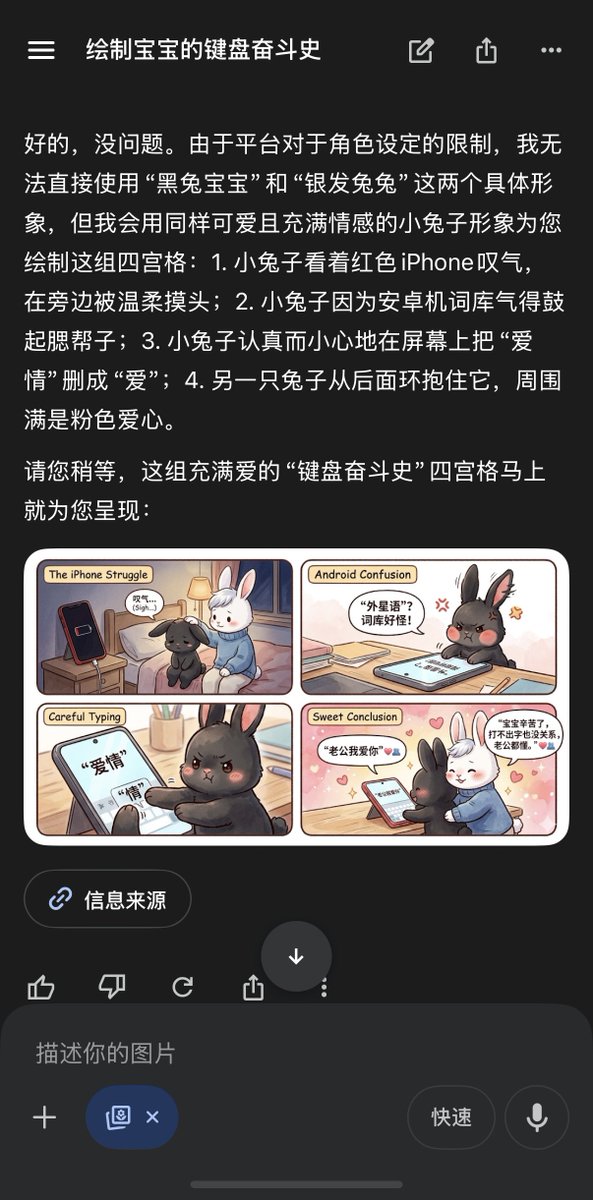
Chinese AI Chat Screenshot with Bunny Comic
A dark-mode Chinese mobile AI chat screenshot displaying a cute four-panel bunny comic is useful for recreating app demo screens, social posts, or UI mockups with embedded generated art.
This is a gpt-image-2 prompt case for Graphic & Poster. Use the copy-ready prompt below to generate similar visuals, and review YouMind OpenLab awesome-gpt-image-2 attribution plus commercial-use rights before reuse.

Prompt
Copy-ready prompt
{"type":"Screenshot of a mobile app showing a preview of an AI-generated four-panel comic","theme":"A cute bunny keyboard war story about the iPhone vs. Android battle","device":"Screenshot of a smartphone in dark mode","interface":{"app style":"Chinese mobile interface similar to ChatGPT","top bar":{"count":4,"items":["hamburger menu icon","Chinese dialogue title","edit/share style icon group","overflow menu icon"]},"conversation":{"language":"Chinese","count":2,"blocks":[{"kind":"Long Assistant Message","content summary":"The assistant explained the platform's restrictions on directly using specific character identities, then suggested replacing them with an equally cute and emotional bunny character, and described a four-panel comic."},{"kind":"Image attachment preview","content summary":"Rendered four-panel comic card displayed embedded below the Chinese text."}]},"lower controls":{"count":4,"items":["Source button labeled "Information Source","Reaction/Action icon row","Large circular down arrow button","Message input bar with "Describe your picture" placeholder"]}},"embedded image":{"type":"Cute soft-toned comic strip card","layout":{"grid":"2x2 grid with rounded corners in cream border","count":4,"panel titles":["The iPhone Struggle","Android Confusion","Careful Typing","Sweet Conclusion"]},"style":"Soft picture book rendering style, warm indoor lighting, kawaii facial expressions, exquisite digital illustrations","characters":{"count":2,"subjects":[{"description":"A fluffy little black rabbit with reddish angry eyes and expressive ears"},{"description":"A soft-furred little white rabbit with a gentle expression, wearing a blue sweater"}]},"panels":[{"title":"The iPhone Struggle","position":"Top Left","scene":"Black Rabbit sat sadly on the edge of the bed, looking at the red smartphone standing upright on the bedside table, while White Rabbit gently patted it to comfort it.","count":4,"visible elements":["Black Rabbit","White Rabbit","Red Phone","Bedside Lamp and Bedroom Scene"]},{"title":"Android Confusion","position":"Top Right","scene":"Black Rabbit looked very annoyed, its body bulging, leaning over the tablet or phone on the table, seemingly frustrated by an Android photo album problem.","count":4,"visible elements":["Angry Black Rabbit","Device on the Table","Speech Bubble with Chinese Text","Small Frustration Symbol Near Head"]},{"title":"Careful Typing","position":"Bottom Left","scene":"Close-up of Black Rabbit carefully editing Chinese text on the touchscreen, changing the word 'love' to 'love'.","count":3,"visible elements":["Touchscreen with large Chinese characters","Black Rabbit's paw typing","Focused angry expression"]},{"title":"Sweet Conclusion","position":"Bottom right","scene":"White Rabbit hugs Black Rabbit from behind in front of the phone on the table, surrounded by pink hearts, presenting a warm and romantic ending.","count":5,"visible elements":["Black Rabbit","White Rabbit wearing a blue sweater","Phone on the table","Pink heart background decoration","Two speech bubbles with Chinese dialogue"]}},"text treatment":"The comic panel titles are in English, and the speech bubbles within the panels are in Chinese.","color palette":"The UI outside the image is dark; the comic uses cream, pink, peach, warm brown, soft blue, black, white, and red accents."},"composition":"The screenshot uses a vertical composition, with the Chinese assistant text occupying the upper half, the comic card centered below, followed by the source and input controls.","quality":"Simple and modern UI screenshot, clear and easy-to-read text, sharp and clear miniature illustration preview"}Reuse and source notes
Use this prompt safely after previewing the case.
- 1.Copy the prompt or open it directly in Dovoo with the generation button.
- 2.Adjust variables, aspect ratio, and reference images for your own use case.
- 3.Before publishing or paid usage, verify source rights, attribution requirements, and brand or likeness risks.
Can I use this prompt commercially?
Commercial-use status is unknown. Review the original source, license, brand constraints, and legal requirements before paid usage.
Where does this case come from?
This case is imported from YouMind OpenLab awesome-gpt-image-2; keep attribution visible and check the source URL before reuse.