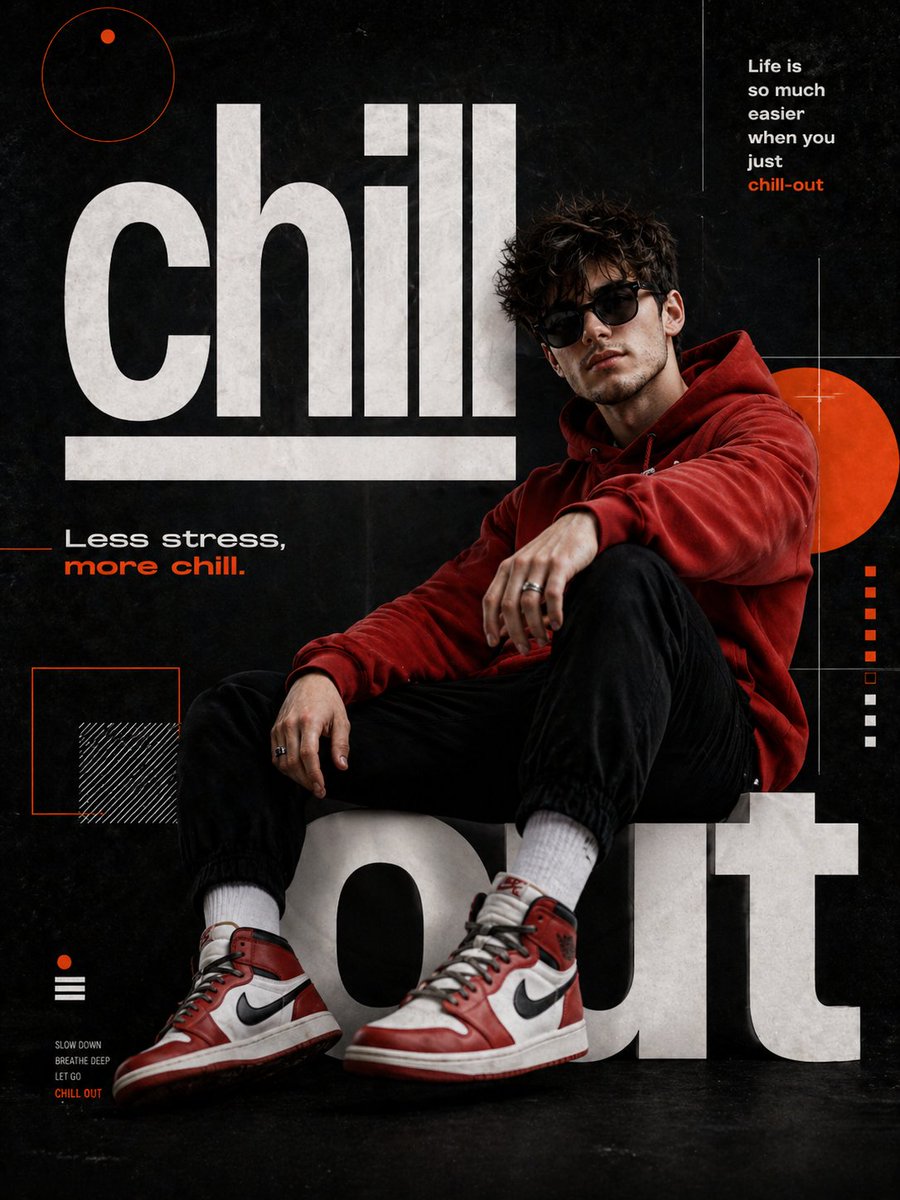
Chill-out Cinematic Poster
A detailed prompt for creating a hyper-realistic 8K cinematic poster of a man in a relaxed pose, featuring specific typography and DSLR-style photography elements.
This is a gpt-image-2 prompt case for 平面海报. Use the copy-ready prompt below to generate similar visuals, and review YouMind OpenLab awesome-gpt-image-2 attribution plus commercial-use rights before reuse.

Prompt
Copy-ready prompt
Create a hyper-realistic 8K UHD cinematic poster portrait, with the main character being {argument name="subject" default="A man"} Inspired by reference images, the subject should possess a similar hairstyle, facial structure, and physique while maintaining a natural realism. The shooting effect should resemble using a 35mm lens at f/1.8 aperture, with sharp focus, soft background blur, cinematic color grading, and a delicate DSLR-like skin texture. Design a modern graphic poster titled "{argument name="title" default="Chill-out"} The man was wearing{argument name="clothing" default="red hoodie"} He wore black jogging shorts, red and white Air Jordan high-top sneakers, dark sunglasses, and a silver ring. He leaned back in a relaxed, oversized font, one leg bent, the other slightly extended towards the audience. His body tilted to the right, his face turned towards the camera, presenting a confident two-thirds profile. The background was matte black. The striking white sans-serif letters "chill" and "out" formed a bench-like structure, with an underline below "chill." Orange circles, squares, thin white grid lines, and the phrases "Life is so much easier when you just chill-out" and "Less stress, more chill" were added.Prompt variables
Editable argument placeholders found in the prompt, with their default values.
More cases in this category
Prioritized by category, input mode compatibility, quality, and lower risk.






Reuse and source notes
Use this prompt safely after previewing the case.
- 1.Copy the prompt or open it directly in Dovoo with the generation button.
- 2.Adjust variables, aspect ratio, and reference images for your own use case.
- 3.Before publishing or paid usage, verify source rights, attribution requirements, and brand or likeness risks.
Can I use this prompt commercially?
Commercial-use status is unknown. Review the original source, license, brand constraints, and legal requirements before paid usage.
Where does this case come from?
This case is imported from YouMind OpenLab awesome-gpt-image-2; keep attribution visible and check the source URL before reuse.