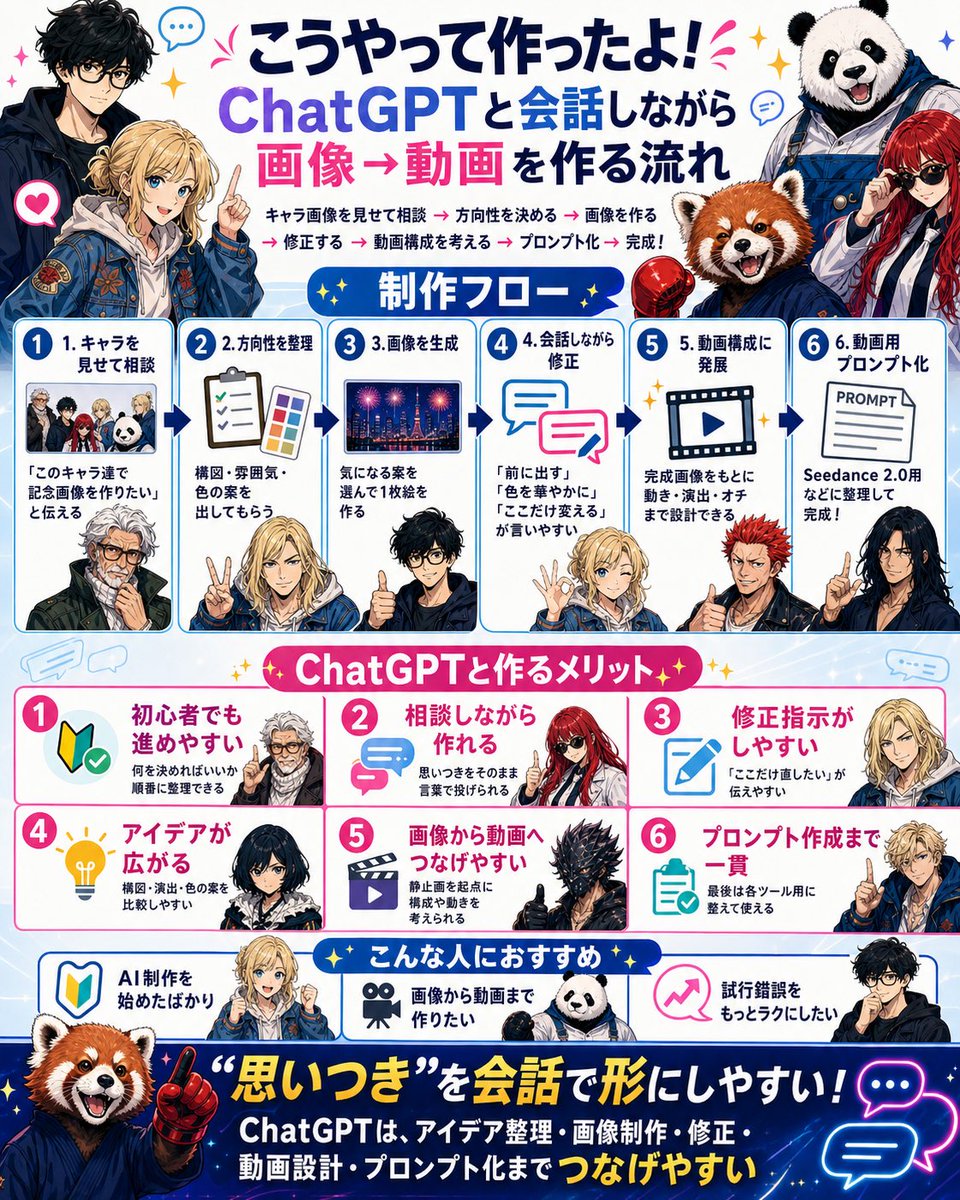
Japanese ChatGPT Image-to-Video Workflow Infographic
Generates a colorful Japanese infographic explaining a six-step workflow for creating images and videos through conversation with ChatGPT.
This is a gpt-image-2 prompt case for 平面海报. Use the copy-ready prompt below to generate similar visuals, and review YouMind OpenLab awesome-gpt-image-2 attribution plus commercial-use rights before reuse.

Prompt
Copy-ready prompt
{
  "type": "bright Japanese social-media infographic poster",
  "format": "single square poster, 4:5-ish dense layout, white and pale blue background with blue panel borders, pink accents, yellow sparkles, speech bubbles, arrows, rounded cards, sticker-like anime characters and mascot animals",
  "language": "Japanese visible text",
  "headline": {
    "position": "top center",
    "text": "{argument name=\"headline text\" default=\"This is how I made it! The process involves creating a video from an image while chatting with ChatGPT.\"}",
    "style": "Large, bold Japanese lettering, dark navy and purple for ChatGPT, hot pink for images → videos, celebratory marks"
  },
  "top_characters": {
    "count": 4,
    "descriptions": [
      "left: tall black-haired anime man in dark jacket, face intentionally blurred",
      "left-center: blond anime young man in blue embroidered jacket pointing upward, face intentionally blurred",
      "right: smiling panda mascot wearing blue work overalls",
      "right-lower: red panda mascot in blue hoodie next to a red-haired woman in sunglasses"
    ]
  },
  "intro_line": {
    "text": "Show character images and discuss → Decide on a direction → Create images → Make revisions → Plan the video structure → Create prompts → Done!",
    "style": "small bold text under headline with pink arrow separators"
  },
  "layout": {
    "sections": [
      {
        "title": "Production flow",
        "position": "upper middle",
        "count": 6,
        "style": "six numbered blue-bordered cards connected by dark blue arrows",
        "cards": [
          {
            "number": "1",
            "title": "1. Show me your character and discuss.",
            "visual": "small group thumbnail of four characters and panda, plus lower anime man portrait",
            "body": "\"I want to create a commemorative image with these characters.\""
          },
          {
            "number": "2",
            "title": "2. Clarify the direction",
            "visual": "clipboard checklist and color palette, blond character making peace sign",
            "body": "Please provide suggestions for composition, atmosphere, and color scheme."
          },
          {
            "number": "3",
            "title": "3. Generate the image",
            "visual": "night city fireworks image thumbnail, black-haired man giving thumbs up",
            "body": "Choose an idea that interests you and create a single illustration."
          },
          {
            "number": "4",
            "title": "4. Make corrections while conversing.",
            "visual": "two overlapping chat bubbles, blond character making OK sign",
            "body": "\"Bring it forward,\" \"Make the colors more vibrant,\" and \"Change just this part\" are easy to say."
          },
          {
            "number": "5",
            "title": "5. Developing into video composition",
            "visual": "film frame with play button, red-haired spiky anime man",
            "body": "Based on the finished image, we can design everything from movement and direction to the punchline."
          },
          {
            "number": "6",
            "title": "6. Prompting for video",
            "visual": "paper labeled PROMPT, dark-haired woman pointing",
            "body": "Organized for Seedance 2.0 and now it's complete!"
          }
        ]
      },
      {
        "title": "Benefits of creating with ChatGPT",
        "position": "middle",
        "count": 6,
        "style": "six pink-numbered benefit cards in two rows, white cards with pink borders and icons",
        "cards": [
          {
            "number": "1",
            "title": "Easy to follow even for beginners",
            "icon": "beginner mark with check",
            "body": "You can organize the things you need to decide in order.",
            "character": "white-haired anime man face blurred"
          },
          {
            "number": "2",
            "title": "You can make it while consulting with others.",
            "icon": "pink chat arrows",
            "body": "You can just throw out your ideas as words.",
            "character": "red-haired woman with sunglasses"
          },
          {
            "number": "3",
            "title": "Easy to give correction instructions",
            "icon": "blue pencil edit icon",
            "body": "It's easy to communicate \"I only want this part fixed.\"",
            "character": "blond character face blurred"
          },
          {
            "number": "4",
            "title": "Ideas expand",
            "icon": "yellow lightbulb",
            "body": "Easy to compare ideas for composition, direction, and color.",
            "character": "dark-haired woman face blurred"
          },
          {
            "number": "5",
            "title": "Easy to transition from images to videos",
            "icon": "movie clapper/play icon",
            "body": "You can start by thinking about composition and movement using still images as a starting point.",
            "character": "black spiky armored creature giving thumbs up"
          },
          {
            "number": "6",
            "title": "From creating the prompt to the final result.",
            "icon": "clipboard checklist",
            "body": "Finally, you can organize and use it for each tool.",
            "character": "blond character pointing"
          }
        ]
      },
      {
        "title": "Recommended for people like this",
        "position": "lower middle",
        "count": 3,
        "style": "three recommendation cards with blue borders and icons",
        "cards": [
          {
            "title": "I've just started creating AI.",
            "icon": "beginner mark",
            "character": "red panda mascot"
          },
          {
            "title": "I want to create videos from images.",
            "icon": "movie camera",
            "character": "panda mascot"
          },
          {
            "title": "I want to make trial and error easier.",
            "icon": "pink rising arrow",
            "character": "black-haired glasses anime man"
          }
        ]
      }
    ]
  },
  "footer": {
    "position": "bottom",
    "background": "deep navy starry gradient banner",
    "main_quote": "{argument name=\"footer quote\" default=\"It's easy to turn "spur-of-the-moment ideas" into concrete actions through conversation!\"}",
    "subtext": "ChatGPT makes it easy to connect ideas, create and edit images, design videos, and create prompts.",
    "visuals": "large red panda mascot on left pointing upward with red glove, neon blue and pink chat bubble icons on right, yellow sparkles"
  },
  "style": {
    "illustration": "polished anime and mascot collage, YouTube thumbnail energy, crisp vector-infographic UI, glossy icons, expressive characters, intentional blurred rectangular face areas on several human characters",
    "colors": "white, sky blue, deep navy, hot pink, purple, yellow sparkle accents",
    "typography": "bold rounded Japanese display fonts, high contrast, dense but readable, numbered circles"
  },
  "customization": {
    "main tool": "{argument name=\"main tool name\" default=\"ChatGPT\"}",
    "video tool": "{argument name=\"video tool name\" default=\"Seedance 2.0\"}",
    "background tone": "{argument name=\"background tone\" default=\"bright blue and pink celebratory tech infographic\"}"
  }
}
Prompt variables
Editable argument placeholders found in the prompt, with their default values.
More cases in this category
Prioritized by category, input mode compatibility, quality, and lower risk.






Reuse and source notes
Use this prompt safely after previewing the case.
- 1.Copy the prompt or open it directly in Dovoo with the generation button.
- 2.Adjust variables, aspect ratio, and reference images for your own use case.
- 3.Before publishing or paid usage, verify source rights, attribution requirements, and brand or likeness risks.
Can I use this prompt commercially?
Commercial-use status is unknown. Review the original source, license, brand constraints, and legal requirements before paid usage.
Where does this case come from?
This case is imported from YouMind OpenLab awesome-gpt-image-2; keep attribution visible and check the source URL before reuse.