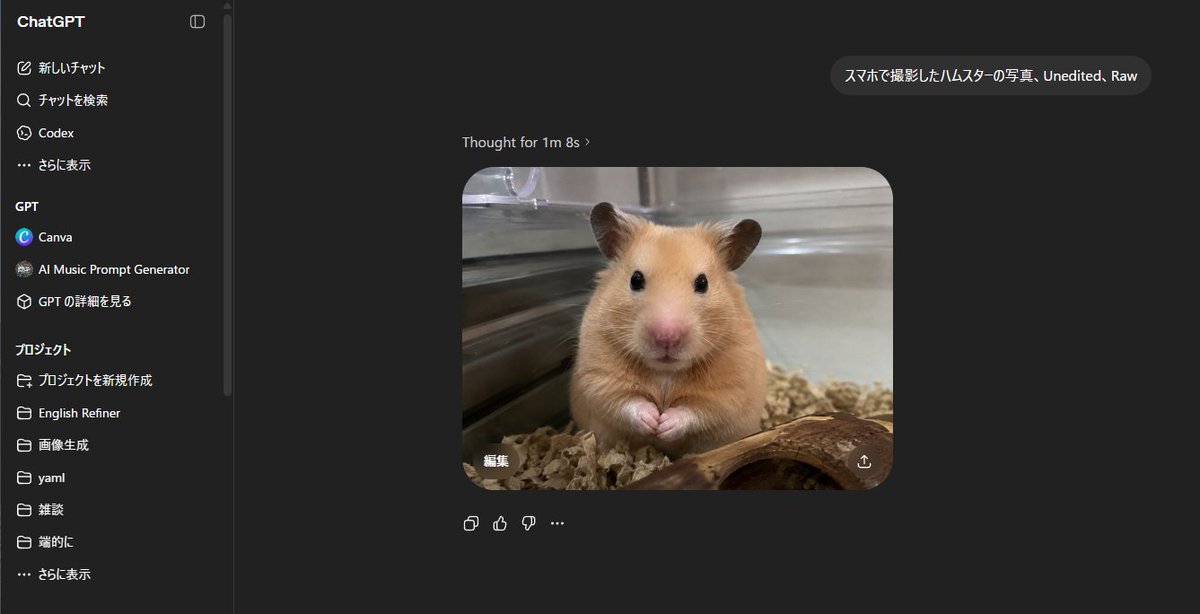
ChatGPT Hamster Image Screenshot
Generates a realistic dark-mode ChatGPT screenshot showing a Japanese prompt and a raw smartphone-style hamster photo result.
This is a gpt-image-2 prompt case for 其他灵感. Use the copy-ready prompt below to generate similar visuals, and review YouMind OpenLab awesome-gpt-image-2 attribution plus commercial-use rights before reuse.

Prompt
Copy-ready prompt
{
  "type": "Realistic desktop screenshots of ChatGPT web version's dark mode.",
  "canvas": "Widescreen 16:9 screenshot, approximately 1200x645 pixels, clear UI, browser borders not displayed.",
  "main_scene": {
    "description": "The ChatGPT chat page displays the generated image in the center: a realistic mobile-style photo showing a golden hamster in a glass enclosure, facing the camera with its two small paws clasped together, shiny black eyes, pink nose, and brown fur. There is bedding below, a curved piece of wood in the foreground, and a metal or glass cage wall in the background. It has a shallow depth of field and the texture of an unedited original photo.",
    "user_prompt_bubble": "{argument name=\"user prompt text\" default=\"Hamster photos taken with a smartphone, Unedited, Raw\"}",
    "assistant_status_text": "Thinking time: 1 minute 8 seconds",
    "generated_image": {
      "position": "Right side of the chat area",
      "shape": "Rounded rectangle",
      "count": 1,
      "content": "Hamster photos",
      "style": "The photos are realistic, with a slightly soft, natural indoor lighting, warm brown animal fur, and reflections from the transparent fence.",
      "overlay_controls_count": 2,
      "overlay_controls": [
        "The generated image has an edit button in the lower left corner with the Japanese word \"edit\".",
        "Download/share icon in the bottom right corner of the generated image"
      ]
    }
  },
  "layout": {
    "background": "ChatGPT Dark Theme (almost black)",
    "left_sidebar": {
      "position": "Left side",
      "width": "It occupies about one-fifth of the image.",
      "title": "ChatGPT",
      "visible_top_navigation_count": 4,
      "visible_top_navigation": [
        "New chat",
        "Search chat",
        "Codex",
        "Show more"
      ],
      "gpt_section": {
        "title": "GPT",
        "visible_items_count": 3,
        "items": [
          "Canva",
          "AI Music Prompt Generator",
          "View GPT details"
        ]
      },
      "projects_section": {
        "title": "project",
        "visible_items_count": 7,
        "items": [
          "Create a new project",
          "English Refiner",
          "Image generation",
          "yaml",
          "Casual chat",
          "In short",
          "Show more"
        ]
      },
      "details": "There are thin vertical dividing lines and scroll bars near the edge of the sidebar."
    },
    "chat_area": {
      "position": "Dark blank workspace on the right side of the sidebar",
      "message_count": 2,
      "messages": [
        "A user message bubble near the top right corner contains Japanese/English prompts.",
        "A reply image generated by the assistant is displayed in the center at the bottom, with status text above it."
      ],
      "below_image_action_icons_count": 4,
      "below_image_action_icons": [
        "Copy icon",
        "Like icon",
        "Click the icon",
        "More options ellipsis"
      ]
    }
  },
  "style_directives": "To make the interface look like a screenshot of the ChatGPT web application in authentic Japanese, use a clean sans-serif UI font, dark gray panels, white and light gray text, subtle rounded corners, precise spacing, and embed a realistic hamster photo as the main output. Avoid using decorative borders or extra annotations.",
  "customization": {
    "animal": "{argument name=\"animal\" default=\"golden Syrian hamster\"}",
    "photo style": "{argument name=\"photo style\" default=\"smartphone photo, unedited, raw\"}",
    "interface language": "{argument name=\"interface language\" default=\"Japanese\"}"
  }
}
Prompt variables
Editable argument placeholders found in the prompt, with their default values.
More cases in this category
Prioritized by category, input mode compatibility, quality, and lower risk.






Reuse and source notes
Use this prompt safely after previewing the case.
- 1.Copy the prompt or open it directly in Dovoo with the generation button.
- 2.Adjust variables, aspect ratio, and reference images for your own use case.
- 3.Before publishing or paid usage, verify source rights, attribution requirements, and brand or likeness risks.
Can I use this prompt commercially?
Commercial-use status is unknown. Review the original source, license, brand constraints, and legal requirements before paid usage.
Where does this case come from?
This case is imported from YouMind OpenLab awesome-gpt-image-2; keep attribution visible and check the source URL before reuse.