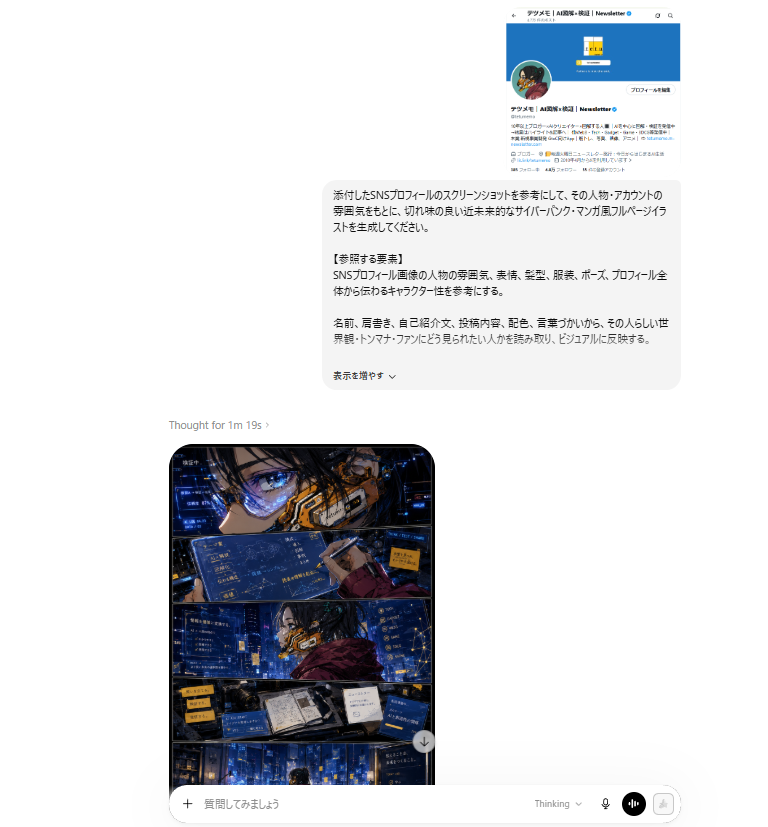
ChatGPT Cyberpunk Manga Screenshot
Generates a realistic AI chat webpage screenshot showing a Japanese SNS-profile prompt and a four-panel cyberpunk manga result.
This is a gpt-image-2 prompt case for 动漫游戏. Use the copy-ready prompt below to generate similar visuals, and review YouMind OpenLab awesome-gpt-image-2 attribution plus commercial-use rights before reuse.
Prompt
Copy-ready prompt
Objective: Create a realistic ChatGPT-style webpage desktop screenshot showcasing Japanese prompt requests and generated cyberpunk comic book illustrations. Canvas: Landscape browser screenshot, approximately 768 x 827 pixels, predominantly white background with ample margins. The chat box is slightly right-aligned, and the generated image preview is located in the lower left corner of the prompt card. Layout: A small embedded social media profile screenshot is displayed in the upper right corner. Below this is a large, rounded, light gray Japanese prompt bubble. In the lower left corner of the bubble is a small status bar displaying "Thought for 1m 19s ›". Below that is a tall, rounded image card (partially visible), and at the very bottom is a message input bar spanning the bottom. Top Social Profile Screenshot: Displays a miniature Japanese X/Twitter-style profile card with a bright blue header, a circular avatar on the left, a small square yellow logo in the header area, a Japanese account name containing "Newsletter", a follow/profile button, and dense Japanese bio text. Keep it small and slightly blurred, like a pasted reference screenshot. Japanese prompt bubble: A rounded rectangle with a very light gray background containing black Japanese text. The text should generate a stylish, sharp, futuristic cyberpunk-style full-page comic illustration based on the attached SNS profile screenshot. Includes a prominent section tag "【Reference Elements】". Mentions the reference character/account atmosphere, facial expressions, hairstyle, clothing, pose, overall profile feel, name, writing style, self-introduction, posts, colors, wording, worldview, catchphrases, and activities. A small control bar similar to "Add to the display ⌄" is included at the bottom. Generated comic card: Displays a vertical full-page cyberpunk comic image within a card with rounded black borders. The comic's pages are precisely divided into four horizontal panels: 1. Top panel: Close-ups of the anime character's eyes and face, wearing futuristic glasses or goggles with sharp angles, a blue holographic UI screen, and orange mechanized cybernetic facial armor. 2. Second panel: Wide-angle shot of the same character in a deep blue neon city/control room environment, wearing a maroon jacket or cape, surrounded by floating blue interface panels with Japanese text. 3. Third panel: A desk or workstation panel with an open notebook/book, devices, a screen, yellow sticky-note-like labels, and data panels, all illuminated by blue neon lights. 4. Bottom panel: A vast, deep blue cityscape or a cyberpunk environment resembling a server room, with tiny glowing windows, data panels, and a small silhouette of a figure near the bottom. Comic Visual Style: High-detail Japanese cyberpunk comic art, dramatic ink lines, glossy digital painting, cinematic blue-orange lighting effects, dense holographic overlays, futuristic UI typography, high-contrast shadows, a post-rain neon atmosphere, sharp comic panel borders, and no speech bubbles except for tiny decorative Japanese UI text. Bottom Input UI: A rounded white input bar is displayed at the bottom. The left side contains a plus icon and placeholder Japanese text "質問してみましょう" (I'll ask you something), while the right side contains four controls: a "Thinking" dropdown text, a microphone icon, a black circular voice/equalizer button, and a light-colored disabled send/icon button. Constraints: Make the entire image look like a cropped AI dialogue webpage, rather than a standalone promotional poster. Retain visible Japanese text, but keep it small and not necessarily fully legible. Use clean browser UI spacing, rounded cards, soft shadows, and no additional watermarks. The main illustration character should be {argument name="character vibe" default="A sharp, futuristic cyberpunk comic book character inspired by Japanese social newsletter accounts."} The main neon color should be{argument name="neon color palette" default="Deep electric blue with orange accents"} The prompt language should be {argument name="prompt language" default="Japanese"} The comic page style should be{argument name="comic style" default="High-detail cyberpunk Japanese manga"} The visible dialogue state should be:{argument name="thinking status text" default="Thought for 1m 19s ›"} .Prompt variables
Editable argument placeholders found in the prompt, with their default values.
More cases in this category
Prioritized by category, input mode compatibility, quality, and lower risk.






Reuse and source notes
Use this prompt safely after previewing the case.
- 1.Copy the prompt or open it directly in Dovoo with the generation button.
- 2.Adjust variables, aspect ratio, and reference images for your own use case.
- 3.Before publishing or paid usage, verify source rights, attribution requirements, and brand or likeness risks.
Can I use this prompt commercially?
Commercial-use status is unknown. Review the original source, license, brand constraints, and legal requirements before paid usage.
Where does this case come from?
This case is imported from YouMind OpenLab awesome-gpt-image-2; keep attribution visible and check the source URL before reuse.