ChatGPT App Cat Story Screenshot
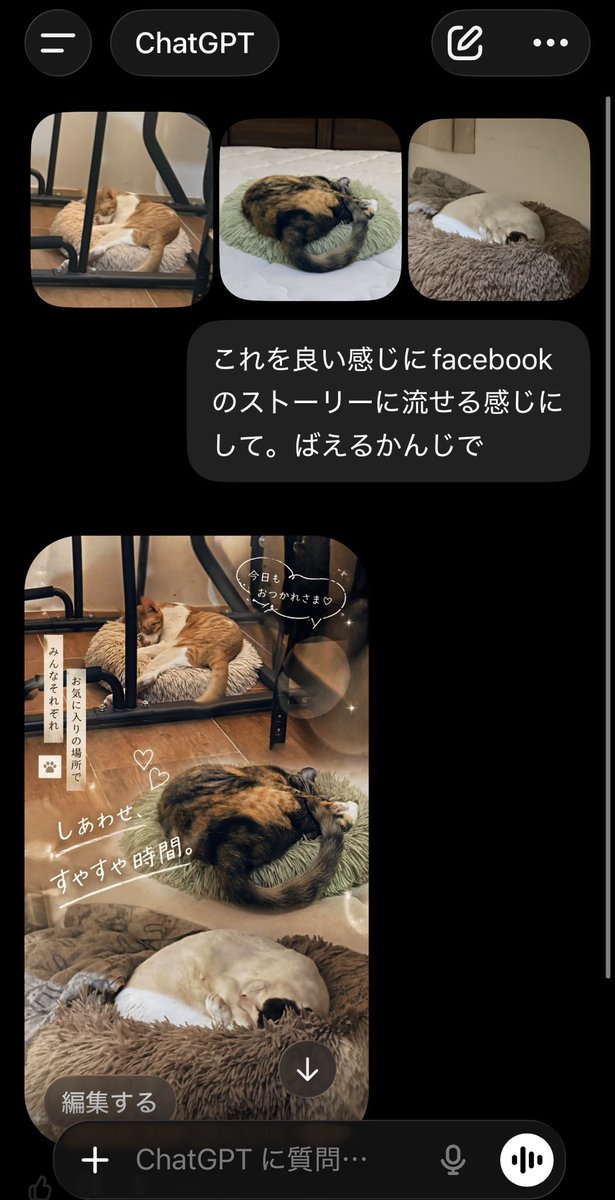
A realistic mobile app screenshot showing ChatGPT turning three cat photos into a cozy Japanese Facebook Story collage, useful for mockups, social media demos, and UI concept visuals.
This is a gpt-image-2 prompt case for 其他灵感. Use the copy-ready prompt below to generate similar visuals, and review YouMind OpenLab awesome-gpt-image-2 attribution plus commercial-use rights before reuse.
Prompt
Copy-ready prompt
A realistic screenshot of the ChatGPT mobile app in dark mode on a smartphone, with a black background and an iOS-style UI. The top displays a title bar, a hamburger menu icon on the left, a rounded label with "ChatGPT" in the middle, and two icons on the right: a compose icon and a three-dot menu. Below are three rounded cat thumbnails: the first shows an orange and white cat sleeping on a plush cushion under a black metal chair frame on a wooden floor; the second shows a calico cat curled up on a light green round cushion in bed; and the third shows a cream-colored cat curled up sleeping in a brown plush pet bed. Below the thumbnails is a dark gray chat bubble containing the Japanese text: “これを良い感じにfacebookのストーリーに流せる感じにして。ばえるかんじで。” Below the message, the generated image is displayed: a tall, vertical Facebook Story-style collage that blends the three cat photos into a warm, comforting composition. The top area features an orange and white cat under a chair, the middle area a curled-up calico cat, and the bottom area a cream-colored cat in a fluffy bed. Soft beige and brown tones, dreamy lighting, subtle bokeh, delicate glitter, and a gentle lifestyle aesthetic are applied. Cute Japanese handwritten-style overlay text and stickers are added to the collage: a speech bubble near the top reads "Today is here♡", a vertical sticky note on the left reads "Minna sorezore otori no bazo de", two small heart doodles near the center, and a large diagonal title "Shiawasesuyasuya time." In the bottom left corner of the generated image, a rounded, dark button labeled "编集する" (Edit), and a circular download icon with a downward arrow is placed near the bottom center. At the very bottom of the screen, there is a ChatGPT input bar with a plus icon, placeholder text "ChatGPT に质问…" (ChatGPT に质问…), a microphone icon, and a circular voice button. This makes the overall image look like a realistic application screenshot, vertically oriented, with a thin white scroll bar visible on the right edge.
More cases in this category
Prioritized by category, input mode compatibility, quality, and lower risk.

Premium Sports Editorial Poster
Text to Imageunknown

Hyper Realistic FIFA Football Poster
Text to Imageunknown

Direct Flash Editorial Portrait
Text to Imageunknown

Vintage Film Projection Portrait
Image to Imageunknown

Cosmic Big Bang Snooze Comic
Text to Imageunknown

Hand-Drawn Sketch Photo Annotation
Text to Imageunknown
Reuse and source notes
Use this prompt safely after previewing the case.
- 1.Copy the prompt or open it directly in Dovoo with the generation button.
- 2.Adjust variables, aspect ratio, and reference images for your own use case.
- 3.Before publishing or paid usage, verify source rights, attribution requirements, and brand or likeness risks.
Can I use this prompt commercially?
Commercial-use status is unknown. Review the original source, license, brand constraints, and legal requirements before paid usage.
Where does this case come from?
This case is imported from YouMind OpenLab awesome-gpt-image-2; keep attribution visible and check the source URL before reuse.