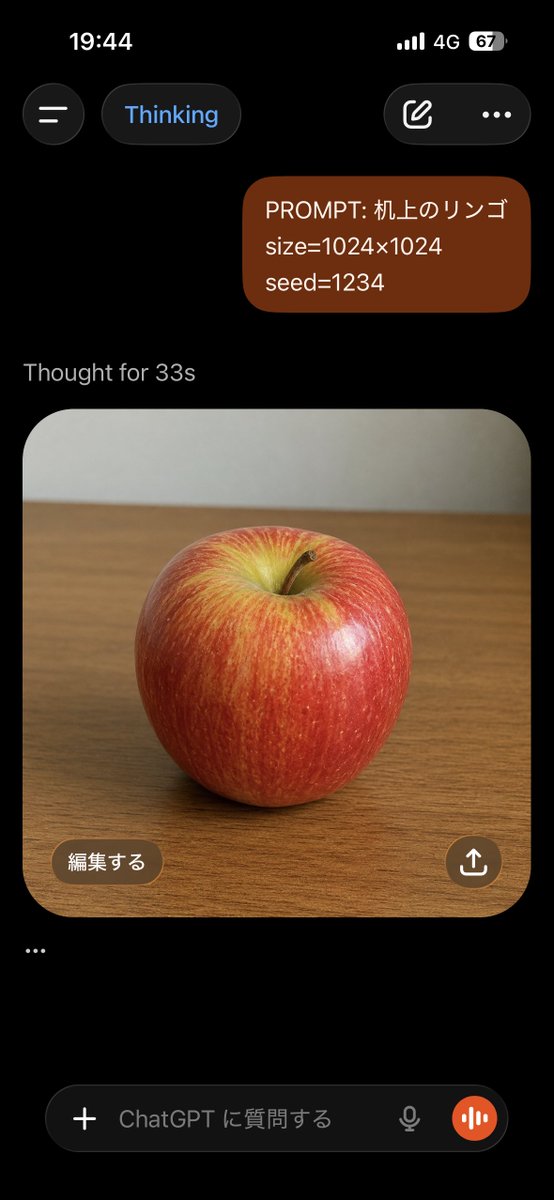
ChatGPT Apple Generation Screenshot
Creates a dark-mode mobile ChatGPT screenshot showing a prompt bubble and a generated photorealistic apple image on a desk.
This is a gpt-image-2 prompt case for 其他灵感. Use the copy-ready prompt below to generate similar visuals, and review YouMind OpenLab awesome-gpt-image-2 attribution plus commercial-use rights before reuse.

Prompt
Copy-ready prompt
目标:创建一个逼真的 ChatGPT 移动端 App 竖屏截图(深色模式),展示关于苹果的图像生成对话。

画布:高长宽比手机截图,9:16 比例,黑色背景,顶部带有 iPhone 风格的状态栏。时间显示为 19:44,包含信号格、4G 图标以及 67% 的电量。

布局:顶部包含 4 个界面元素:左侧的圆形汉堡菜单按钮、蓝色文字的“Thinking”圆角胶囊按钮、右侧带有编辑铅笔图标的圆角按钮,以及一个三点菜单图标。下方放置一个右对齐的深红褐色圆角用户消息气泡,包含 3 行文字:“PROMPT: {argument name="prompt text" default="机上のリンゴ"}”、“size={argument name="image size" default="1024×1024"}”以及“seed={argument name="seed value" default="1234"}”。在其下方,显示灰色状态文本“Thought for {argument name="thinking time" default="33s"}”。

生成的图像卡片:在状态文本下方,展示一张大型圆角方形图像卡片,中心为木质桌面上的逼真红苹果。苹果表皮光亮,顶部凹陷处带有黄绿色高光,有细微的垂直纹理,带有一个小棕色果梗,并采用柔和的摄影棚灯光。照片背景为木桌上方平淡的浅灰色墙壁,略微模糊。卡片具有大圆角,占据屏幕大部分宽度。

叠加层与底部 UI:在图像卡片左下角,添加一个标注为“編集する”的棕色圆角按钮。在右下角,添加一个带有白色上传/分享箭头图标的圆形棕色分享按钮。在图像卡片下方,添加一个独立的省略号行:“…”。底部显示一个 ChatGPT 输入栏,包含 5 个可见元素:加号图标按钮、占位符文字“ChatGPT に質問する”、一个小麦克风图标、一个橙色圆形语音波形按钮,以及圆角深色文本框容器。

视觉风格:真实的 iOS ChatGPT App 截图,深色主题,界面清晰,间距真实,简洁的无衬线字体,无额外消息,无水印,无浏览器边框。
Prompt variables
Editable argument placeholders found in the prompt, with their default values.
More cases in this category
Prioritized by category, input mode compatibility, quality, and lower risk.






Reuse and source notes
Use this prompt safely after previewing the case.
- 1.Copy the prompt or open it directly in Dovoo with the generation button.
- 2.Adjust variables, aspect ratio, and reference images for your own use case.
- 3.Before publishing or paid usage, verify source rights, attribution requirements, and brand or likeness risks.
Can I use this prompt commercially?
Commercial-use status is unknown. Review the original source, license, brand constraints, and legal requirements before paid usage.
Where does this case come from?
This case is imported from YouMind OpenLab awesome-gpt-image-2; keep attribution visible and check the source URL before reuse.