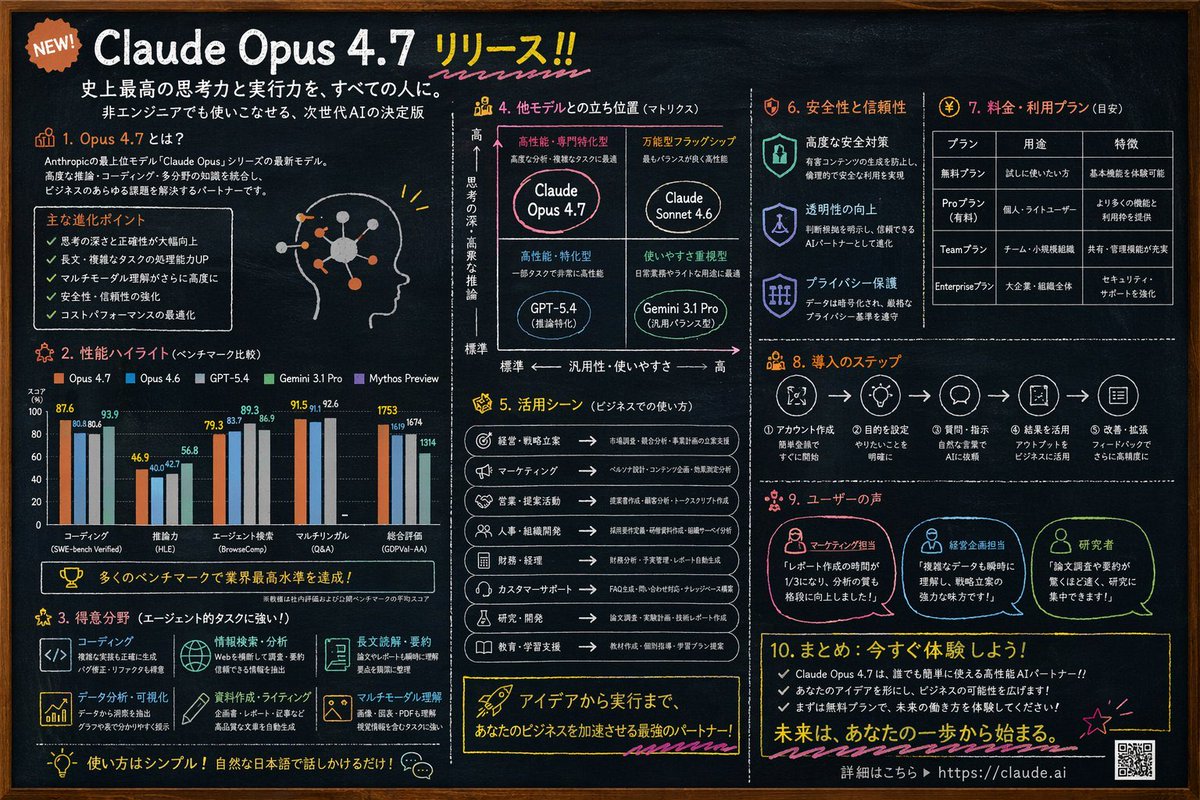
Chalkboard AI Product Infographic
Generates a highly detailed, 10-section chalkboard-style infographic for a software release, featuring charts, matrices, and tables.
This is a gpt-image-2 prompt case for 平面海报. Use the copy-ready prompt below to generate similar visuals, and review YouMind OpenLab awesome-gpt-image-2 attribution plus commercial-use rights before reuse.
Prompt
Copy-ready prompt
{
  "type": "Blackboard-style infographic",
  "style": "Dark slate background, white text, hand-drawn style decorations, simple layout.",
  "colors": {
    "background": "Deep slate limestone",
    "text": "White",
    "accents": [
      "{argument name=\"accent color 1\" default=\"orange color\"}",
      "{argument name=\"accent color 2\" default=\"light blue\"}",
      "yellow",
      "pink"
    ]
  },
  "header": {
    "badge": "Newly released!",
    "title": "{argument name=\"main headline\" default=\"Claude Opus 4.7 Released!!\"}",
    "subtitles": [
      "Providing everyone with the strongest thinking and execution capabilities in history.",
      "The next generation of AI, easily mastered even by non-technical personnel."
    ]
  },
  "layout": {
    "sections": [
      {
        "id": "1",
        "title": "1. What is Opus 4.7?",
        "content": "Description text, 5 key points, profile picture illustration with glowing neural nodes"
      },
      {
        "id": "2",
        "title": "2. Performance Highlights (Benchmark Comparison)",
        "content": "Grouped bar charts compare the performance of the five models across five categories: encoding, reasoning ability, agent search, multilingual ability, and overall evaluation."
      },
      {
        "id": "3",
        "title": "3. Areas of Expertise (Powerful agent task processing capabilities!)",
        "content": "A 2x3 grid is used to showcase six advantages and their corresponding icons: coding, information retrieval and analysis, long-form reading and summarizing, data analysis and visualization, document writing and composition, and multimodal understanding."
      },
      {
        "id": "4",
        "title": "4. Comparison of localization with other models (matrix diagram)",
        "content": "A 2x2 positioning matrix containing 4 quadrants:{argument name=\"product name\" default=\"Claude Opus 4.7\"} , Claude Sonnet 4.6, GPT-5.4, Gemini 3.1 Pro"
      },
      {
        "id": "5",
        "title": "5. Application Scenarios (Commercial Use)",
        "content": "A list containing 8 business use cases, accompanied by icons and arrows."
      },
      {
        "id": "6",
        "title": "6. Safety and Reliability",
        "content": "Three vertically arranged items, each with a shield/lock icon: Advanced Security, Increased Transparency, and Privacy Protection."
      },
      {
        "id": "7",
        "title": "7. Prices and Packages (for reference)",
        "content": "A 3-column, 4-row data table showing the pricing tiers: Free, Pro, Team, and Enterprise."
      },
      {
        "id": "8",
        "title": "8. Deployment Steps",
        "content": "A horizontal flowchart containing 5 numbered steps connected by arrows."
      },
      {
        "id": "9",
        "title": "9. User Reviews",
        "content": "Three user testimonials, each accompanied by a profile icon: Marketing Personnel, Business Planning Personnel, and Researcher."
      },
      {
        "id": "10",
        "title": "10. Summary: Try it now!",
        "content": "3 key points, call to action, URL{argument name=\"website url\" default=\"https://claude.ai\"} and a QR code"
      }
    ]
  }
}
Prompt variables
Editable argument placeholders found in the prompt, with their default values.
More cases in this category
Prioritized by category, input mode compatibility, quality, and lower risk.






Reuse and source notes
Use this prompt safely after previewing the case.
- 1.Copy the prompt or open it directly in Dovoo with the generation button.
- 2.Adjust variables, aspect ratio, and reference images for your own use case.
- 3.Before publishing or paid usage, verify source rights, attribution requirements, and brand or likeness risks.
Can I use this prompt commercially?
Commercial-use status is unknown. Review the original source, license, brand constraints, and legal requirements before paid usage.
Where does this case come from?
This case is imported from YouMind OpenLab awesome-gpt-image-2; keep attribution visible and check the source URL before reuse.