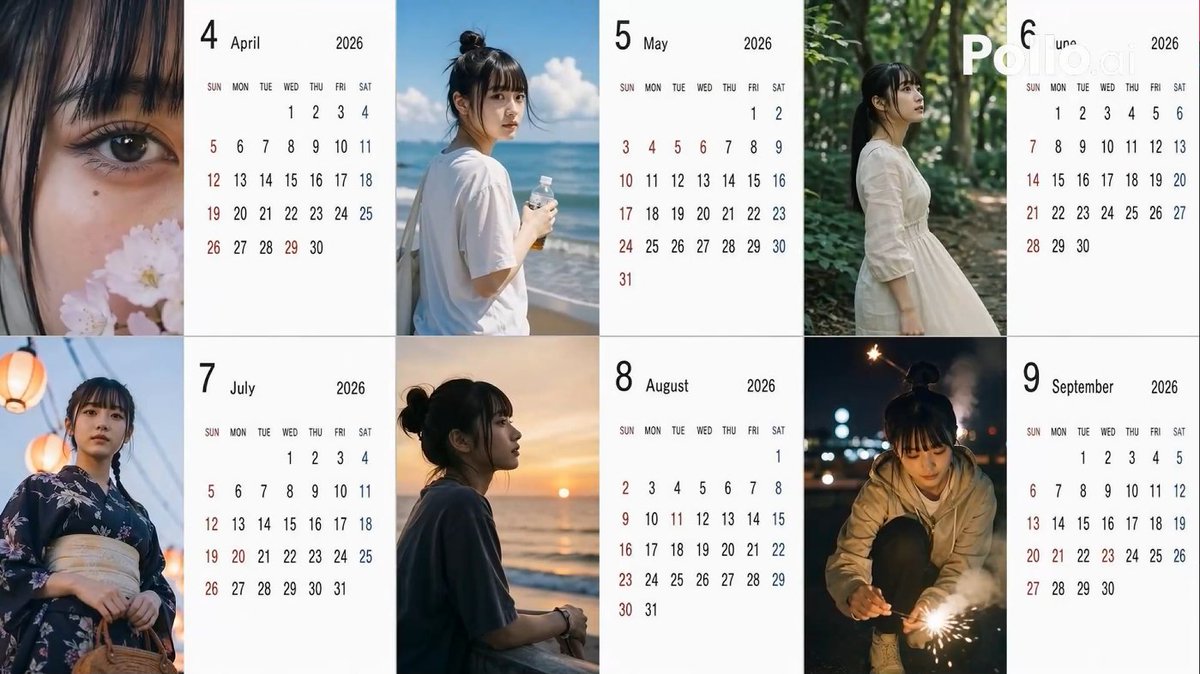
Candid 2026 Japanese Calendar Prompt
A highly structured prompt for generating a 6-month Japanese calendar for 2026, using random variables for angles, hair styles, and poses to create a 'candid smartphone' aesthetic.
This is a gpt-image-2 prompt case for Product & Commercial. Use the copy-ready prompt below to generate similar visuals, and review YouMind OpenLab awesome-gpt-image-2 attribution plus commercial-use rights before reuse.

Prompt
Copy-ready prompt
[Subject] Create a{argument name="year" default="2026"} Year{argument name="period" default="April to September"} (common{argument name="number of months" default="6"} A Japanese-style calendar (monthly), using the person in the reference image as a model. [Calendar] The background of the calendar section should be white to ensure clarity and readability. [Image] The images are themed around the seasons of each month, simulating amateur photos taken with an iPhone. [Location] Automatically determined by AI based on the season. [Distance] Randomly selected each month: extreme_close, close, bust, mid, far, candid. [Angle] Randomly selected each month: eye, low, high, side, back. [Exposure/Tone] Randomly selected each month: overexp, natural, warm, cool, dark. [Hairstyle] Randomly selected each month: ponytail, bun, down, half-up, messy, wet, short, bob, braid, twin. [Clothing] Automatically determined by AI based on the season. [Noise] Randomly selected each month: low, mid, high, film. [Blur/Focus] Randomly selected each month: sharp, slight, motion blur, soft. [Pose] Randomly selected each month: natural_stand, sitting, walking, phone, wall_lean, crouch, look_back. [Items] One item will be randomly selected each month: none, smartphone, bottled water, coffee, umbrella, bag, towel, script. [Time Period] One item will be randomly selected each month: early_morning, morning, noon, afternoon, evening, night, late_night.Prompt variables
Editable argument placeholders found in the prompt, with their default values.
Reuse and source notes
Use this prompt safely after previewing the case.
- 1.Copy the prompt or open it directly in Dovoo with the generation button.
- 2.Adjust variables, aspect ratio, and reference images for your own use case.
- 3.Before publishing or paid usage, verify source rights, attribution requirements, and brand or likeness risks.
Can I use this prompt commercially?
Commercial-use status is unknown. Review the original source, license, brand constraints, and legal requirements before paid usage.
Where does this case come from?
This case is imported from YouMind OpenLab awesome-gpt-image-2; keep attribution visible and check the source URL before reuse.