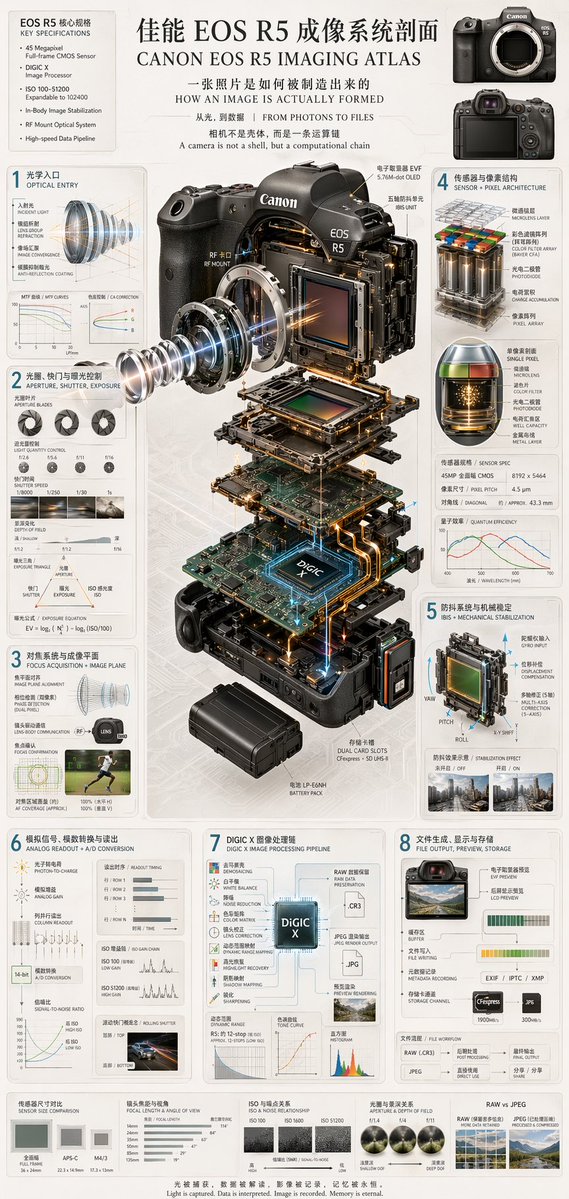
Camera Exploded View Infographic
Generates a highly detailed, multi-panel technical infographic featuring a 3D exploded view of a camera and 8 numbered sections explaining the imaging process.
This is a gpt-image-2 prompt case for Graphic & Poster. Use the copy-ready prompt below to generate similar visuals, and review YouMind OpenLab awesome-gpt-image-2 attribution plus commercial-use rights before reuse.
This prompt is designed for multiple reference images. We will open Dovoo with the prompt and the available preview image; add the remaining references in Dovoo before generating.

Prompt
Copy-ready prompt
{
  "type": "Technical Infographics and Exploded Views",
  "header": {
    "title": "{argument name=\"main title\" default=\"Canon EOS R5 Imaging Atlas\"}",
    "subtitles": [
      "How is an image actually formed?",
      "From Light to Data | FROM PHOTONS TO FILES",
      "A camera is not a shell, but a computational chain."
    ],
    "top_left_box": {
      "title": "EOS R5 Key Specifications",
      "bullet_points_count": 6
    },
    "top_right_images": {
      "count": 2,
      "description": "Front and rear views of the camera body"
    }
  },
  "centerpiece": {
    "description": "Highly detailed{argument name=\"camera model\" default=\"Canon EOS R5\"} 3D exploded view from the camera, showing vertically separated internal components.",
    "components_visible": [
      "Lens mount",
      "Lens element with blue light emission",
      "Image sensor",
      "With light{argument name=\"processor name\" default=\"DIGIC X\"} motherboard of the chip",
      "battery pack",
      "Dual card slots",
      "Electronic viewfinder (EVF)"
    ]
  },
  "layout": {
    "numbered_sections": [
      {
        "number": 1,
        "title": "Optical Entry",
        "elements": [
          "Lens cross-section with light",
          "2 line charts"
        ]
      },
      {
        "number": 2,
        "title": "Aperture, Shutter, and Exposure Control",
        "elements": [
          "3 images of aperture blades",
          "4 sample photos of shutter speeds",
          "Depth of field diagram",
          "Exposure triangle diagram"
        ]
      },
      {
        "number": 3,
        "title": "Focusing system and imaging plane",
        "elements": [
          "Lens alignment diagram",
          "runner's autofocus coverage photo"
        ]
      },
      {
        "number": 4,
        "title": "Sensor and Pixel Architecture",
        "elements": [
          "3D pixel array diagram",
          "Single pixel cross-sectional image",
          "Sensor Specifications",
          "Quantum efficiency diagram"
        ]
      },
      {
        "number": 5,
        "title": "Image stabilization system and mechanical stabilization (IBIS + MECHANICAL STABILIZATION)",
        "elements": [
          "Diagram of sensor displacement mechanism with yaw/pitch/roll axes",
          "Two photos comparing the image stabilization effect."
        ]
      },
      {
        "number": 6,
        "title": "Analog Signal, Analog-to-Digital Conversion and Readout",
        "elements": [
          "Signal Flow Diagram",
          "3 readout timing diagrams",
          "Signal-to-noise ratio diagram",
          "Example photos of the jelly effect in cars"
        ]
      },
      {
        "number": 7,
        "title": "DIGIC X Image Processing Pipeline",
        "elements": [
          "Processing flowchart with central chip as the core",
          "Dynamic range diagram",
          "Tone curve",
          "Histogram"
        ]
      },
      {
        "number": 8,
        "title": "File creation, display, and storage: FILE OUTPUT, PREVIEW, STORAGE",
        "elements": [
          "File output flowchart",
          "2 memory card icons",
          "Document Workflow Diagram"
        ]
      }
    ],
    "bottom_comparisons": {
      "count": 5,
      "labels": [
        "Sensor Size Comparison",
        "Lens focal length and angle of view",
        "ISO and Noise Relationship",
        "Aperture and Depth of Field",
        "RAW vs JPEG"
      ]
    },
    "footer": "{argument name=\"footer quote\" default=\"Light is captured, data is interpreted, images are recorded, and memories are made eternal.\"}"
  },
  "style": "Simple, technically advanced, highly detailed, photorealistic components, blueprint-style annotations, light gray background, and precise typography."
}
Prompt variables
Editable argument placeholders found in the prompt, with their default values.
Reuse and source notes
Use this prompt safely after previewing the case.
- 1.Copy the prompt or open it directly in Dovoo with the generation button.
- 2.Adjust variables, aspect ratio, and reference images for your own use case.
- 3.Before publishing or paid usage, verify source rights, attribution requirements, and brand or likeness risks.
Can I use this prompt commercially?
Commercial-use status is unknown. Review the original source, license, brand constraints, and legal requirements before paid usage.
Where does this case come from?
This case is imported from YouMind OpenLab awesome-gpt-image-2; keep attribution visible and check the source URL before reuse.